Solved BLF Function quit with V18 on Yealink

Status
Not open for further replies.

Mark Colman

Customer
Joined
Feb 2, 2019
Messages
15
Reaction score
2
Upgraded from V16 to 18 (Debian 9 to 10 -upgrade as well....very smooth!) Sunday on my virtual server in house.
I have two T27Gs and three T23G phones. Ever since the upgrade the BLF lamps do not work, and we can not use them to pick up another line like we used to. The new windows app works, and we can use it to pick up a call on another user's phone....but I feel like we did not win with this upgrade.
Any ideas?
I have reset the phones, reloaded the security certs, and tried to modify the phones web page DSS settings with no joy. I am reluctant to go back to 16 since I do like that the android app stops ringing at the same time as I pick up the desk phone, unlike before where it would keep ringing for 1.5 more rings after i picked it up. afraid I would need to change windows and android apps back to earlier versions..

Cheers,
Mark Colman
 
Sorry, I should have completed all the info in the format you wanted. I hope this works better for you now.
  • 3CX Version, Professional Annual 18.0 update 1 (build 237)
  • Server OS, Debian 10
  • Is the 3CX Server Hosted and where? .Virtual server in house on internal network
  • IP Phone Make/Model/Firmware version, Yealink T27G (69.86.0.5) & T23G (44.84.0.140)
  • Provisioning Method: Hmmm. Used your system via the phones interface. I think that means PnP, or Direct. I reset one of the T23G phones to factory, and reprovisioned via the interface. It works, but did not fix this problem.
  • Trunk Provider or VoIP Gateway Make/Model, Wiretap Telecom
  • Has the Firewall Checker passed: YES
  • Are custom Phone Templates being used: NO
 
Hi Mark,

1. Since you are on a virtual server, is it perhaps based on Hyper-V?

In case it is make sure please that the NTP instructions for Debian are followed:
https://www.3cx.com/docs/installing-microsoft-hyper-v/#h.cjj20zk71lns

Also important, the time on the phones needs to be correct since timing between the phone and server may affect the ability of the BLF to work. We have seen some examples where the server time drifts, causing BLFs to appear like they do not light up.

2. Make sure the phone is factory reset so it forgets any custom settings you had put in.

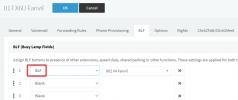
3. Check that the BLFs have been configured in 3CX like so:
1635345679327.png
Do not setup the BLFs from the phone itself - they might end up misconfigured

4. You mentioned that you "reloaded the security certs". For a local installation, the phones do not need any security certs to function with 3CX. Can you perhaps explain what you mean by this?
 
I followed the 3CX info to reload the certs in the Management console only.

I just added NTP to Debian. Yes it is a Hyper V server, the normal Network adapter is used, not the Legacy version.
The phone time looks exactly like the server time via the Date command.

Reset my phone. BLF on 3CX server only.

Oh, now my T27G says "No Service" but the BLFs are programed....

ugh...

Mark
 
I am frustrated. so... I ordered Fanvil phones. Your site suggests them.
I would love to have my desk phone back. maybe something else is going on. I tried to reset the phone several times, and now I have a phone that can't get service and I cant log into it, since it stays stuck on the bold new phone location. Maybe overnight something will happen. I would like to keep this phone for some more users at this business, so I don't want to give up....
My normal local IT guy had a baby a couple of days ago, so I don't want to disturb him....And my 3CX provider is having a FAA exam today.... I can do IT, but not that competent.... LOL....

Thanks for your continued support!!

Cheers,
Mark
 
Well, got my phone to work. Needed to use the internal address, not the FQDN -- duh... But still have the problem with the BLF keys not working. No lights and can't pick up a call. Can press them to call the assigned extension though.
 
updated internal DNS to add FQDN pointing to internal address. should make provisioning easier...but no joy...
 
It possible your extension doesn't have pickup or even see status rights. Lets rule out the physical phones for a second.

Can you pickup with web client or see if an extension is busy or not?

Setting up the FQDN on internal DNS is part of proper deployment as mentioned here:
https://www.3cx.com/docs/creating-fqdn-split-dns/
 
Have you activated TLS on your Phones? Whe have tried today to activate TLS an the BLFs stopped working. After switchback to TCP/UDP the BLFs work again.....
 
It possible your extension doesn't have pickup or even see status rights. Lets rule out the physical phones for a second.

Can you pickup with web client or see if an extension is busy or not?

Setting up the FQDN on internal DNS is part of proper deployment as mentioned here:
https://www.3cx.com/docs/creating-fqdn-split-dns/
The extensions all worked with V16 just fine. The new fanvil phones should be here tomorrow, I can try them.
The web client, windows app, and I think my android app all work fine for the BLF function. For now my secretary is using the web app to pick up my line when I am out of the office. She just can't do it from her desk phone any more.

Yeah, I should have had the DNS setup a long time ago. but worked around it a couple of years ago and forgot...
 
Have you activated TLS on your Phones? Whe have tried today to activate TLS an the BLFs stopped working. After switchback to TCP/UDP the BLFs work again.....
Very interesting! I will check that in a little while....I wonder if V18 turned that on.... I did not change anything other than upgrade to 18 from 16.
Thanks!
Mark
 
The extensions all worked with V16 just fine. The new fanvil phones should be here tomorrow, I can try them.
The web client, windows app, and I think my android app all work fine for the BLF function. For now my secretary is using the web app to pick up my line when I am out of the office. She just can't do it from her desk phone any more.

Yeah, I should have had the DNS setup a long time ago. but worked around it a couple of years ago and forgot...
If it's working from the webclient that it's phone specific.

What happens if you manually pull a call (dial *20*ext - if your extension is 100 then *20*100) instead of using the blf button?
 
If it's working from the webclient that it's phone specific.

What happens if you manually pull a call (dial *20*ext - if your extension is 100 then *20*100) instead of using the blf button?
Yes, I can pull it using the *20*ext method.
 
Very interesting! I will check that in a little while....I wonder if V18 turned that on.... I did not change anything other than upgrade to 18 from 16.
Thanks!
Mark
from the local phone web UI, it shows the phones remain configured for UDP. I don't believe 3CX changed to TLS on me....
 
from the local phone web UI, it shows the phones remain configured for UDP. I don't believe 3CX changed to TLS on me....
3CX doesn't do auto-provisioning of the protocol. By default it is UDP and that's what it expects.
 
Yes, I can pull it using the *20*ext method.
If you look at the phone UI and go to the DSS tab, is the BLF key not programmed to do the same thing (*20* against the extension? But pushing the button does nothing?
 
Hi Mark,

Please log in to your management console, and click on your license number.

You can then click refresh license key and notice whether any errors pop up or if simply refreshes without any message popping up.

There is a chance your machine failed to re-activate after the upgrade and has reverted to a temporary licence state where the BLFs will not work.
 
Hi Mark,

Please log in to your management console, and click on your license number.

You can then click refresh license key and notice whether any errors pop up or if simply refreshes without any message popping up.

There is a chance your machine failed to re-activate after the upgrade and has reverted to a temporary licence state where the BLFs will not work.
I think that is it. It will not reach activation.3cx.com. I have pinged it from the debian instance that the management console is on, and that works just fine. but the console can not connect.
 
Ok once this is solved, the BLF issue should also go away.

You might wanna see whether your firewall is blocking any traffic to our activation servers.

If you have any firewall rules (or geolocation based blocking) you might want to relax them and see if you can activate.
 
Status
Not open for further replies.

Members Online Now

Forum statistics

Threads
111,831
Messages
589,277
Members
164,660
Latest member
RJenkinsROCK