BLF keys not lighting up, fanvil phones, multi location

Status
Not open for further replies.

ElementalWindX

Bronze Partner
Advanced Certified
Joined
Oct 24, 2018
Messages
367
Reaction score
40
I have a client with 2 physically different locations. Cloud hosted PBX in Vultr. Setup the same as all our other clients. Same network too. However this client for whatever reason cannot get BLF keys to light up. Using Fanvil x6u v1 phones. (Firmware 2.4.12)

Any idea what could be causing this and how to fix it?

Using latest version of 3cx 18.0 (Build 312)

Thanks.

Here is an example of the BLF config in the phone:
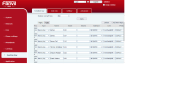
1683575025961.png
 
Last edited:
SBC or STUN? (if STUN, try an SBC)
If you are setting them in the phone they'll be overwritten by 3CX daily.
 
SBC or STUN? (if STUN, try an SBC)
If you are setting them in the phone they'll be overwritten by 3CX daily.
Stun all using non conflicting ports. All set via 3cx. Not manually in the phone.
 
The rule of thumb that 3CX often posts here is that STUN may work fine, until it doesn’t. YMMV. We’ve used it once at an 2 phone satellite office and if they ever have any issues I’m going to change one into a router phone now that that’s available.

Doesn’t look like these Fanvil’s can do that https://www.3cx.com/sip-phones/manually-provision-fanvil/#h.5znx0mww8kld but looks like they can use an SBC. Even if you can install the Windows version temporarily to test it might help, then plan where to put it.
 
  • Like
Reactions: JohnS_3CX
Hi @ElementalWindX

We have seen these types of issues when over STUN, and can happen even when all ports are forwarded correctly.

This is one of the reasons we strongly recommend installing an SBC, so the phone does not have to pass through your firewall NAT and ALG, resulting in a more reliable service. Try installing an SBC as a test, and reprovisioning one of your phones to connect via it to see if the problems go away.
 
Installing the newest fanvil template fixed the issue. It was on the version before the latest. Just wish I knew where there was a clear indication as to what template version was being used on these phones. Is there a place that shows this info? Looks like it would fit perfectly under the phones page where it shows the firmware version and all other info.

Now all phones are perfect except there is 1 blf key on 1 phone that isn't lighting up. So strange. Any idea what could cause that?
 
I don't think the template had anything to do with it, but rather the fact that the phones forced a re-register and re-subscribe upon reprovisioning (and quite possibly "woke up" the firewall to allow SUBSCRIBE/NOTIFY messages through once again). Your screenshot above shows your provisioning was actually correct the first time around..

This is an example of the unreliability of STUN - I'm willing to help you set up your SBCs if you change your mind :)
 
I don't think the template had anything to do with it, but rather the fact that the phones forced a re-register and re-subscribe upon reprovisioning (and quite possibly "woke up" the firewall to allow SUBSCRIBE/NOTIFY messages through once again). Your screenshot above shows your provisioning was actually correct the first time around..

This is an example of the unreliability of STUN - I'm willing to help you set up your SBCs if you change your mind :)
Isn't there something with the new fanvil x6u v2 phones where you can make them act like a SBC? I'd love to learn how to do that. I tried quickly looking into it but couldn't quite figure it out and haven't taken the time to properly learn it. Would love to know if someone has made a tutorial on doing it with one of those phones.


Just so strange that almost 35 sites all 100% identical in network hardware, phones, pbx, versions, and pbx host and way it's setup, and this one client at both locations had this issue.
 
The X6U-V2 now has an onboard SBC, where it can act as an SBC both for itself and for upto 10 other phones if needed.

With the latest PBX, we added the ability to configure them in this mode (via the new webclient admin panel - not the classic management console).

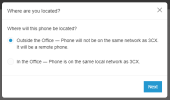
1. Select outside the office
1683637946350.png

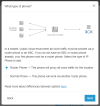
2. Select router phone
1683637965753.png

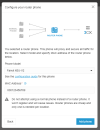
3. Pick your model and enter the MAC
1683638000440.png

You then factory reset the phone and give it a couple of minutes to do its stuff.

  • Port forwards should be removed at the phone site firewall - they are no longer needed as the SBC will connect to your 3CX tunnel port and take care of business via a random outgoing port.
  • You need to install our latest firmware before you go ahead, as the older firmware did not yet have the SBC function built in.
The official guide is here: https://www.3cx.com/sip-phones/fanvil-x3-x5/
As well as a more general guide here: https://www.3cx.com/docs/manual/ip-phones/#h.xch7xw79u4e6

Also available on these models: V64, V65, V62, X4U-V2, X5U-V2, X6U-V2, X7-V2, X7C-V2, X210-V2 and X210i-V2
 
Status
Not open for further replies.

Forum statistics

Threads
111,974
Messages
590,081
Members
164,899
Latest member
mazet