Call forwarding from my Outbound Number rather than Callers Number

pgo

Customer
Joined
Jun 17, 2025
Messages
5
Reaction score
0
I've tried changing to outbouldcallerid switching back and forth from originatorcallerid in SIP settings, but nothin helps. The issue started after the upgrade to V20. I've tried a lot of ways from the forum but no luck. can someone give a solution. Thanks
 
Hello pgo,

this depends on the provider / sip trunk template used, and the options set in this template.
What template / options are you using?

Paulo
 
Hello pgo,

this depends on the provider / sip trunk template used, and the options set in this template.
What template / options are you using?

Paulo
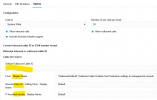
GenericSIPTrunk.pv.xmlScreenshot 2025-06-17 113824.png
 
Hello pgo,

You can check with these options, this will set the outbound number used on the SIP Trunk:


1750142438063.png

Paulo
 
Same result, forward my extensions outbound number, not the actual callers number
 
Hi,

Does your SIP Trunk provider currently support Clip No Screening? Because that feature is getting removed by many providers. Let's make sure we are not chasing a configuration that is blocked externally anyway.
 
Hi pgo,

Okay so you want it the other way around.

Just to be clear.
You want to send the number of the caller out on your trunk.
Meaning you want to overide your own number, and send some strange number (not yours).

Please first check with your provider if number spoofing is allowed !
By default this is not allowed in most country's if not all country's.

Because this will mean you can dial out with any number you like, and that is not safe.

Paulo
 
It was working before upgrade to V20, When a caller calls my extension, his outbound number gets forwarded, not my outbound number. and my provider supports Clip No Screening. Outbound number list is given by the provider and we make extention based on that. When forwarding that assigned outbound number gets forwarded. For Example

User 111 (Outbound 3130111) calls 191 (Outbound 3130191, Forwarding enabled to 9990199)
with current setting Forwarded number 9990199 gets call from 3130191 no matter who calls to my extension

before update
When forwarded 9990199 gets called outbound 3130111 (From the Original Caller)
 
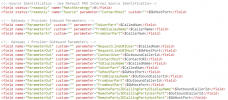
Can you export your template using the 3 dot menu on the right of the trunk and post your outbound parameters here? You also run a pcap and capture the Invite going to the provider to see what is actually being sent rather than relying to the results shown from the provider.
 
<field name="ParameterIn" custom="" parameter="FromUserPart">$CallerNum</field>
<field name="ParameterIn" custom="" parameter="FromDisplayName">$CallerName</field>
<field name="ParameterIn" custom="" parameter="ToUserPart">$CalledNum</field>
<field name="ParameterOut" custom="" parameter="RequestLineURIUser">$CalledNum</field>
<field name="ParameterOut" custom="" parameter="RequestLineURIHost">$GWHostPort</field>
<field name="ParameterOut" custom="" parameter="ContactUser">$OutboundCallerId</field>
<field name="ParameterOut" custom="" parameter="ContactHost">$ContactUri</field>
<field name="ParameterOut" custom="" parameter="ToDisplayName">$CalledName</field>
<field name="ParameterOut" custom="" parameter="ToUserPart">$OutboundCallerId</field>
<field name="ParameterOut" custom="" parameter="ToHostPart">$GWHostPort</field>
<field name="ParameterOut" custom="123" parameter="FromDisplayName">$OutboundCallerId</field>
<field name="ParameterOut" custom="" parameter="FromUserPart">$OutboundCallerId</field>
<field name="ParameterOut" custom="" parameter="FromHostPart">$GWHostPort</field>
<field name="ParameterOut" custom="" parameter="RemotePartyIDCallingPartyUserPart">$OutboundCallerId</field>
<field name="ParameterOut" custom="" parameter="RemotePartyIDCallingPartyHostPart">$GWHostPort</field>
 
Last edited:
I do not see OriginatorCallerID anywhere to be honest. I do see some changes that do not look right though.

Revert <field name="ParameterOut" custom="" parameter="ToUserPart">$OutboundCallerId</field> back to default.
You can also try changing
<field name="ParameterOut" custom="123" parameter="FromDisplayName">$OutboundCallerId</field>
<field name="ParameterOut" custom="" parameter="FromUserPart">$OutboundCallerId</field>
to
<field name="ParameterOut" custom="" parameter="FromDisplayName">$OriginatorCallerId</field>
<field name="ParameterOut" custom="" parameter="FromUserPart">$OriginatorCallerId</field>

Export the trunk, make the changes and import it back in after you deleted the original. Then try again.
 
Hello I just came here today to say I was able to export, then change the necessary lines to $OriginatorCallerId, imported as a new template, and it has started working well. Thank you all!
 

Forum statistics

Threads
111,972
Messages
590,065
Members
164,886
Latest member
784