


- Joined
- Mar 17, 2022
- Messages
- 21
- Reaction score
- 3
I currently have the following XML file, which is set up to do call journaling and do a look up on a contact based on their number and email address.
I have set up values in "Parameter Values" for "Call Journaling" and have also got "ReportCallEnabled" set to True. Now when I run a test by clicking on "Call Journaling" after right clicking on "Parameter Values" I get the following exception,
System.FormatException: Input string was not in a correct format.
at System.Number.ThrowOverflowOrFormatException(ParsingStatus status, TypeCode type)
at CrmIntegration.ScenarioProcessorBase.CreateJsonFromPostValues(RequestItem requestItem, IValueManager customManager)
at CrmIntegration.ScenarioProcessorBase.CreateJsonFromPostValues(RequestItem requestItem, IValueManager customManager)
at CrmIntegration.ScenarioProcessorBase.ProcessRequest(ScenarioRequest request, IValueManager customManager, HttpClient client, CancellationToken token)
at CrmIntegration.ScenarioProcessorBase.ProcessScenario(ProtocolScenario scenario, IValueManager customManager, CancellationToken token)
at CrmIntegration.ScenarioProcessorBase.Execute(ProtocolScenario scenario, CancellationToken token)
at CrmIntegration.CrmProcessor.ExecuteScenarioByName(String scenarioName, IEnumerable`1 parameters, Boolean useNoAuthProvider, CancellationToken token)
at CrmIntegration.CrmProcessor.ExecuteScenarioWithRetries(String scenarioId, Dictionary`2 parameters, CancellationToken token)
at CrmIntegration.CrmProcessor.ReportCall(CallEndedEvent callEndedEvent, CancellationToken token)
Now the values set for "Call Journaling" under "Parameter Values" is as follows,
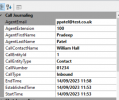
Have I missed something obviously wrong with this? I have no idea where I have gone wrong so would appreciate any help on this please.
XML:
<?xml version="1.0"?>
<Crm xmlns:xsi="http://www.w3.org/2001/XMLSchema-instance" xmlns:xsd="http://www.w3.org/2001/XMLSchema" Country="US" Name="Debug-3CX" Version="1" SupportsEmojis="true">
<Number Prefix="AsIs" MaxLength="[MaxLength]" />
<Connection MaxConcurrentRequests="2" />
<Parameters>
<Parameter Name="UserName" Type="String" Parent="General Configuration" Editor="String" Title="Username:" />
<Parameter Name="Password" Type="Password" Parent="General Configuration" Editor="String" Title="Password:" />
<Parameter Name="ReportCallEnabled" Type="Boolean" Editor="String" Title="Enable Call Journaling" Default="True" />
<Parameter Name="Subject" Type="String" Parent="ReportCallEnabled" Editor="String" Title="Call Subject:" Default="3CX PhoneSystem Call" />
<Parameter Name="InboundCallText" Type="String" Parent="ReportCallEnabled" Editor="String" Title="Answered Inbound Call:" Default="[DateTime]: Answered incoming call from [Number] to [Agent] ([Duration])" />
<Parameter Name="MissedCallText" Type="String" Parent="ReportCallEnabled" Editor="String" Title="Missed Call:" Default="[DateTime]: Missed call from [Number] to [Agent]" />
<Parameter Name="OutboundCallText" Type="String" Parent="ReportCallEnabled" Editor="String" Title="Answered Outbound Call:" Default="[DateTime]: Answered outgoing call from [Agent] to [Number] ([Duration])" />
<Parameter Name="NotAnsweredOutboundCallText" Type="String" Parent="ReportCallEnabled" Editor="String" Title="Unanswered Outbound Call:" Default="[DateTime]: Unanswered outgoing call from [Agent] to [Number]" />
</Parameters>
<Authentication Type="Basic">
<Value>[UserName]:[Password]</Value>
</Authentication>
<Scenarios>
<Scenario Id="ReportCall" Type="REST" EntityId="Contacts" EntityOrder="[LookupOrder]">
<Request SkipIf="[IIf([ReportCallEnabled]!=True||[EntityId]=="",True,[IIf([CallType]!=Inbound,True,False)])]" Url="https://5623-2a01-4b00-e208-dd00-980f-da75-1287-c64d.ngrok-free.app?A=HttpApiSuppdeskWebHook" MessagePasses="0" Message="" RequestContentType="application/json" RequestEncoding="Json" RequestType="Post" ResponseType="Json">
<PostValues>
<Value Key="webhookEvent" Passes="1" Type="String">suppdesk</Value>
<Object Key="call">
<Value Key="reference" Passes="1" Type="String">001234</Value>
<Value Key="folderno" Passes="1" Type="String">1</Value>
<Value Key="email" Passes="1" Type="Integer">[AgentEmail]</Value>
<Value Key="phone" Passes="1" Type="Integer">[CallNumber]</Value>
<Value Key="status" Passes="1" Type="String">open</Value>
<Value Key="subject" Passes="2" Type="Integer">[Subject]</Value>
<Value Key="description" Passes="1" Type="String">test desc</Value>
</Object>
</PostValues>
</Request>
<Variables />
<Outputs Next="ReportCallMissed" AllowEmpty="false" />
</Scenario>
<Scenario Id="ReportCallMissed" Type="REST">
<Request SkipIf="[IIf([ReportCallEnabled]!=True||[EntityId]=="",True,[IIf([CallType]!=Missed,True,False)])]" Url="https://login:password@5623-2a01-4b00-e208-dd00-980f-da75-1287-c64d.ngrok-free.app?A=HttpApiSuppdeskWebHook" MessagePasses="0" RequestContentType="application/json" RequestEncoding="Json" RequestType="Post" ResponseType="Json">
<PostValues>
<Value Key="webhookEvent" Passes="1" Type="String">suppdesk</Value>
<Object Key="call">
<Value Key="reference" Passes="1" Type="String">001234</Value>
<Value Key="folderno" Passes="1" Type="String">1</Value>
<Value Key="email" Passes="1" Type="Integer">[AgentEmail]</Value>
<Value Key="phone" Passes="1" Type="Integer">[CallNumber]</Value>
<Value Key="status" Passes="1" Type="String">open</Value>
<Value Key="subject" Passes="2" Type="Integer">[Subject]</Value>
<Value Key="description" Passes="1" Type="String">test desc</Value>
</Object>
</PostValues>
</Request>
<Variables />
<Outputs Next="ReportCallOutbound" AllowEmpty="true" />
</Scenario>
<Scenario Id="ReportCallOutbound" Type="REST">
<Request SkipIf="[IIf([ReportCallEnabled]!=True||[EntityId]=="",True,[IIf([CallType]!=Outbound,True,False)])]" Url="https://login:password@5623-2a01-4b00-e208-dd00-980f-da75-1287-c64d.ngrok-free.app?A=HttpApiSuppdeskWebHook" MessagePasses="0" RequestContentType="application/json" RequestEncoding="Json" RequestType="Post" ResponseType="Json">
<PostValues>
<Value Key="webhookEvent" Passes="1" Type="String">suppdesk</Value>
<Object Key="call">
<Value Key="reference" Passes="1" Type="String">001234</Value>
<Value Key="folderno" Passes="1" Type="String">1</Value>
<Value Key="email" Passes="1" Type="Integer">[AgentEmail]</Value>
<Value Key="phone" Passes="1" Type="Integer">[CallNumber]</Value>
<Value Key="status" Passes="1" Type="String">open</Value>
<Value Key="subject" Passes="2" Type="Integer">[Subject]</Value>
<Value Key="description" Passes="1" Type="String">test desc</Value>
</Object>
</PostValues>
</Request>
<Variables />
<Outputs Next="ReportCallNotanswered" AllowEmpty="true" />
</Scenario>
<Scenario Id="ReportCallNotanswered" Type="REST">
<Request SkipIf="[IIf([ReportCallEnabled]!=True||[EntityId]=="",True,[IIf([CallType]!=Notanswered,True,False)])]" Url="https://login:password@5623-2a01-4b00-e208-dd00-980f-da75-1287-c64d.ngrok-free.app?A=HttpApiSuppdeskWebHook" MessagePasses="0" RequestContentType="application/json" RequestEncoding="Json" RequestType="Post" ResponseType="Json">
<PostValues>
<Value Key="webhookEvent" Passes="1" Type="String">suppdesk</Value>
<Object Key="call">
<Value Key="reference" Passes="1" Type="String">001234</Value>
<Value Key="folderno" Passes="1" Type="String">1</Value>
<Value Key="email" Passes="1" Type="Integer">[AgentEmail]</Value>
<Value Key="phone" Passes="1" Type="Integer">[CallNumber]</Value>
<Value Key="status" Passes="1" Type="String">open</Value>
<Value Key="subject" Passes="2" Type="Integer">[Subject]</Value>
<Value Key="description" Passes="1" Type="String">test desc</Value>
</Object>
</PostValues>
</Request>
<Variables />
<Outputs AllowEmpty="false" />
</Scenario>
</Scenarios>
</Crm>System.FormatException: Input string was not in a correct format.
at System.Number.ThrowOverflowOrFormatException(ParsingStatus status, TypeCode type)
at CrmIntegration.ScenarioProcessorBase.CreateJsonFromPostValues(RequestItem requestItem, IValueManager customManager)
at CrmIntegration.ScenarioProcessorBase.CreateJsonFromPostValues(RequestItem requestItem, IValueManager customManager)
at CrmIntegration.ScenarioProcessorBase.ProcessRequest(ScenarioRequest request, IValueManager customManager, HttpClient client, CancellationToken token)
at CrmIntegration.ScenarioProcessorBase.ProcessScenario(ProtocolScenario scenario, IValueManager customManager, CancellationToken token)
at CrmIntegration.ScenarioProcessorBase.Execute(ProtocolScenario scenario, CancellationToken token)
at CrmIntegration.CrmProcessor.ExecuteScenarioByName(String scenarioName, IEnumerable`1 parameters, Boolean useNoAuthProvider, CancellationToken token)
at CrmIntegration.CrmProcessor.ExecuteScenarioWithRetries(String scenarioId, Dictionary`2 parameters, CancellationToken token)
at CrmIntegration.CrmProcessor.ReportCall(CallEndedEvent callEndedEvent, CancellationToken token)
Now the values set for "Call Journaling" under "Parameter Values" is as follows,
Have I missed something obviously wrong with this? I have no idea where I have gone wrong so would appreciate any help on this please.


 assword in the URL. However, you'll wanna check your API side and see if requests are coming in.


