Call not logging into zoho crm from 3cx

Status
Not open for further replies.

Vetri Murugan

Free User
Joined
Feb 3, 2023
Messages
9
Reaction score
0
Hi Team,

I have integrated zoho crm with 3cx ,integration is done perfectly based on user guide,it is working (Checked by test the zoho crm phone number in 3cx i gove the response and also whenever i click the phonenumber i in zoho crm,i redirected to 3cx and phone number is added with 3cx crm company book.)

But the issue is i can't able to get call log details in my Zoho crm from 3cx (i have tried everything,both inbound calls and outbound call).what can i do ?.

Please let me know to solve the issue.
 
You may set the PBX in verbose and check the system service log file for further troubleshooting.
 
  • Like
Reactions: edossantos
Could you let me know how to set the verbose?what is verbose ?

How to check the system service log file ..this could help me solve this issue.
 
Regarding how to collect the PBX logs and set it to Verbose you may also refer to:
https://www.3cx.com/docs/collecting-logs-for-3cx-support/

Keep in mind that the call journal depends also on the contact match that is returned to the PBX and also the email of the user in the CRM that matches the extension email.

Generating the logs and checking you can find the information, but if for any further investigation i would suggest that you create a ticket to the Support.
 
  • Like
Reactions: edossantos
Okay let me chheck .In Above you have mentioned the extension email match to crm email?

is the extension email means chrome login email(We have added the 3cx extension to chrome)
 
  • Like
Reactions: edossantos
1675424395183.png

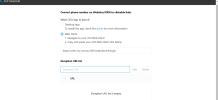
In Above screenshot where i need to configure the email there is no email configuring option
 
This is a screenshot from the settings of the Click2Call.
Please check the guideline where it is stated:
"To report external calls and chats to Zoho, the email address configured for the 3CX extension must match the email address of a Zoho user. This way 3CX can map the 3CX extension receiving the call or chat to the Zoho user."
 
  • Like
Reactions: edossantos
we have integrated the zohocrm extension in 3cx management console In there management console there no email setting right?or ?
 
Hello is there any update ?
 
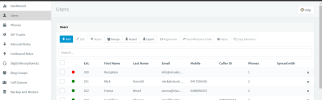
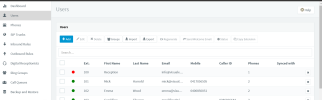
do we need to do add users in USER section? .please find the below screenshot.

1675480642825.png
 
Hi Any update regarding this
 
I believe there is a confusion here regarding CRM integration. Let me clarify:
• In the PBX management console you create the PBX extensions and you are also configuring email addresses for the users
• In Zoho you create users as well
• The email that you are using for the extension in the PBX must be also configured in Zoho for each user in order to match and report the call.
 
  • Like
Reactions: edossantos
the zoho user email which we used in pbx integration extension (that client id and client secret added section) is not added in PBX user section(below screenshot) ,so it can chance to fail the call logs right ?

1675480642825.png
 
There is nowhere mentioned that "that client id and client secret added section"
The extension email should match the email of the user in Zoho.
 
  • Like
Reactions: edossantos
Status
Not open for further replies.

Members Online Now

No members online now.

Forum statistics

Threads
111,843
Messages
589,327
Members
164,679
Latest member
SamadMYK