call order call center or branch office

Status
Not open for further replies.

Dallamarr

New User
Joined
Jun 11, 2021
Messages
4
Reaction score
0
Hello

I have this kind of problem with 3cx configuration for IP Phones.

We have two location: call center and branch office.

Some of our employee work 2 days in call center and 3 days at branch office.
I would like to have configuration like this:

If someone will dial our call center number the phones should ring in call center.

If user is logged in to IP phone in call center his phone should be ringing. But if the same user is logged in to phone in branch office his phone should not be ringing or should not be ringing for example by 30 seconds and after that no-one in call center answer the phone the phone should start ringing.

Thank you in Advance for any kind of solution or tip.
 
Hi,

You can use the Hot Desking feature (Pro license) which allows the employee to log in to the phone they are using right now. This means you don't have to change any settings on your call flow.

https://www.3cx.com/docs/hot-desking/
 
Hmm this does not seems to fit what I need.

Maybe this will explain something:

Numbers:

CallCenterPhoneNumber
BranchOfficePhoneNumber

Call center:

Phone1

Branch office:

Phone2
Phone3

Users:

User1
User2
User3
User4

Day1:

User1 logged in to Phone1
User2 logged in to Phone2
User3 logged in to Phone3

Customer call to CallCenterPhoneNumber:

Phone1 - phone ringing
Phone2 - phone not ringing or ringing after for example 2 minutes
Phone3 - phone not ringing or ringing after for example 2 minutes

Customer call to BranchOfficePhoneNumber:

Phone1 - phone not ringing
Phone2 - phone ringing
Phone3 - phone ringing

Day2:

User2 logged in to Phone1
User1 logged in to Phone2
User4 logged in to Phone4

Customer call to CallCenterPhoneNumber:

Phone1 - phone ringing
Phone2 - phone not ringing or ringing after for example 2 minutes
Phone3 - phone not ringing or ringing after for example 2 minutes

Customer call to BranchOfficePhoneNumber:

Phone1 - phone not ringing
Phone2 - phone ringing
Phone3 - phone ringing

Day3:

User3 logged in to Phone1
User4 logged in to Phone2
User1 logged in to Phone4

Customer call to CallCenterPhoneNumber:

Phone1 - phone ringing
Phone2 - phone not ringing or ringing after for example 2 minutes
Phone3 - phone not ringing or ringing after for example 2 minutes

Customer call to BranchOfficePhoneNumber:

Phone1 - phone not ringing
Phone2 - phone ringing
Phone3 - phone ringing
 
you'd have to set up 2 extensions, one for each site and set a forwarding rule so that it sends the call over to the other site if not picked up/status not available.
 
Hi @Dallamarr,

The solution here is two part, depending on if you're using queues or ring groups: 1) The forwarding when maximum wait time is reached (Call center and branch) and 2) the logging in to different extensions on different days.

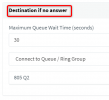
As @kieferschild mentioned you will set up the ring group / queue using the "Destination if no answer" option allowing the calls to move from Phone1 to Phone 2 and 3 respectively.

As my colleague mentioned, I think Hotdesking would be apart of the solution. You'd need multiple users to be able to login to devices, so that agents can change devices depending on the day.
 
Day1:

User1 logged as extension 190 (it is his extension to log in to all phones at this extension as it is his account) in to Phone1
User2 logged as extension 120 (it is his extension to log in to all phones at this extension as it is his account) in to Phone2
User3 logged as extension 101 (it is his extension to log in to all phones at this extension as it is his account) in to Phone3

User 1 cannot log in to any other extension than 190.
Extensions are assigned to users not to the phones nor to the sites. Extension goes with person like personal address.

Below updated.

Same as email addresses: Each user have their own personal address and other users cannot log in to other user account.

Numbers:

CallCenterPhoneNumber
BranchOfficePhoneNumber

Call center:

Phone1

Branch office:

Phone2
Phone3

Users:

User1
User2
User3
User4

Day1:

User1 logged in to Phone1 (using 190 extension)
User2 logged in to Phone2 (using 120 extension)
User3 logged in to Phone3 (using 101 extension)

Customer call to CallCenterPhoneNumber:

Phone1 - phone ringing
Phone2 - phone not ringing or ringing after for example 2 minutes
Phone3 - phone not ringing or ringing after for example 2 minutes

Customer call to BranchOfficePhoneNumber:

Phone1 - phone not ringing
Phone2 - phone ringing
Phone3 - phone ringing

Day2:

User2 logged in to Phone1 (using 120 extension)
User1 logged in to Phone2 (using 190 extension)
User4 logged in to Phone4 (using 195 extension)

Customer call to CallCenterPhoneNumber:

Phone1 - phone ringing
Phone2 - phone not ringing or ringing after for example 2 minutes
Phone3 - phone not ringing or ringing after for example 2 minutes

Customer call to BranchOfficePhoneNumber:

Phone1 - phone not ringing
Phone2 - phone ringing
Phone3 - phone ringing

Day3:

User3 logged in to Phone1 (using 101 extension)
User4 logged in to Phone2 (using 195 extension)
User1 logged in to Phone4 (using 190 extension)

Customer call to CallCenterPhoneNumber:

Phone1 - phone ringing
Phone2 - phone not ringing or ringing after for example 2 minutes
Phone3 - phone not ringing or ringing after for example 2 minutes

Customer call to BranchOfficePhoneNumber:

Phone1 - phone not ringing
Phone2 - phone ringing
Phone3 - phone ringing
 
Hi @Dallamarr

How about you make 2 queues, and forward Q1 to Q2 after 30 seconds?
1623417566031.png
Q1 = Will be the main call center
Q2 = Will be the branch

- Today User1 works in call center, they log in Q1 only

- If tomorrow User1 works in branch, they log in Q2 only

If the callcenter-Q1 is busy, the customer will reach the branch-Q2 in 30 seconds

Your agents will belong in both queues but they will log in ONLY in the one that belongs to the location they will work that day
 
  • Like
Reactions: jed
That looks like should fit my problem I will test it, but tell me one more thing ? How employee can login into the right queue after login to the phone via his own extensionID and PIN ? Does he need to enter any kind of another credential or what ? How the process of verification which queue should be used ?
 
That looks like should fit my problem I will test it, but tell me one more thing ? How employee can login into the right queue after login to the phone via his own extensionID and PIN ? Does he need to enter any kind of another credential or what ? How the process of verification which queue should be used ?
You cannot log in/out of specific queues via the phone.

You would either

A) need the queue manager to log you in/out
B) log yourself in/out of the queue(s) via web client or desktop client
C) globally log in/out of all queues via the phone (default *62 or *63), mobile/desktop app/web client
D) log yourself out of specific queues via the web client or desktop app
E) Set up working ours her extension under forwarding rules to automatically log you in/out of queues by changing ext status
 
Hi @Dallamarr,

You can manage the logging in and out of specific queues from either the Web Client or the Windows Client. In the Web Client under Switchboard, select the queue and log the agent out using the Q button. From the Windows Client, you can open the Manager view, select the queue and right click the extension, select log out from the queue.

More here: https://www.3cx.com/docs/pbx-queue-status/
 
Status
Not open for further replies.