call queue voicemail greeting

Status
Not open for further replies.

Judako

Forum User
Advanced Certified
Joined
Mar 16, 2022
Messages
23
Reaction score
6
Hello everyone,

I want to set up my call queues so that when someone calls us outside of our office hours, a greeting plays, letting them know. I find the option to set this up for my users individually, but not for my call queues. If I have to set up a dummy extension for this, how do I configure the voicemail to be sent to my users - if possible at all?
 
Regarding your question, what is the call routing requirement? Do you want a prompt to be played before the call is forwarded to the call queue, or do you want the call to go to a different destination outside of office hours? If so, where?
 
Regarding your question, what is the call routing requirement? Do you want a prompt to be played before the call is forwarded to the call queue, or do you want the call to go to a different destination outside of office hours? If so, where?
I want it so that when someone calls outside of office hours, it plays a prompt letting them know to record a message or send an email, then go to voicemail. Currently, someone calls one of my two queues outside of office hours, call is routed to voicemail of either one of the queues, some standard 3cx prompt plays, caller records a message and queue members get an email containing the voicemail. I'd like to keep it that way, just change the 3cx prompt to one I recorded.

Side note, the standard prompt calls for # to be pressed at the end of the recording. Is that necessary or does ending the call after recording a message complete the voicemail recording as well?
 
You can do this with office hours configuration and set the inbound rules for the DIDs to route the calls to IVR's outside of office hours, one for each DID if you wish to transfer to a different destination for each DID outside of office hours.

The IVR messages can be recorded to inform the callers and then choose the option that they want to route the call to or even set a low time out to route calls automatically to the desired destination. If the queue is unattended, no agents are logged in, the call will be routed to the 'destination if no answer' that is set in the queue, to be routed to the desired voicemail.

Although note that if the routing here is the queue voicemail, the default voicemail prompt cannot be changed, and there is no way to remove the * option from being offered, I'm afraid.
 
You can do this with office hours configuration and set the inbound rules for the DIDs to route the calls to IVR's outside of office hours, one for each DID if you wish to transfer to a different destination for each DID outside of office hours.

The IVR messages can be recorded to inform the callers and then choose the option that they want to route the call to or even set a low time out to route calls automatically to the desired destination. If the queue is unattended, no agents are logged in, the call will be routed to the 'destination if no answer' that is set in the queue, to be routed to the desired voicemail.

Although note that if the routing here is the queue voicemail, the default voicemail prompt cannot be changed, and there is no way to remove the * option from being offered, I'm afraid.
Thank you! Time to get started with setting up an IVR, I guess. One thing about this bugs me though: my understanding is that even if we route to an IVR outside of office hours, if we want the functionality of sending the voicemail as a .wav file to the queue members, we cannot get around the caller having to listen to the default 3cx prompt. Am I getting this right?
 
Thank you! Time to get started with setting up an IVR, I guess. One thing about this bugs me though: my understanding is that even if we route to an IVR outside of office hours, if we want the functionality of sending the voicemail as a .wav file to the queue members, we cannot get around the caller having to listen to the default 3cx prompt. Am I getting this right?
That's correct. I'm afraid there is no way to change the default prompt for the voicemail of the queue/ring group.

You can consider a dummy extension and set this as the 'Destination if no answer' for the queue, then have an email distribution group, within your email server, with the email for all queue agents as members to receive an email with the vmail attached when one is left to the extensions vmai. This way, you can change the vmail greeting for this extension and fulfill your requirement.
 
That's similar to what we do with our 3CX Voicemail Manager (group voicemails). We use a dummy extension so you can set the greetings like other extensions, but we also propagate the voicemail to each member of the group, This propagation turns on the MWI on their phones. Then we monitor if anyone in the group listens to the voicemail. If someone listens to the voicemail, we turn off the MWI for everyone in the group. This approach ensures we don't have multiple people chasing the same voicemail.
 
That's correct. I'm afraid there is no way to change the default prompt for the voicemail of the queue/ring group.

You can consider a dummy extension and set this as the 'Destination if no answer' for the queue, then have an email distribution group, within your email server, with the email for all queue agents as members to receive an email with the vmail attached when one is left to the extensions vmai. This way, you can change the vmail greeting for this extension and fulfill your requirement.
Thanks for your input so far, I have set up the dummy extension and will test later today.

It would probably be best to create a new topic for this, but my supervisor now wants the following: instead of being forwarded to the queue mailbox after a customer waits in the queue too long, they want something like "We're busy, try again later" played and the call to end. I would've set up another extension just like the dummy extension I already have, but with a different prompt - that just goes to voicemail again though. Any idea how or if that would work?
 
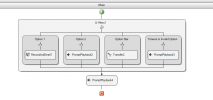
In the case where you just want it to play a message "We're busy, try again later" and then hang up, use an IVR with the desired prompt, with a 1 second timeout, that has no options and hangs up once the message is played.
 
  • Like
Reactions: Judako
We accomplish this very thing with a callflow app. Adjust the message and kick off messaging based on timing and be able to reroute etc.Really the possiblies are endless.


1691252804880.png
 
Status
Not open for further replies.

Forum statistics

Threads
111,974
Messages
590,081
Members
164,899
Latest member
mazet