Cannot activate license / 3cx package not updated // activate.3cx.com (Cloudflare block)

Status
Not open for further replies.

dan-bln

Free User
Joined
Jan 7, 2019
Messages
10
Reaction score
0
My understanding is. in order to renew the license, I require to be on 15.5 or higher.

Currently I am on 15.2
The auto update did not run.

I tried:
sudo apt-get update
sudo apt-get install 3cxpbx=15.5.15060.6 and
sudo apt-get install 3cxpbx

==> No later version has been found.
Any idea on how to trigger the update through terminal?


I also noticed, when opening your activate URL http://activate.3cx.com - I receive the following Cloudflare error:
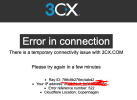
1673267084055.png

Just want to make sure that the update is not prevented due to cloud flare settings.
 
You have to be on 18.0.5 to activate your License. You need to update your 3CX to the newest version.
 
Hi @dan-bln ,

You were not blocked by Cloudflare, the message you received just says that your connection to the origin timed out and that is because our activation server is not listening on port 80. It is irrelevant to your PBX not updating.
 
Please note that V15 SP2 is a very old version of the PBX. Since then there have been many many changes and the PBX requires that is in V18 SP5 in order to be able and activate. At this point your options are:
1) Move to the latest V18 using a backup as per blog post:
- https://www.3cx.com/blog/releases/direct-upgrade-v18/
2) You may contact our 3CX CSR team to guide you regarding the migration process that we offer in order to be able and restore your backup to the latest V18:
- https://www.3cx.com/docs/switch-hos...need help to,require support to configure 3CX.

As we have also seen, there other installation with low Sim Call licenses and we strongly recommend to move to 3CX Hosted or 3CX Startup. Those installations are managed by 3CX Team, always keep installations up to date and 24/7 monitoring of the systems:
https://www.3cx.com/ordering/pricing/hosted-info/
https://www.3cx.com/docs/manual/install/
 
Thanks guys,
Note, type, I am on 18.2 while running on a RaspPi - hence this seems to be the reason next to the 18.5 release update which is not available for Pi device no longer.

While I would love to switch to the cloud - while DTAG / Telekom standard lines do not support external cloud PBX unless something has changed.

If I am not mistaken - 3CX - will no longer be an option to be used, as Cloud does not run unless, I shape a VPN between the 3CX Cloud and my Home Network. Or I change with Telekom to a Business Contract, which I do not really aim to consider.

Any additional thoughts and ideas?
 
Thanks guys,
Note, type, I am on 18.2 while running on a RaspPi - hence this seems to be the reason next to the 18.5 release update which is not available for Pi device no longer.

While I would love to switch to the cloud - while DTAG / Telekom standard lines do not support external cloud PBX unless something has changed.

If I am not mistaken - 3CX - will no longer be an option to be used, as Cloud does not run unless, I shape a VPN between the 3CX Cloud and my Home Network. Or I change with Telekom to a Business Contract, which I do not really aim to consider.

Any additional thoughts and ideas?
Just change the hardware to something debian compatible.
 
  • Like
Reactions: Evolute IT
Status
Not open for further replies.

Forum statistics

Threads
111,974
Messages
590,081
Members
164,899
Latest member
mazet