





When it comes to choosing the right SIP trunk provider for your 3CX deployment, opting for a preferred or supported provider is always recommended. Our teams make sure that each release of 3CX is thoroughly tested with the provider. Not only does this guarantee a faster and seamless setup, but if you ever need technical support with your trunk, our support team will be at hand to help you understand the issue and resolve it much quicker. This is because our preferred providers enjoy a strong relationship with 3CX due to the responsiveness of their support teams. Read on for more information.
Firstly, what is a SIP trunk?

A SIP trunk is provided by a VoIP Provider as a means to make and receive calls to external parties over the PSTN.
3 categories to help break it down
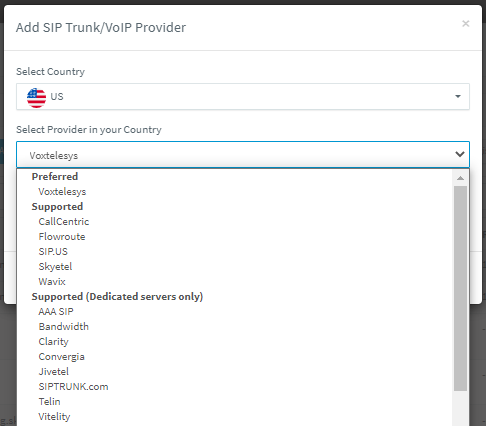
Our supported providers are broken down into 3 separate categories.
Preferred
These providers are compatible with StartUP and dedicated instances both hosted and on-premise. They are fully tested with every build of 3CX and don't require any manual configuration.
Supported
These trunks can also be used with all 3CX “modes” but some may require additional manual configuration steps to get them up and running.
Supported (Dedicated servers only)
Tested against 3CX Hosted and on-premise installations, dedicated server providers are not compatible with 3CX StartUP.
There is a 4th choice but not recommended
Admins running a dedicated 3CX instance will notice that when selecting their region and using the drop-down selector, there is another category, 3rd party supported. These providers offer trunks that support 3CX. However, a key important factor to consider is that these 3rd-party providers have not undergone an interoperability test by 3CX. Consequently, we do not support issues when using any of these providers.
Why registration based is the preferred option
SIP trunks can connect with the VoIP provider via 1) IP authentication or 2) registration-based authentication. We recommend the latter as there is no fixed tie to the public IP address of the 3CX instance you are connecting to. If you opt for a provider that only offers IP authentication, you could run into issues if you have to migrate your 3CX quickly.
For example, in an emergency, if your cloud-hosted data center goes offline, creating a new instance would likely mean you get a new public IP address. You would temporarily lose the ability to make and receive calls until your SIP trunk provider updates your trunk details with the new public IP address. Using registration-based trunks completely avoids this being an issue.
How to set up a SIP trunk on 3CX
It's super easy to get a SIP trunk set up on 3CX by following these 4 steps
- Sign up with your chosen provider
- Add the trunk to 3CX
- Configure SMS if your provider supports it
- Create outbound rules so that you can use the trunk
For a more detailed overview of setting up a SIP trunk in 3CX, check out our guide.
VoIP Providers… Interop with 3CX today
3CX only partners with well-known providers, selected based on commercial merits and technical specifications. Our aim is to provide our customers with an easy configuration, a great user experience, and excellent support by approving the best providers. If you think your company would be a good fit to partner with 3CX, we invite you to review the technical requirements to interop, prior to signing up.









 Copyright © 2026