Solved Cannot change Office Hours

Status
Not open for further replies.

Mack Allison

Joined
Dec 10, 2018
Messages
2
Reaction score
1
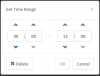
Now that I've set up office hours once, I cannot change them in the Management Interface. Now that's set up the global office hours, when I open the dialog to change the hours, the 'OK' button remains grayed out and unresponsive.

Has anyone seen this before and do you have a work around?
 

Attachments

  • Capture.PNG
    Capture.PNG
    5.6 KB · Views: 13
Well, I solved it myself. Feel a little dumb, but maybe this will help others.

You can't change the times in a set time condition, but you can delete them and create new ones.
 
  • Like
Reactions: accentlogic
Not dumb, just needed to learn how 3CX does things. Glad you figured it out.
 
Glad to see the issue has been resolved and thank you for updating the thread with your solution. Indeed you need to delete a set rule and create a new one to apply any required changes.
 
Status
Not open for further replies.

Forum statistics

Threads
111,908
Messages
589,684
Members
164,773
Latest member
ccocala.org