Change 3cx Recording Path - Gcloud

Status
Not open for further replies.

max1498

Customer
Basic Certified
Joined
Jun 4, 2021
Messages
7
Reaction score
0
Hello,

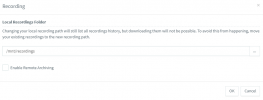
i have attched a new disk to the VM instance and now i want to store the recordings to the new disk.

I have selected the new path in 3cx recording and assigned the quota but still calls are not getting recorded and not showing the new disk space on dashboard.

Can you please help

Thank you!

 

Attachments

  • Dashboard.png
    Dashboard.png
    24.7 KB · Views: 34
  • Path.png
    Path.png
    16.3 KB · Views: 34
After attaching the disk, did you mount it in Linux? And verify the folder actually works, via SSH?
 
yes the disk is attached and verified via SSH (refer to the attached screenshot)
 

Attachments

  • Screenshot 2022-01-07 180632.png
    Screenshot 2022-01-07 180632.png
    5 KB · Views: 28
Try this:
- create a folder via SSH in the mnt/recordings.
- set that folder's owner to phonesystem:phonesystem

Set it in the 3CX console, reboot and try to make a call. See if it records.

I recommend putting the system in verbose while you do this so logs can help you figure out the issue if it persist.
 
  • Like
Reactions: ChrisC_3CX
Check your permissions on the folder. Make sure user and group rights are set to phonesystem / phonesystem.
 
  • Like
Reactions: ChrisC_3CX
Check your permissions on the folder. Make sure user and group rights are set to phonesystem / phonesystem.
How to set user and group rights to phonesystem? Can you please share the steps?
 
How to set user and group rights to phonesystem? Can you please share the steps?
Connect via SSH and run:
Bash:
sudo chown phonesystem:phonesystem /mnt/recordings
 
Last edited by a moderator:
How to set user and group rights to phonesystem? Can you please share the steps?
I can't go into details as this is completely unrelated to 3CX but if you search online for how to change file permissions and ownership on Debian you should fine plenty information.

All you will need to know in regards to 3CX from there on is what to set on the Recordings folder and all it's contents and that is the following:

File permissions: rwxr-xr-x
Ownership: phonesystem phonesystem

This should make sense once you search for these options a bit.
 
  • Like
Reactions: Evolute IT
I would offer a suggestion that 3CX check the permissions when the user selects a custom recording location. At a minimum display a message similar to "You must ensure the following rights are assigned to the selected location...". I have seen this same challenge with several other partners recently.
 
Last edited:
I recommend to archive the recordings to an GCP Cloud Storage Bucket. Its much cheaper and has easy access.
 
  • Like
Reactions: Evolute IT
I would offer a suggestion that 3CX check the permissions when the user selects a custom recording location. At a minimum display a message similar to "You must ensure the following rights are assigned to the selected location...". I have seen this same challenge with several other partners recently.
I can sort of understand with end users but with partners? o_O
 
Status
Not open for further replies.

Forum statistics

Threads
111,974
Messages
590,083
Members
164,901
Latest member
Silent_Guru