Solved change If I do not answer calls within:

Status
Not open for further replies.

mohamed hamed

Premier Customer
Joined
Apr 16, 2019
Messages
60
Reaction score
2
how to change forwarding rules ->internal calls -> If I do not answer calls within (time) for all extensions
 
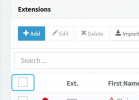
What you can do is actually select all extensions by clicking the first checkbox in the "Extensions" section:
1623669222272.png

Then, just click on "Edit", go to "Forwarding Rules >> Available" and set the ring time for internal calls to the value you want. Click on OK and now the change should apply to all extensions.
 
  • Like
Reactions: mohamed hamed
What you can do is actually select all extensions by clicking the first checkbox in the "Extensions" section:
View attachment 22493

Then, just click on "Edit", go to "Forwarding Rules >> Available" and set the ring time for internal calls to the value you want. Click on OK and now the change should apply to all extensions.
Thank you , it's working
 
Glad I could help!

Please feel free to start a new thread should you need additional assistance or information.
 
Status
Not open for further replies.

Forum statistics

Threads
111,974
Messages
590,081
Members
164,899
Latest member
mazet