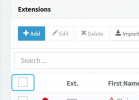
What you can do is actually select all extensions by clicking the first checkbox in the "Extensions" section:
View attachment 22493
Then, just click on "Edit", go to "Forwarding Rules >> Available" and set the ring time for internal calls to the value you want. Click on OK and now the change should apply to all extensions.