Chat on WordPress site remain active

Status
Not open for further replies.

imprimis

SOHO User
Joined
Apr 20, 2020
Messages
3
Reaction score
0
Hello @imprimis ,

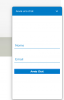
The offline form will be shown in case that "Queue Status" on all agents is set to off or all agents are set their status to statuses like, "Away", "DND", "Custom 2"
 
Thanks for your replay.
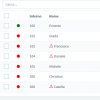
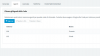
No, didn't work for me. At this time, we have 2 agents on Queue: first (me) with Queue Status=off, and second agent offline (the pc where installed 3cx client is off).
And chat is still active.
There something else that I can do?
 

Attachments

  • agents_status.png
    agents_status.png
    11.1 KB · Views: 3
  • chat_status.png
    chat_status.png
    7.6 KB · Views: 3
  • queue_agents.png
    queue_agents.png
    17.4 KB · Views: 3
  • queue_status.png
    queue_status.png
    14.1 KB · Views: 3
Hello @imprimis ,

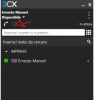
Can you please open on Windows App and click on Switchboard. From views select the "Manager" and then on lower panel area choose the queue that match in your case. Check there the Status of the Agents. If the user is logged in the log him out.

1587535745067.png
 
Hi,
thanks again. With your suggest our chat is offline. Good.
But if both agents close Windows APP, the chat is still online. If I check agents status in 3cx Admin, they are correclty offline (red icon).
Is this normal or there is something wrong?

Thanks for your precious support!
 
You are welcome. This is how it is designed the functionality. You are not doing something wrong. We are collecting feedback in regards to this one. So stay tuned for future updates.

Try also our Browser Extension. It is a work in progress but we are very proud on this one.
 
Status
Not open for further replies.

Forum statistics

Threads
112,147
Messages
590,961
Members
165,167
Latest member
Finatra.us