Solved Cisco 7906 register on 3CX Server. Help please!!

Status
Not open for further replies.

ethiongoo

Trial User
Joined
Dec 6, 2019
Messages
12
Reaction score
1
Happy Holidays Guys,
I have several cisco 7906 phones that i have spent days upgrading to the latest SIP9-4-2SR1 firmware. but am stuck on one problem. The phones won't register to my 3CX server and returns the wrong date on screen and i can not see any phone dialogue on the activity log. Please someone advise me on what i am doing wrong. Here is the SEPXX.cnf.xml
PS: i have cisco 7940 working perfectly on the same network.

<device>
<deviceProtocol>SIP</deviceProtocol>
<sshUserId>cisco</sshUserId>
<sshPassword>cisco</sshPassword>
<devicePool>
<dateTimeSetting>
<dateTemplate>D/M/Y</dateTemplate>
<timeZone>Easy African Time</timeZone>
<ntps>
<ntp>
<name>server 3.africa.pool.ntp.org</name>
</ntp>
</ntps>
</dateTimeSetting>
<callManagerGroup>
<members>
<member priority="0">
<callManager>
<ports>
<ethernetPhonePort>2000</ethernetPhonePort>
<sipPort>5060</sipPort>
<securedSipPort>5061</securedSipPort>
</ports>
<processNodeName>3CX Server IP</processNodeName>
</callManager>
</member>
</members>
</callManagerGroup>
</devicePool>
<sipProfile>
<sipProxies>
<registerWithProxy>true</registerWithProxy>
</sipProxies>
<enableVad>false</enableVad>
<preferredCodec>g711ulaw</preferredCodec>
<natEnabled>false</natEnabled>
<phoneLabel>Seirs</phoneLabel>
<sipLines>
<line button="1">
<featureID>9</featureID>
<featureLabel>Seirs</featureLabel>
<proxy>3CX Server IP</proxy>
<name>Office</name>
<displayName>Office</displayName>
<authName>XXXXXXX</authName>
<authPassword>XXXXXX</authPassword>
<messagesNumber>99</messagesNumber>
</line>
</sipLines>
<dialTemplate>dialplan.xml</dialTemplate>
</sipProfile>
<commonProfile>
<phonePassword></phonePassword>
</commonProfile>
<loadInformation>SIP11.9-4-2SR3-1S</loadInformation>
<versionStamp></versionStamp>
<directoryURL></directoryURL>
<servicesURL></servicesURL>
</device>
 
Sorry ! Update
License at mo is Professional 16.04.485
Server OS id Debian9
Hosted Locally as a VM on Proxmox Platform
 
The difference is the 7940 is and end of life phone but has a template and the 7906 was never supported.

https://www.3cx.com/sip-phones/cisco-7940g-7960g/
But surely having an sip image 7906 should work. I have a Linksys PAP-2T on the same network that works perfect as well and was never supported and don't have a template.
Do you mean any phone without 3CX template wont work?
 
Any SIP standard device should work, both most folks here are going to use 3CX supported devices and this isn't one of them. Typically if you want to use a device that isn't supported you need to open up wireshark to compare a working phone to a non-working phone.
 
Any SIP standard device should work, both most folks here are going to use 3CX supported devices and this isn't one of them. Typically if you want to use a device that isn't supported you need to open up wireshark to compare a working phone to a non-working phone.
@cobaltit :D:D i love your reply, i realise i was asking where i can get a fish, only for you to direct me on to how i could make a fishing rod and fish myself.
Just like i managed to upgrade the phones to the latest firmware i will get them work with 3CX and report back. Hopefully soon;)
 
A few years back, just after 3CX began supporting the Cisco 794X and 796X sets, did some searches for configuration file examples so that I could modify them and configure the sets the way I wanted them..i.e. multiple extension numbers per set. I found I had more luck, when Google searching for the set model and the word "asterisk" when trying to find SIP configuration examples. Once you have a basic templete for your model, you can modify the file to suit your 3CX server specifications.
 
thank you @cobaltit @leejor , i have got the phones registered okay and making calls.
this might help someone,
The trick was in firmware update, i have tested all 7906/7911 sip releases and the only firmware that worked for me was sip.9-4-2SR1-1 and sip.9-4-2SR3-1S.
The other thing i did was to include XMLDefault.cnf.xml file. i realised the model don't understand SEPXXX.cnf.xml well than XMLDefault.cnf.xml file.
here is my template for XMLDefault.cnf.xml file:
Code:
<Default>
<callManagerGroup>
<members>
<member priority="0">
<callManager>
<ports>
<analogAccessPort>2002</analogAccessPort>
<digitalAccessPort>2001</digitalAccessPort>
<ethernetPhonePort>2000</ethernetPhonePort>
<mgcpPorts>
<listen>2427</listen>
<keepAlive>2428</keepAlive>
</mgcpPorts>
</ports>
<processNodeName>192.168.20.16</processNodeName>
</callManager>
</member>
</members>
</callManagerGroup>
<loadInformation369 model="Cisco Phone 7906G">SIP11.9-4-2SR1-1S</loadInformation369>
</Default>

The other trick was to include
Code:
<proxy>USECALLMANAGER</proxy>
<port>5060</port>
in SEPXXXX.cnf.xml file. i have learnt this line is key to allow sip registration.
Below i share my SEPXXXX.cnf.xml file

Code:
<device>
<deviceProtocol>SIP</deviceProtocol>
<sshUserId>admin</sshUserId>
<sshPassword>cisco</sshPassword>
<devicePool>
<dateTimeSetting>
<dateTemplate>D/M/Y</dateTemplate>
<timeZone>Easy African Time</timeZone>
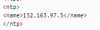
<ntps>
<ntp>
<name>132.163.97.5</name>
</ntp>
</ntps>
</dateTimeSetting>
<callManagerGroup>
<members>
<member priority="0">
<callManager>
<ports>
<ethernetPhonePort>2000</ethernetPhonePort>
<sipPort>5060</sipPort>
<securedSipPort>5061</securedSipPort>
</ports>
<processNodeName>3CX Server IP</processNodeName>
</callManager>
</member>
</members>
</callManagerGroup>
</devicePool>
<sipProfile>
<sipProxies>
<registerWithProxy>true</registerWithProxy>
</sipProxies>
<enableVad>false</enableVad>
<preferredCodec>g711</preferredCodec>
<natEnabled>true</natEnabled>
<phoneLabel>Company Name</phoneLabel>
<sipLines>
<line button="1">
<featureID>9</featureID>
<featureLabel>Name</featureLabel>
<name>100</name>
<displayName>NAME</displayName>
<contact>100</contact>

<proxy>USECALLMANAGER</proxy>
<port>5060</port>
<autoAnswer>
<autoAnswerEnabled>2</autoAnswerEnabled>
</autoAnswer>
<callWaiting>3</callWaiting>

<authName>xxxxxx</authName>
<authPassword>xxxxx</authPassword>

<sharedLine>false</sharedLine>
<messageWaitingLampPolicy>1</messageWaitingLampPolicy>
<messagesNumber>99</messagesNumber>
<ringSettingIdle>4</ringSettingIdle>
<ringSettingActive>5</ringSettingActive>

<forwardCallInfoDisplay>
<callerName>true</callerName>
<callerNumber>false</callerNumber>
<redirectedNumber>false</redirectedNumber>
<dialedNumber>true</dialedNumber>
</forwardCallInfoDisplay>
</line>
</sipLines>
<dialTemplate>DRdialplan.xml</dialTemplate>
</sipProfile>
<commonProfile>
<phonePassword></phonePassword>
</commonProfile>
<loadInformation>SIP11.9-4-2SR1-1S</loadInformation>
<versionStamp></versionStamp>
<directoryURL></directoryURL>
<servicesURL></servicesURL>
</device>
Thank you all.
 
Last edited:
Having solved the most important bit, i now need to understand why the phones cant register the correct date at all even with most recent firmware. Any suggestion is welcome, as i try and will report back :):)
 
13445
is this setting your NTP server ? is it a public ntp service? if so it's not working for me

why not trying with : ntp.pool.org
 
Ok, thanks John
 
Yes John, i got it to work via SBC and now returns the correct time having set SNTP IP.

Thanks so much

Rgds
Eamonn
 
  • Like
Reactions: JohnS_3CX
Status
Not open for further replies.

Forum statistics

Threads
111,935
Messages
589,823
Members
164,815
Latest member
natedog