Configuration is not updated on GrandStream phones

Status
Not open for further replies.

comp4all

Free User
Joined
Nov 29, 2019
Messages
35
Reaction score
2
System V16 Update 4
Debian 9

Phones: Grandtream GXP1630.

I'm provisioning the phones via SBC.
every day I have to change the ringtones on the call features menu on each phone.

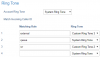
I also have an issue where I see the extension number twice although under the accounts only 1 is configured.

I read something about templates, do you know where I can change it once and for all ???

Thank you,
Tal
 
For the the line appearance I understand this is a limitation.

for the configuration of the phones this should be supported but it keeps coming back to different ringtones.

I am on the current version as appears on the 3CX website.
 
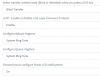
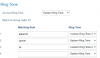
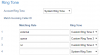
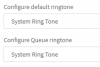
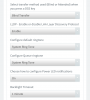
this is what I see that is changed every day on the phones and what I configured in the 3cx:
1582791237495.png1582791202734.png
 
Hi @comp4all

The reason it keeps coming back is because the phones reprovision automatically everyday and follow what the PBX gives them.

To change the ringtone you should do it from the extension settings.
 
  • Like
Reactions: Evolute IT
Hi @comp4all

The reason it keeps coming back is because the phones reprovision automatically everyday and follow what the PBX gives them.

To change the ringtone you should do it from the extension settings.

Thank you, John
I did exactly that. I changed each extension to work with System Ringtone but it keeps changing back to the pics I uploaded in my earlier reply. It seems like it doesn't do anything.
 
If you reset the phone, and reprovision it with whatever the management console shows, will it work as intended the first time?

If the answer is yes, you later find these to be changing, then perhaps the users are changing from the phone menus?
 
Hi John,

I did that. I choose system ring. It keeps changing to custom ring 3.

because of that I have to change the configuration from the phone everyday.
 
Default provisioning in V16U4 appears like this
1582800896686.png
And under Phone Account 1 > Call Settings appears like this
1582800935930.png


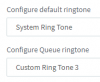
Now when I change my settings to be like yours
1582803768419.png
And then reprovision the phone
1582804021586.png

This is the default behavior you should expect, since you changed your queue ringtone to the system ringtone the phone will honor the settings you have selected.
 
  • Like
Reactions: Evolute IT
Hi
Default provisioning in V16U4 appears like this
View attachment 14641
And under Phone Account 1 > Call Settings appears like this
View attachment 14642


Now when I change my settings to be like yours
View attachment 14643
And then reprovision the phone
View attachment 14644

This is the default behavior you should expect, since you changed your queue ringtone to the system ringtone the phone will honor the settings you have selected.
John,

my configuration in 3CX system system ring tone as you can see below:
1582810765306.png

It keeps changing to custom ring tone 3 only on the phone. The configuration on the 3CX MC is correct.

many ideas?
 
Rebooting the phone, or reprovisioning the phone should result in the same settings being applied, the change you observe should not be happening.

1.) You can try to reboot it to see if it will lose the correct setting (give it 5 minutes to start up).
2.) If it changes, you can reprovision it from the management console and see if the settings correct themselves

Let me know the results you get for both these points.
 
  • Like
Reactions: Evolute IT
Tal, did you get a free instance hosted by 3CX?

Your phone might be provisioning from two different servers, and receiving settings from the other PBX..
 
  • Like
Reactions: Evolute IT
Tal, did you get a free instance hosted by 3CX?

Your phone might be provisioning from two different servers, and receiving settings from the other PBX..
I'm hosting it on Google cloud under my account.
 
Upon further review, since you wish to change the external calls ringtone, this cannot be done via the 3CX Phone Provisioning tab. It is hardcoded in the templates we provide, and you only have options for "Default" and "Queue".

You can do it using custom templates but please be aware of this message before you proceed:

1582903121440.png
https://www.3cx.com/docs/custom-ip-phone-templates/
 
  • Like
Reactions: Evolute IT
Status
Not open for further replies.

Members Online Now

Forum statistics

Threads
111,835
Messages
589,291
Members
164,668
Latest member
Infinity Network