Continuous Attack from Different IP Add

Status
Not open for further replies.

Deepak | Aastitva.com

Free User
Joined
Jun 3, 2021
Messages
68
Reaction score
4
Hi,

We are facing continuous attacks from different IP addresses.

The firewall has been strongly configured.

How to stop this nuisance?

Regards,
Abhijit
InfoTech Team
 

Attachments

  • scrnli_7_24_2023_8-58-12 PM.png
    scrnli_7_24_2023_8-58-12 PM.png
    87.1 KB · Views: 30
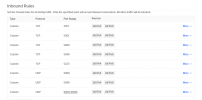
Restrict 5060 to SIP providers IP. Any STUN devices want to either use mobile app or SBC.
 
  • Like
Reactions: CentrexJ and pangel
Hi @Deepak | Aastitva.com you must use an ACL (access list) for the SIP PORT 5060 to only allow the incoming traffic from external VoIP Providers.

Any remote IP phone must be provisioned using the 3CX SBC, so the tunnel port 5090 you can leave it open publicly without issues.

Also please read our guides and, if needed, take the appropriate action.

3CX PBX Security - Reset credentials/Passwords
Vol.1: Keep Complex Credentials - 3CX
Vol.2: Call Fraud - 3CX
Vol.3: Top 4 PBX Security Tips - 3CX
Vol.4: Monitor Your Instance - 3CX
 
Hi,

We are facing continuous attacks from different IP addresses.

The firewall has been strongly configured.

How to stop this nuisance?

Regards,
Abhijit
InfoTech Team
I know I am coming to this party a bit late, but I want to say I experienced exactly the same issue as you and I implemented basically the same solution that has been posted here and it worked. Completely stopped the hacking.

However, I did go one step further, I not only locked out 5060, I locked out EVERY port used by 3cx to my trunk providers IP address's. Creates havoc with the firewall checker, but is very effective :-)
 
Hi All,
I am extremely sorry for reacting so delayed. Just could not take this agenda up. Thank you @Alejandro_3CX and @Charles_3CX for helping me out.
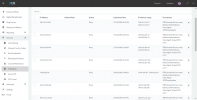
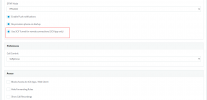
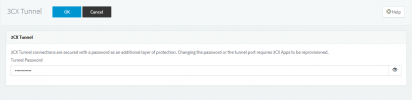
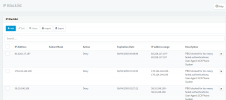
The SBC tunnel is enabled with the password, and every phone is provisioned to use the tunnel. Please note the screenshots.

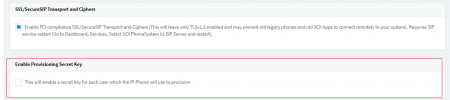
In the Anti-Hacking menu (LHS), there is an option for Enable Provisioning of Secret Key. This is not enabled. Should enabling that help?

If you note, the hacking attempts has not stopped. The only thing is that they are not able to penetrate. How to stop the hacking attempt even? Because, every attempt made is a threat to security.

Regards,
Deepak
 

Attachments

  • scrnli_12_7_2023_7-47-16 PM.png
    scrnli_12_7_2023_7-47-16 PM.png
    21 KB · Views: 4
  • scrnli_12_7_2023_7-45-24 PM.png
    scrnli_12_7_2023_7-45-24 PM.png
    26 KB · Views: 4
  • scrnli_12_7_2023_7-44-38 PM.png
    scrnli_12_7_2023_7-44-38 PM.png
    18.2 KB · Views: 4
  • scrnli_12_7_2023_7-50-28 PM.png
    scrnli_12_7_2023_7-50-28 PM.png
    39.7 KB · Views: 4
Hi All,
I am extremely sorry for reacting so delayed. Just could not take this agenda up. Thank you @Alejandro_3CX and @Charles_3CX for helping me out.
The SBC tunnel is enabled with the password, and every phone is provisioned to use the tunnel. Please note the screenshots.

In the Anti-Hacking menu (LHS), there is an option for Enable Provisioning of Secret Key. This is not enabled. Should enabling that help?

If you note, the hacking attempts has not stopped. The only thing is that they are not able to penetrate. How to stop the hacking attempt even? Because, every attempt made is a threat to security.

Regards,
Deepak
You need to set your firewall to only allow connections to 5060 from your sip provider like in the posts just before yours.
 
  • Like
Reactions: N_G
Hi @bitn2 ,

Thank you for your quick response. We are hosted with Digital Ocean on Debian 9 stretch.
Do you mean we need to configure the server firewall? I believe 3CX application per se has no separate firewall option if I am not mistaken.

Regards,
 
Hi @bitn2 ,

Thank you for your quick response. We are hosted with Digital Ocean on Debian 9 stretch.
Do you mean we need to configure the server firewall? I believe 3CX application per se has no separate firewall option if I am not mistaken.

Regards,
correct, you need to configure the firewall in front of the pbx. But why you are on debian 9? Its pretty old. Which version ist your pbx?
 
Hi,

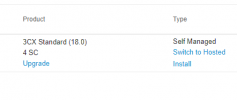
We are on 3CX Standard 18.0.

I understand from your comment you suggest to upgrade the Debian version.
 
I am attaching the screenshot. This is all I can find out.
 

Attachments

  • scrnli_12_7_2023_8-49-51 PM.png
    scrnli_12_7_2023_8-49-51 PM.png
    6.2 KB · Views: 9
I am attaching the screenshot. This is all I can find out.
You will find the correct information on the dashboard of your pbx. Anyway, your should be on debian 10 allready. How to configure the Digital Ocean firewall i cant help you, but this is the way to secure your pbx more against this attacks.
 
Hi,

Thank you each one of you.

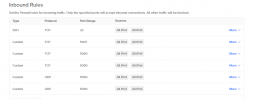
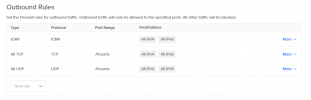
I am not as technical as you guys. However, I have tried to configure the firewall before the 3CX server.

I am sending the screenshots. Please take a look and validate me.

Regards,
 

Attachments

  • scrnli_12_8_2023_1-58-25 PM.png
    scrnli_12_8_2023_1-58-25 PM.png
    39.1 KB · Views: 5
  • scrnli_12_8_2023_1-58-21 PM.png
    scrnli_12_8_2023_1-58-21 PM.png
    28.7 KB · Views: 5
SSH should be off and only on when you need it. All RTP Ports are missing. The rest looks fine for me.
 
Hi @bitn2

Please do a final check. Attached is the screenshot.
 

Attachments

  • scrnli_12_8_2023_2-17-31 PM.png
    scrnli_12_8_2023_2-17-31 PM.png
    42.1 KB · Views: 6
Hi @bitn2 ,

Removed those ports. Thank you so much.
 
Status
Not open for further replies.

Members Online Now

Forum statistics

Threads
111,832
Messages
589,282
Members
164,662
Latest member
DejanMDS