Custom call script and holidays

ITSP

Premier Customer
Joined
May 4, 2022
Messages
69
Reaction score
10
We have created a custom call script so that when an incoming call arrives on the trunk, it first checks if a certain extension is logged in/available and if it is, then it plays an audio file and terminates the call. This is for the purpose of a lockdown message (we're a public school so when someone triggers that lockdown extension by logging in, all incoming calls are met with a message saying don't come to the school and that we'll provide updates via the website and social media platforms). This works fine for most days except when holidays arrive. I followed the documentation here: https://www.3cx.com/docs/holiday-script/ to create a holiday message.

However, it won't play because the trunk's default route is set to Call Processing Script and the custom lockdown script we created. If we set the default route to Digital Receptionist and then specify the extension of our main attendant, the holiday message works.

I think it is possible to combine both scripts into 1 but I am not exactly a programmer. Is there a way to combine both call scripts?

Also, having read some forum posts re: available 20.0 Update 9 alpha release, it seems that the holiday prompt feature is coming back with us not having to run the call script? If that's the case, should I just wait for this to become general release?
 
By the way, I have access to the 3CX Call Flow Designer. Would it be possible to get the project file for the holiday.cs from the store? I might give it a try to combine the 2 scripts.
 
Hello ITSP,

You could try to combine the 2 scripts and make a selection with the Date/time Condition.

1775207019735.png

Paulo
 
However, it won't play because the trunk's default route is set to Call Processing Script and the custom lockdown script we created. If we set the default route to Digital Receptionist and then specify the extension of our main attendant, the holiday message works.
It is probably because your CFD program in 3CX is not assigned to any department (with holidays). The holiday.cs checks the department of the call destination and determines whether it is a public holiday or not.

By the way, I have access to the 3CX Call Flow Designer. Would it be possible to get the project file for the holiday.cs from the store? I might give it a try to combine the 2 scripts.
Note:
A program created with the CFD for a 3CX system always answers any call, always.
A program written in C#, such as the holiday.cs, does not. Therefore such a program behaves differently - especially when it is intended to trigger on the SIP trunk. It is not necessarily a good idea to use a CFD-based program there. Therefore it does not make sense to recreate the holiday.cs in your CFD program using a Date/Time Condition component. That is not sufficient as the holiday.cs works differently.

Also, having read some forum posts re: available 20.0 Update 9 alpha release, it seems that the holiday prompt feature is coming back with us not having to run the call script? If that's the case, should I just wait for this to become general release?
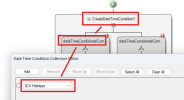
Yes, 3CX v20u9 will simplify the handling of holiday announcements. Your problem will persist if the call destination is not assigned to any department. Therefore the u9 would not help you.
 
The problem is that when I set up the call processing script, when I select "Upon receiving a call on a trunk", the Department is grayed out.

I can only set the Department if I select "When this DID is called".

The screenshot in the document seem to indicate that you can set "Upon receiving a call on a trunk" and then set the appropriate Department. For me, it doesn't. When I select "Upon receiving a call on a trunk", the Department is fixed to "System wide".
 
Hello,

I may have read you information wrong, but it seems to me there are 3 options mentioned.
1) logged in/available and if it is, then it plays an audio file = (play audio)
2) default route to Digital Receptionist = (play audio)
3) or the holiday message works = (play audio)

In all 3 the options the system will answer the call and play a message, so there is no need to be scared that the system will answer the call in a CFD as it will always answer the call for option 1,2 and 3 and play audio.
That is why I did mention the CFD option, however there are many options to get to the required result.
So build what you need and are comfortable with.

Paulo
 

Latest Posts

Forum statistics

Threads
112,281
Messages
591,677
Members
165,402
Latest member
noufir