Custom Integration; Test Succesful but System doesn't lookup

Status
Not open for further replies.

JasonKerner

Free User
Joined
Sep 13, 2023
Messages
7
Reaction score
0
Hi,
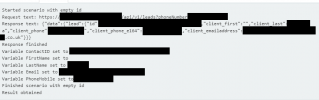
We have a custom integration, with an API developed specfically for looking up into a custom CRM - and the Template file has been uploaded to the Management portal, as well as a test coming back successfully matching the incoming number and returning fields (see screenshots)

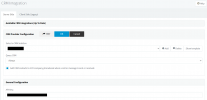
But, when this is used for 'real', no requests are sent to the CRM system from the 3CX system; heres our Management Screen and the test result screenshot.

Is there a setting somewhere that we have to turn on to addition to this config? We're just using it in a way to do a lookup for now (not writing anything back to the phone system)
test-result-1.pngmanagement-screen.png
 
What outputs are you providing in your template? In order for a match to be considered valid, you need to provide:
1) At least one of FirstName, LastName or CompanyName
2) The phone number being searched
3) The ContactUrl

If any of this is not there, the contact is discarded.

Also, please note that the integration works with external calls, so if you're testing this with calls between extensions, it will not work.
 
  • Like
Reactions: Evolute IT
How about EntityID and EntityType, do they still need to be set?
 
How about EntityID and EntityType, do they still need to be set?
If you will not implement Call Journaling, as in this case, then it's not mandatory. That's information that will be passed to the ReportCall scenario.
 
  • Like
Reactions: Evolute IT
So, during the test, the search result payload does show the ContactURL field being filled in, the Lastname field and the PhoneMobile field

My bigger concern is, I'm testing this with a direct dial number into my extension, but the 3CX system doesn't even make the API call - I'm watching the web server logs where the API is hosted, and no request even hits the server when being used for real.

The template has been uploaded, and the API key has been provided (we're using Basic Auth) and the API works via Postman and via the Test Console, but when a real phone number is dialed into the phone system, its not making the API call out to the CRM system to even bother looking up, let alone disregarding a match if it does get a result.

Edit: I've attached the output of the test (blurred the actual CRM paths, and person details, but you can see the fields are being set)
 

Attachments

  • phone-system-test.jpg
    phone-system-test.jpg
    65.2 KB · Views: 4
In order to investigate the issue, please enable verbose logs from the 3CX Console > Dashboard > Activity Log > Settings. Then make a test call where you reproduce the issue, and check the 3cxSystemService.log file that you can download from the 3CX Console > Dashboard > Activity Log > Logs button > Instance folder. There you will see the invocation from 3CX to the CRM, if it's happening, or any error related to this.
 
I'm testing this with a direct dial number into my extension
Just to be clear, is this call coming from a SIP Trunk? Or you're making a call from an extension to another extension?
 
I'm making a call from my mobile number, into the DDI assigned to my extension - and the web console rings, and shows my mobile number correctly, but the name (which I know is in the CRM), never comes up.

I could message our XML template directly if that helps?
 
One more question; is there any additional settings / setup required on the Management Console itself?

The template has been uploaded, and the API key set - but do you need to 'turn it on' somewhere?
 
I'm making a call from my mobile number, into the DDI assigned to my extension - and the web console rings, and shows my mobile number correctly, but the name (which I know is in the CRM), never comes up.

I could message our XML template directly if that helps?
Is your mobile number configured for an extension? In that case, please remove it for your test. If this number is set as an extension's mobile number, then the name will not be shown because the extension takes precedence.
 
One more question; is there any additional settings / setup required on the Management Console itself?

The template has been uploaded, and the API key set - but do you need to 'turn it on' somewhere?
You need to select it from the Management Console > Settings > CRM. Select your integration and complete the configuration parameters. That's it.
 
Is your mobile number configured for an extension? In that case, please remove it for your test. If this number is set as an extension's mobile number, then the name will not be shown because the extension takes precedence.
Not that I know of; I have a standard UK landline to call, which makes my extension ring directly - but my mobile number isn't paired with the phone system in anyway.

What I find strange is that the 3CX system, even with the Template and the API in, doesn't even make an API call at all. Under what circumstances would it decide not to make the API call to look up the caller?
 
As I mentioned, enable verbose logs and check the logs. That will tell you what's happening.
 
Just a thought; does the lookup occur as the call is coming in, or only when it's answered by an operator?
 
Just a thought; does the lookup occur as the call is coming in, or only when it's answered by an operator?
As soon as it arrives to 3CX from an external line (SIP Trunk).
 
Hi Ernesto, We enabled verbose logs - and I've got all the log file extractions - which log file should point me in the right direction? Is it the 3cxManagementConsole.log file?
 
Hi Ernesto, We enabled verbose logs - and I've got all the log file extractions - which log file should point me in the right direction? Is it the 3cxManagementConsole.log file?
You need to check the 3cxSystemService.log file.
 
Status
Not open for further replies.

Latest Posts

Forum statistics

Threads
112,322
Messages
591,882
Members
165,469
Latest member
footandankle.my3fcx.us