Digital receptionist "Can't call internal extensions"

Status
Not open for further replies.

abdo abdelmordy

Forum User
Joined
Jan 4, 2021
Messages
17
Reaction score
0
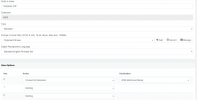
I created a new IVR and I need if the customer needs to reach an agent directly to call his extension number as I guide in the IVR msg
but I hear the massage but after dialing the extension no response at all.
 

Attachments

  • ivr.png
    ivr.png
    43.3 KB · Views: 15
When you say you dial the extension, do you mean you pressed 0 (as in the image) or you dialed the 4-digits extension manually during the IVR prompt (which should work automatically)
 
the 4-digits extension manually during the IVR prompt
 
Is the extension registered?

Is the status set to available?

And is external calls disabled by any means?

Also, if you dial another extension, does it work?
 
Is the extension registered? no

Is the status set to available? yes

And is external calls disabled by any means? no

Also, if you dial another extension, does it work? noi
 
If the extension is not registered, you should get the voicemail by default unless specified otherwise in the extension's forwarding rules.

Are extension-to-extension calls working?
 
Are extension-to-extension calls working? yes
and there is no voice mail found
 
Hello @abdo abdelmordy ,

As @Frederick Marcoux , correctly mentioned, if the extension you are dialing is not registered, then the corresponding Forwarding Rule for that extension will be followed. If for instance the call is an external call that ends up on the said IVR and then the caller uses the direct dial feature by dialing a specific extension while in the IVR, the call should then follow the following forwarding rule:

Extensions >> Edit Extension dialed >> Forwarding Rules >> Available Status >> External Calls >> If I am busy or my phone is unregistered, forward calls to:


The above should apply provided that the extension is in the Available Profile Status and unregistered at the time. Is this not what is happening?

For more information regarding Extension Profiles and Forwarding Rules please consider having a look at our training material: https://www.3cx.com/3cxacademy/videos/intermediate/configuring-extensions/
 
@ChrisC_3CX really I need to discuss my problem here with all the 3cx lovers

I need to make an IVR system for my number when someone calls my number he should hear a msg guided him to call the extension directly if he knows it or press 0 for help which will redirect him to the reciptionanist.

that is all that I need to make so I need simple steps to implement, thanks in advance.
 
This should work out-of-the-box. We use it.

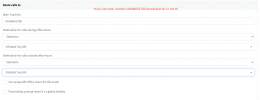
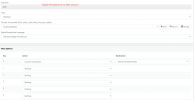
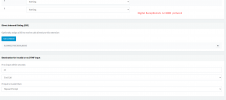
Please send a screenshot of your whole IVR config and make sure that This IVR is the one configured for the DID in Inbound Rules.
 
this is all the config
 

Attachments

  • 1.png
    1.png
    23.2 KB · Views: 14
  • 2.png
    2.png
    29.4 KB · Views: 12
  • 3.png
    3.png
    22.1 KB · Views: 12
And when you call, you can't dial any extensions directly, at all?
 
yes or when I press 0 not routed to anything and after the time ends I hear goodbye thanks you that is all.
 
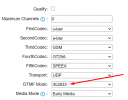
Sounds like DTMF issue.

What SIP trunk provider are you using? And what device do you use to call?
 
the sip trunk is with Yeastar TG800 and I use my phone number to call the sim card number which is 01006695434
 
How is the DTMF configured in the Yeastar?
 
can you show what do you mean by this?
 
this what you need?
 

Attachments

  • 22.png
    22.png
    23.7 KB · Views: 19
Yes. It should work using RFC since that's what 3CX uses.

Register an extension using the mobile app or the webclient, dial the IVR and then during the prompt, dial another extension. Does it work? (That's how we test IVRs)
 
no, I made this test more than 10 times with different extensions with no luck.
 
Status
Not open for further replies.