Direct Access to Conference Bridge

Status
Not open for further replies.

GManNAtl

Joined
Sep 13, 2012
Messages
58
Reaction score
0
Am I missing something here? Is there no way to direct an incoming DID to the Conference Bridge? If not, why is there an option in this section of the admin to provide the external number. The bridge extension doesn't come up under extension, digitial receptionist, or any of the other categories.
 
You can setup the did to point to the 700/7000 extention, but the person calling the line will need to know the meeting passcode.
 
That's my point, it doesn't show up in any of my lists. If I select "Connect to Extension", Connect to Que/Ring Group, Connect to Digital Receptionist, or Voicemail box for extension, 7000 doesn't show as an option in any of them.
 
It may help to know which version of 3CX is being used and if a paid, demo or free one. I have a paid one and it (700 in my case)shows up under connect to extension.
 
v12 128 call Enterprise, and this is the case on all off my paid installations, all v12.
 
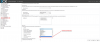
I can't explain it either. As you can see in the screenshot below extension 700 is available. Just so that we haven't missed something, the DID registered and the Conference Extension you are trying to forward it to are on the same 3CX Phone System installation correct?
 

Attachments

  • inbound_rules_screenshot.png
    inbound_rules_screenshot.png
    137.1 KB · Views: 1,603
Well, I temporarily fixed it using the VAD. However, it was bothering me so I went back to take a look.

YMMV, but on my install it was at the very bottom of the extensions list. Not sorted by the extension number and it didn't say Conference Bridge or anything, it simply had 7000.

Anyway, problem solved!
 
Status
Not open for further replies.

Members Online Now

No members online now.

Forum statistics

Threads
111,835
Messages
589,289
Members
164,665
Latest member
dominik.pepel