Hi guys,
It perfectly works on my side.
I checked T46G, T46S and T58 - they are OK.
@
Michael Groom
Try to check the following:
1. Confirm that you are really using the correct default template. Just go to the Phones page, select your yealink t46 phone and press "+Cofig" button. You need to see something like this:
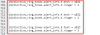
Do you see this? If yes, you are using the correct template.
2. Confirm that the phone is really re-provisioned. Connect to it, go to the Settings->Ring page and confirm that you can see something like this:
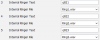
3. The last think that you can check is the PBX functionality.
Connect to your yealink phone, go to the Settings->Configuration and Start Pcap Feature there.
Make the call to queue, confirm that the phone rings and close the call. Stop the pcap, find the SIP Invite coming from the PBX to your yealink and confirm that you see something like this:

If all are good but the phone still rings incorrectly, than, I think, this phone is just broken.
@it145
Confirm that you are using the SP6 version (15.5.15505.6) and default provisioning template.
Go to Settings->Phone / Client Options page of 3cx PBX and enable the "Use custom ringtones per queue:" feature.
Add some queues and add agents (extensions) to these queues.
Edit that extensions (agents), go to the Phones Provisioning tab and select the custom queue ring tones by pressing the "
Custom Queue Ringtones" button

Save and re-provision the phones attached to these extensions (agents).








