Distinctive ring tones not working with SP6

Status
Not open for further replies.

Michael Groom

Customer
Joined
Dec 11, 2017
Messages
62
Reaction score
3
We have updated hoping that ringtones for queues would work but sadly 3cx still didnt get this right. I have set it up on my system. But all queues still ring with the default.
 
Hello @Michael Groom

Have you enabled the option under settings / Phone / Client options? If you do and you are using a device that supports the function you will see the option under the extension settings / Phone provisioning tab. Choose a queue and a ringtone and reprovision your phone.

2018-09-05_16h20_57.png
 
I have enabled it. then have gone to the provisioning tab and set it to multiple different rings and then reprovisioned phone and tested and it still just rings with the normal default ring. I am using a yealink t46 on the latest firmware and default template.
 
Is there any update on this please, we're using T58 phones and don't see any Client options relating to this?
 
Hi guys,
It perfectly works on my side.
I checked T46G, T46S and T58 - they are OK.

@Michael Groom
Try to check the following:
1. Confirm that you are really using the correct default template. Just go to the Phones page, select your yealink t46 phone and press "+Cofig" button. You need to see something like this:
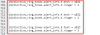
upload_2018-9-21_15-16-24.png
Do you see this? If yes, you are using the correct template.

2. Confirm that the phone is really re-provisioned. Connect to it, go to the Settings->Ring page and confirm that you can see something like this:
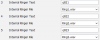
upload_2018-9-21_15-20-44.png

3. The last think that you can check is the PBX functionality.
Connect to your yealink phone, go to the Settings->Configuration and Start Pcap Feature there.
Make the call to queue, confirm that the phone rings and close the call. Stop the pcap, find the SIP Invite coming from the PBX to your yealink and confirm that you see something like this:

upload_2018-9-21_15-27-50.png

If all are good but the phone still rings incorrectly, than, I think, this phone is just broken.


@it145
Confirm that you are using the SP6 version (15.5.15505.6) and default provisioning template.
Go to Settings->Phone / Client Options page of 3cx PBX and enable the "Use custom ringtones per queue:" feature.
Add some queues and add agents (extensions) to these queues.
Edit that extensions (agents), go to the Phones Provisioning tab and select the custom queue ring tones by pressing the "Custom Queue Ringtones" button
upload_2018-9-21_15-37-13.png
Save and re-provision the phones attached to these extensions (agents).
 

Attachments

  • upload_2018-9-21_15-33-26.png
    upload_2018-9-21_15-33-26.png
    11.3 KB · Views: 16
  • Like
Reactions: craigreilly
Thanks very much PhoneMaster and really sorry I was looking in the wrong place and the option had not been enabled in Settings. Your info is valuable though.
 
Thanks very much PhoneMaster and really sorry I was looking in the wrong place and the option had not been enabled in Settings. Your info is valuable though.
It's my pleasure ;)
 
Status
Not open for further replies.

Latest Posts

Forum statistics

Threads
111,894
Messages
589,604
Members
164,763
Latest member
Techmansam


