


- Joined
- Nov 21, 2017
- Messages
- 31
- Reaction score
- 23
Currently when you disable the Global PickUp Permission
Settings -> General -> General Options

You are able to limit the PickUp right to members inside of User Groups.
Setting following Right inside the User Group
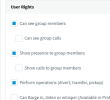
Does not work.
To do pickups you have to enable "Can see group clalls" and "Show calls to group members" to be able to do Pickups.
This is documented in https://www.3cx.com/docs/managing-c...it call,group” depending on your requirements.
From my point of view "Limit Call Pickup to Calls received in their extension group" disabled global pickup permission. But if I set "Perform operations (divert, transfer, pickup)" is like a local pickup permission limited to the User Group. So it makes no sense that you need additional permissions that are not required if the global pickup is allowed.
Looking at data protection a customer that is not allowed to see the calls of the group memebers are not able to do pickups? But is this technically necessary?
Regards
Claas
Settings -> General -> General Options
You are able to limit the PickUp right to members inside of User Groups.
Setting following Right inside the User Group
Does not work.
To do pickups you have to enable "Can see group clalls" and "Show calls to group members" to be able to do Pickups.
This is documented in https://www.3cx.com/docs/managing-c...it call,group” depending on your requirements.
From my point of view "Limit Call Pickup to Calls received in their extension group" disabled global pickup permission. But if I set "Perform operations (divert, transfer, pickup)" is like a local pickup permission limited to the User Group. So it makes no sense that you need additional permissions that are not required if the global pickup is allowed.
Looking at data protection a customer that is not allowed to see the calls of the group memebers are not able to do pickups? But is this technically necessary?
Regards
Claas
Upvote
4


