Dynamics CRM screen pop

Status
Not open for further replies.

ckobayashi

Free User
Joined
Jan 12, 2021
Messages
34
Reaction score
8
We are using 3CX 16.0.9 and it is integrated with Dynamics CE (CRM). We have configured the integration to "Automatically open Contact URL when CRM Integration is Enabled."

When an incoming call rings 3CX opens the Contact URL of the Dynamics app that is currently in use. For our users using the Dynamics Omnichannel for Customer Service app this causes conflicts with the app, which can only have one instance open at a time.

Is there a way to customize the Dynamics Contact URL in 3CX so we can launch the contact card in a separate Dynamics app for these users?

Thanks in advance!
 
Unfortunately that's not possible. 3CX will query the CRM, return a Contact URL and store it in 3CX Contacts. Then this is passed on to the Web Client when the agent receives the call. The Contact URL will be the same for all users system-wide.
 
@edossantos Thank you for the reply. I'm not sure I understand your explanation.

Can we customize the CRM URL that 3CX launches for an incoming phone call?
 
Can we customize the CRM URL that 3CX launches for an incoming phone call?
You could do it by editing the template we provide. However, the URL will be the same system wide. You can't use an URL for a set of agents, and another URL for another set.
 
  • Like
Reactions: ckobayashi
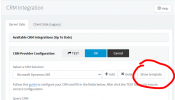
@edossantos Thank you for that info. Is this is the template you are referring to?

1628705409434.png​


If so, where in this template would the URL be edited?
 
Yes, that's correct. The URL is in different places, depending on the entity (contacts, leads, accounts), so you will need to search for the following text in the XML:
<Output Type="ContactUrl"

In order to make the change, click "Show template", and then copy the XML to a text editor. Make your changes, and also change the Name attribute in the second line. Currently it's set to:
Name="Microsoft Dynamics 365"

You should set it to something like:
Name="Microsoft Dynamics 365 Custom"

Finally, ensure that the XML file name is saved with a different name, for example Dynamics365Custom.xml.

Once you have made these changes, you need to click the Add button in that page, and upload your custom template.

Please note that once you do this, you will be using a customized template, and not the standard template. As a result, you will miss any update we release.
 
  • Like
Reactions: ckobayashi
@edossantos This is perfect. Thank you for the info.

Regarding updates, is this template updated in the background or only when we apply an update via the updates page?
 
When 3CX is updated, a new version of the template could be included. Also we release from time to time updates that you can see from the top of this same page.
 
  • Like
Reactions: ckobayashi
Status
Not open for further replies.

Latest Posts

Forum statistics

Threads
112,323
Messages
591,896
Members
165,474
Latest member
costionofrei