Exchange 2016 and 3CX v16

Status
Not open for further replies.

linewise

Forum User
Joined
Sep 2, 2019
Messages
12
Reaction score
0
Hello!

since the new version of 3CX we have issues with the sync of contacts between the exchange server and 3CX.

  • Exchange 2016 inhouse.
  • outside 3CX-system (v16 newst, not alpha) hosted in an other company.

We already made the impersonated user and have the public folder with the contacts and so on.
We also tried the manual from 2018 where the 3CX version was 15.5.
Here we had only one problem so far:

There was a problem with the VirtualDirectory, when using the command for EWS.

Any idea how to fix that?
The error more or less tells (in Exchange commandline) that AD-Configuration for the virtual directory is already there and that we should delete it manual.

Or in general is there no solution from 3CX itself until today?

Thank you and have a nice day.

Best regards,
Daniel
 
Hi,

can you set the logging in verbose and restart the system service, then have a look into this log. do you see something in relation to your exchange public folder path in it?
 
Hi,

can you set the logging in verbose and restart the system service, then have a look into this log. do you see something in relation to your exchange public folder path in it?


thank you for the fast answers. I already tried every solution in the wiki. The thing i was have tried no is the following old forum post https://www.3cx.com/community/threa...-exchange-2016-authentication-problems.55150/

The thing about the public folder out of the logfile, which i think is the right one (two folders "Firmenkontakte" and orginal path "#/path/people":


2019/09/02 17:27:31.083|109486|0016|Info|Synchronization of public folders started...
2019/09/02 17:27:31.401|109486|0016|Info|Synchronization of Public Folder Firmenkontakte/Firmenkontakte started...
2019/09/02 17:27:33.205|109486|0004|Verb|Enqueue Updated.REGISTRATION.2001
2019/09/02 17:27:33.205|109486|0011|Verb|Dequeue Updated.REGISTRATION.2001
2019/09/02 17:27:33.386|109486|0004|Verb|Enqueue Updated.REGISTRATION.2000
2019/09/02 17:27:33.547|109486|0011|Verb|Dequeue Updated.REGISTRATION.2000
2019/09/02 17:27:33.551|109486|0004|Verb|Enqueue Updated.REGISTRATION.1997
2019/09/02 17:27:33.551|109486|0011|Verb|Dequeue Updated.REGISTRATION.1997
2019/09/02 17:27:33.617|109486|0004|Verb|Enqueue Updated.REGISTRATION.2002
2019/09/02 17:27:33.617|109486|0011|Verb|Dequeue Updated.REGISTRATION.2002
2019/09/02 17:27:33.620|109486|0004|Verb|Enqueue Updated.REGISTRATION.1998
2019/09/02 17:27:33.620|109486|0011|Verb|Dequeue Updated.REGISTRATION.1998
2019/09/02 17:27:34.388|109486|0016|Erro|Error while checking contacts from Public Folder Firmenkontakte/Firmenkontakte
2019/09/02 17:27:35.307|109486|0004|Verb|Enqueue Updated.PARAMETER.463
2019/09/02 17:27:35.308|109486|0011|Verb|Dequeue Updated.PARAMETER.463
2019/09/02 17:27:35.369|109486|0004|Verb|Enqueue Updated.PARAMETER.464
2019/09/02 17:27:35.369|109486|0011|Verb|Dequeue Updated.PARAMETER.464
2019/09/02 17:27:35.370|109486|0004|Verb|Enqueue Updated.REGISTRATION.2010
2019/09/02 17:27:35.370|109486|0011|Verb|Dequeue Updated.REGISTRATION.2010
2019/09/02 17:27:36.439|109486|0016|Excpt|System.ComponentModel.Win32Exception (0x80090020): GSSAPI operation failed with error - An invalid status code was supplied (Unknown error).
at System.Net.HttpWebRequest.EndGetResponse(IAsyncResult asyncResult)
at System.Net.WebRequest.<>c.<GetResponseAsync>b__68_2(IAsyncResult iar)
at System.Threading.Tasks.TaskFactory1.FromAsyncCoreLogic(IAsyncResult iar, Func2 endFunction, Action1 endAction, Task1 promise, Boolean requiresSynchronization)
--- End of stack trace from previous location where exception was thrown ---
at Microsoft.Exchange.WebServices.Data.EwsHttpWebRequest.Microsoft.Exchange.WebServices.Data.IEwsHttpWebRequest.GetResponse()
at Microsoft.Exchange.WebServices.Data.ServiceRequestBase.GetEwsHttpWebResponse(IEwsHttpWebRequest request)
at Microsoft.Exchange.WebServices.Data.ServiceRequestBase.ValidateAndEmitRequest()
at Microsoft.Exchange.WebServices.Data.SimpleServiceRequestBase.InternalExecuteAsync()
at Microsoft.Exchange.WebServices.Data.MultiResponseServiceRequest1.ExecuteAsync() at Microsoft.Exchange.WebServices.Data.ExchangeService.FindFolders(FolderId parentFolderId, FolderView view) at Integration.Exchange.Contacts.PublicFolderExtensions.GetTopLevelFolder(ExchangeService service, String folderName) at Integration.Exchange.Contacts.PublicFolderExtensions.GetPublicFolderByPath(ExchangeService service, String ewsFolderPath) at Integration.Exchange.Contacts.PublicFolderExtensions.GetContactsFromPublicFolder(ExchangeService service, Int32 id, String PublicFolder, String ConvertPlusTo) at Integration.Exchange.SchedulerJob.SynchronizePublicFolderContacts(String FolderName) 2019/09/02 17:27:36.439|109486|0016|Info|Synchronization of Public Folder #path=/mail started... 2019/09/02 17:27:36.508|109486|0061|Erro|Error while checking contacts from Public Folder #path=/mail 2019/09/02 17:27:36.510|109486|0061|Excpt|System.ComponentModel.Win32Exception (0x80090020): GSSAPI operation failed with error - An invalid status code was supplied (Unknown error). at System.Net.HttpWebRequest.EndGetResponse(IAsyncResult asyncResult) at System.Net.WebRequest.<>c.<GetResponseAsync>b__68_2(IAsyncResult iar) at System.Threading.Tasks.TaskFactory1.FromAsyncCoreLogic(IAsyncResult iar, Func2 endFunction, Action1 endAction, Task1 promise, Boolean requiresSynchronization) --- End of stack trace from previous location where exception was thrown --- at Microsoft.Exchange.WebServices.Data.EwsHttpWebRequest.Microsoft.Exchange.WebServices.Data.IEwsHttpWebRequest.GetResponse() at Microsoft.Exchange.WebServices.Data.ServiceRequestBase.GetEwsHttpWebResponse(IEwsHttpWebRequest request) at Microsoft.Exchange.WebServices.Data.ServiceRequestBase.ValidateAndEmitRequest() at Microsoft.Exchange.WebServices.Data.SimpleServiceRequestBase.InternalExecuteAsync() at Microsoft.Exchange.WebServices.Data.MultiResponseServiceRequest1.ExecuteAsync()
at Microsoft.Exchange.WebServices.Data.ExchangeService.FindFolders(FolderId parentFolderId, FolderView view)
at Integration.Exchange.Contacts.PublicFolderExtensions.GetTopLevelFolder(ExchangeService service, String folderName)
at Integration.Exchange.Contacts.PublicFolderExtensions.GetPublicFolderByPath(ExchangeService service, String ewsFolderPath)
at Integration.Exchange.Contacts.PublicFolderExtensions.GetContactsFromPublicFolder(ExchangeService service, Int32 id, String PublicFolder, String ConvertPlusTo)
at Integration.Exchange.SchedulerJob.SynchronizePublicFolderContacts(String FolderName)
 
Hi Daniel,

Which public folder are you storing the contacts in? For example here its \Public\Compan2k

12157

Send a screenshot please
 
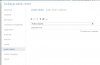
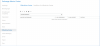
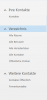
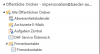
The old Folder was the first Screenshot ("Kontakte Öffentlich"), but we found out that the space maybe can cause troubles, so i created a new folder ("Firmenkontakte"), like on the second Screenshot! I gave the same permissions and so on, and to test i copied a few contacts and then made some test-contacts to try if sync works.

12160


12161
 
Can you also show me the management console Contacts > Exchange > Public folders menu?

12169
 
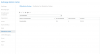
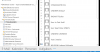
Sure, there you go:

12176

There are 3 different directories because i just wanted to try if anything works, but apparently no....
12177
Here we have the Exchange-Webinterface of the impersonate user, which is in german, but the two public folders are there as you can see.
 
Hi Daniel,

Ok you should only keep Firmenkontakte/Firmenkonatakte only and ensure there are some contacts saved there.

Ensure that the folder is not in the root. root folder cannot be sync'd as per our guide, you have to create a second folder within the root and store the contacts there.

Can you please show me the tree structure from the drop down menu of the path in exch. server gui we can be sure it was done correctly?
 
#path=/mail does not look good...
 
12184

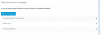
I hope you mean that. So there is the root-folder with the public folders, a folder which is named same as the contactfolder and then the contactfolder himself.

12187

One thing that was a problem with the solution in the other forumentry

https://www.3cx.com/community/threa...-exchange-2016-authentication-problems.55150/

was that at the point where you have to put this command into the exchange-commandline:

New-WebServicesVirtualDirectory -Server SERVERNAME -Role ClientAccess -WebSiteName 3CX_Sync -Path "C:\inetpub\3CX_Snyc\EWS"

this error was shown:

12186
 

Attachments

  • 1567595072019.png
    1567595072019.png
    76.2 KB · Views: 4
#path=/mail does not look good...

with that it worked before the update from version 15th to 16th as far as i know..
but at version 15th the user was a real mail-user/windows-user not a Imp.-Useraccount.

But i tried already without this path and as visable on the screenshots, now with "Firmenkontakte/Firmenkontakte".
 
Is your PBX Windows or Linux based? That forum thread was dealing with the type of authentication
 
Is your PBX Windows or Linux based? That forum thread was dealing with the type of authentication

The PBX of the 3CX is Linux, hostet outside the company, but the Exchange is obviously Windows.
 
And just to confirm, was the authentication for Linux adjusted as per this? https://www.3cx.com/docs/manual/pbx-crm-integration/#h.kkqlf5cur2x

Yes more or less. But the problem if we activate the basic auth. is that outlook it instant not working anymore, or better need authentification, but the normal user which is logged in cant auth. with his password.

Thats why we tried the solution from.
https://www.3cx.com/community/threa...-exchange-2016-authentication-problems.55150/
 
We had a similar problem after upgrading to v16. Everything worked with v15, but with v16 we had to change the Auth Method in Exchange like described here:
https://www.3cx.com/docs/manual/pbx-crm-integration/#h.kkqlf5cur2x

The main problem is: if you set this for your standard EWS directory things like the "out of office assistant" do not work anymore. You have to create another Website in IIS with its own EWS directory and set the auth Method there. Then you can set 3CX to sync with this new website.

This is a german tutorial to set up a second ECP for security reasons:
https://www.codetwo.de/blog/exchange-2013-externen-zugriff-auf-ecp-deaktivieren/5708

After setting this up you can create a second EWS with this command:
New-WebServicesVirtualDirectory -Server "<ServerIdParameter>"-WebSiteName "InternalEAC" -InternalUrl "<internal url>"
 
  • Like
Reactions: Zol
We had a similar problem after upgrading to v16. Everything worked with v15, but with v16 we had to change the Auth Method in Exchange like described here:
https://www.3cx.com/docs/manual/pbx-crm-integration/#h.kkqlf5cur2x

The main problem is: if you set this for your standard EWS directory things like the "out of office assistant" do not work anymore. You have to create another Website in IIS with its own EWS directory and set the auth Method there. Then you can set 3CX to sync with this new website.

This is a german tutorial to set up a second ECP for security reasons:
https://www.codetwo.de/blog/exchange-2013-externen-zugriff-auf-ecp-deaktivieren/5708

After setting this up you can create a second EWS with this command:
New-WebServicesVirtualDirectory -Server "<ServerIdParameter>"-WebSiteName "InternalEAC" -InternalUrl "<internal url>"

Thank you for the reply, we will try this as soon as possible!
 
We tried the idea with the new site for the basic-auth. and it worked more or less.

  • So the new IP-address for the interface is there and useable
  • DNS-entry made and i can ping it.
But the problem seems to be the generating of the ECP-Directory, because when i put in the command:

New-EcpVirtualDirectory -Server "<ServerIdParameter>"-WebSiteName "InternalEAC" -InternalUrl "<internal url>"


With the specialist data the same error occurs as mentioned before (EWS):

Die AD-Konfiguration für das virtuelle Verzeichnis 'ecp' ist bereits in 'CN=ecp
(3CX-Sync),CN=HTTP,CN=Protocols,CN=XXXServernameXXX,CN=Servers,CN=Exchange Administrative Group (FYDIBOHF23SPDLT),CN=Administrative
Groups,CN=First Organization,CN=Microsoft Exchange,CN=Services,CN=Configuration,DC=XXX,DC=local' vorhanden. Entfernen Sie
diese AD-Konfiguration manuell.
Parametername: VirtualDirectoryName
+ CategoryInfo : InvalidArgument: (Servername\ecp (3CX-Sync):ADObjectId) [New-EcpVirtualDirectory], ArgumentExce
ption
+ FullyQualifiedErrorId : [Server=Servername,RequestId=547b13a2-0a64-47e5-829e-88c42a07593c,TimeStamp=10.09.2019 15:16:48
] [FailureCategory=Cmdlet-ArgumentException] FF906815,Microsoft.Exchange.Management.SystemConfigurationTasks.NewEcpVirt
ualDirectory
+ PSComputerName : servername.domain.local


Anybody any ideas what this could be or where i can delete or remove this AD-Object so i can generate the new one?


When i want to open the new website for the 3CX-Connector i get an 403-Error (forbidden).
I have not made an SSL-Cert already because the step before already throws an error. But also over http it does not seem to be possible.

Sorry that the error-message is in german, please just translate! Thank you.

The creation of the OWA with the command:

New-OwaVirtualDirectory -Server "<ServerIdParameter>"-WebSiteName "InternalEAC" -InternalUrl "<internal url>"

worked without any problems!
 
Ok worked i found the AD-Conf which blocked the new ECP.
Now i just need a SSL-Cert for the HTTPS-Site and then i will try the 3CX-Connector again.
Will tell you if it worked!
 
Status
Not open for further replies.

Forum statistics

Threads
111,933
Messages
589,813
Members
164,808
Latest member
jsbjsb