


- Joined
- Oct 5, 2022
- Messages
- 2
- Reaction score
- 2
In another post user NickD_3CX suggested using the command line to launch the desktop app with a specific extension in lieu of native support for account switching. I spent some time today and created a quick batch script to provide a text based menu for extension launching with the windows desktop app. This script should work on Windows 10/11. You will only need to change the menu text, extensions at the end of the CASE statements, and the URLS for each to match your environment.
To get the URL for an extension, log into your 3CX system and go to Users, select the extension you'd like the URL for, download the QR code, and upload it to an online QR code decoder
You can extend this script by adding additional CASE statements for each extension you wish to use.
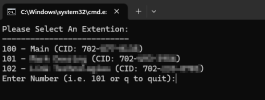
Hopefully this helps someone, I have a few extensions with outbound CIDs configured for my trunk so I can call out using my home number, cell number, or my work number CID, and the work extension rings if someone from my office calls or a call is forwarded to my desk phone at work (I have my desk phone at work set to forward all calls to my home phone which is a SIP trunk into 3CX)
(Edited for code clarity due to emojis)
To get the URL for an extension, log into your 3CX system and go to Users, select the extension you'd like the URL for, download the QR code, and upload it to an online QR code decoder
You can extend this script by adding additional CASE statements for each extension you wish to use.
Code:
@ECHO OFF
SETLOCAL
:SETEXT
CLS
CD "C:\Users\%USERNAME%\AppData\Local\Programs\3CXDesktopApp\"
ECHO Please Select An Extention:
ECHO ---------------------------
ECHO 100 - Main (CID: 111-111-1111)
ECHO 101 - Jane Doe (CID: 222-222-2222)
ECHO 102 - John Doe (CID: 333-333-3333)
SET /P EXT=Enter Number (i.e. 101 or q to quit):

2>NUL CALL :CASE_%EXT% # jump to :CASE_100, :CASE_101, etc.
IF ERRORLEVEL 1 CALL :DEFAULT_CASE # If label doesn't exist

ECHO Done.
EXIT /B

:CASE_100
  ECHO 100
  START 3CXDesktopApp.exe tcx+app:     # <---EXTENSION 100 URL GOES HERE IMMEDIATELY AFTER THE :
  GOTO END_CASE

:CASE_101
  ECHO 101
  START 3CXDesktopApp.exe tcx+app:     # <---EXTENSION 101 URL GOES HERE IMMEDIATELY AFTER THE :
  GOTO END_CASE

:CASE_102
  ECHO 102
  START 3CXDesktopApp.exe tcx+app:     # <---EXTENSION 102 URL GOES HERE IMMEDIATELY AFTER THE :
  GOTO END_CASE

:CASE_q
  VER > NUL # reset ERRORLEVEL
  ENDLOCAL # end local variable session
  GOTO :EOF # quit

:DEFAULT_CASE
  ECHO Unknown ext: "%EXT%"
  GOTO END_CASE

:END_CASE
  VER > NUL # reset ERRORLEVEL
  GOTO :SETEXT # return from CALL
Hopefully this helps someone, I have a few extensions with outbound CIDs configured for my trunk so I can call out using my home number, cell number, or my work number CID, and the work extension rings if someone from my office calls or a call is forwarded to my desk phone at work (I have my desk phone at work set to forward all calls to my home phone which is a SIP trunk into 3CX)
(Edited for code clarity due to emojis)
Last edited:


