Solved External Ringer

Status
Not open for further replies.

Philip Darnell

Joined
Jan 26, 2017
Messages
155
Reaction score
10
Hi
I have a phone that needs an external Ringer, they already have an analogue bell connected from an old ISDN phone system so I want to reuse that. I have done this before by using a Cisco SPA112 and it worked perfectly using the quick setup, this was using a PBX on the premise so was local to the SPA112.

I am trying to set it up using a hosted PBX and I can't get it to connect, do you have any ideas? I have entered the FQDN & extensions user ID and password into the quick setup.
Any help would be appreciated.
 
Not sure about the volume, many external ringers are designed to be loud but have "adjustments" on them. You may have to check the ring settings on the ATA to see if the voltage is set higher than necessary. 90 volts is usually good enough for a local device.

As far as it not ringing when called... I assume you are using SIP forking, the same extension on two devices. Check the 3CX Activity Log to see how each device, and the ATA in particular, is registering (IP & port), Does your port forwarding at the remote end router match up with the ports you see in the registration logs? Then ring the extension number and re-check the log. Is 3CX sending out two alert messages to the devices?

If it still has issues, and you start pulling out your hair, try assigning the ATA a new, unique extension number (try calling that to be sure it works), and making it a part of a ring group with the other extension, Set to ring simultaneously.

I reduced the voltage and have a ring that isn't too loud.

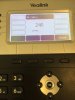
As you suggested I set the bell up on its own extension and tried calling it from an internal extension. It rings but takes probably 4-5 seconds before the phone connects where as with any other extensions its instant. (I've attached an image of the phone I'm calling from, which shows it trying to connect for 4-5 seconds before connecting).

I have forwarded the SIP and RTP ports from the ATA device on the remote router but it is asif 3CX is struggling to locate the ATA for a few seconds?
 

Attachments

  • IMG_0324.JPG
    IMG_0324.JPG
    971.5 KB · Views: 11
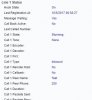
As I'm waiting for the ringing to start I can see on the ATA's interface the following (Capture). 'Call 1 State: Stunning'

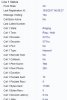
Then when the phone is ringing (Capture 1).
 

Attachments

  • Capture.JPG
    Capture.JPG
    23.1 KB · Views: 8
  • Capture1.JPG
    Capture1.JPG
    27.4 KB · Views: 6
Can you confirm that the delay is in the ATA, and not a "lack of dialplan" issue in the originating set. What are your STUN settings in the ATA?
 
Can you confirm that the delay is in the ATA, and not a "lack of dialplan" issue in the originating set. What are your STUN settings in the ATA?


I think the delay is in the ATA, as it seems to be 'Call 1 State: Stunning' before it eventually rings, so the ATA is getting the connection from call straight away but not processing it quickly.

I've attached an image of the STUN settings.
 

Attachments

  • Capture.JPG
    Capture.JPG
    31.7 KB · Views: 8
I've used these settings on many ATA's, used remotely, with no issues. From an SPA-2102
 

Attachments

  • STUN.jpeg
    STUN.jpeg
    71.2 KB · Views: 9
Tried it setup like that and still no luck, I've asked on a Cisco forum to see if I can get any help.

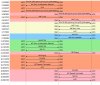
I've had a look at the wireshark capture but I'm not sure if it shows anything that could be causing the delay. As you can see in the wireshark its about 13 seconds before it starts ringing.
 

Attachments

  • Capture.JPG
    Capture.JPG
    73.8 KB · Views: 9
Port 5074 isn't (also) used by another device on the remote network is it? The "Busy here" is puzzling, it's responding, but why "busy".
 
Busy here seems to be while the ATA is 'STUNNING', I'm 99% sure nothing else is using port 5074, well none of the phones are. I will try another port tomorrow just incase.
 
Does the device actually show as registered when you place a call?
Had you forwarded port 5074 to the local IP of the ATA?

As you are using STUN, you should be able to move the 112 to another location (your home?), for testing. See if you get the same delay. If not, then you have to look at the local network.
 
Last edited:
I also tried registering it to my test 3CX system which is hosted at our office (remote from the device) which didn't work either.
Also on dynamic IP?
It is questionable presence of STUN server on your FQDN!
strafelife said:
I just wasn't sure that 3cx had a built STUN server. When I enabled STUN on the external hostname of my 3cx host, it wouldn't work.
 
If you do a search, you can find lists of public STUN servers. I would try one of those, as a test.
 
If you do a search, you can find lists of public STUN servers. I would try one of those, as a test.

Thanks Leejor, I will try this. I have given up on using the external ringer at the minute. But I think we're going to put an SBC in instead of using STUN.
 
Wireshark buddy. You need to learn to use it. It will be your best friend. Also, relying on stun especially with 20 phones in one place sounds like you will be getting a lot of calls for support in the future. There is a reason why SBC were developed. PM me when you ready for a hassle free solution.
 
  • Like
Reactions: Philip Darnell
Wireshark buddy. You need to learn to use it. It will be your best friend. Also, relying on stun especially with 20 phones in one place sounds like you will be getting a lot of calls for support in the future. There is a reason why SBC were developed. PM me when you ready for a hassle free solution.

I ran wireshark and saw it was 'STUNNING' for 5 seconds longer than the actual phone, meaning it didn't start ringing 5 seconds after the phone.

I've decided to install an SBC so hopefully that will sort any issues.
 
It sounds as if something else (an option), to do with STUN, was/is not set up properly. Unless there is some (strange) reason that your public IP is changing almost minute to minute, then there is no reason to have to run STUN any more often than the device re-registers, which is usually 30 minutes or a bit less with 3CX. In reality, it should not even have to be that often, perhaps once or twice a day should suffice with the majority of installations. Why it is doing it, while receiving a call is a bit puzzling.
 
Last edited:
Indeed there is a STUN server running on my 3CX server that I could reach at port 5060.
In this case it is needed to append :5060 in SPA112?:confused:
Otherwise, it will look on default port and stay in stunning mode!
 
I have put an SBC onsite and set all the phones to go up through the SBC, I'm struggling to get the SPA to set up as SBC, can someone help?

I factory reset the SPA and set it to use an outbound proxy of the SBC but it fails to register
 
I have set the settings on the SBC as below:

Anyone any ideas what I'm doing wrong? Or how I can see why it's failing to register?
 

Attachments

  • Capture.JPG
    Capture.JPG
    52.3 KB · Views: 5
I have set the settings on the SBC as below:

Do you mean...the settings on the SPA?

Are other sets behind the SBC working as expected? Rule out an SBC issue.

Is STUN (now) disabled on the SPA (as you are using the SBC)?

Have you tried putting the local IP, of the SBC into the Proxy and Outbound Proxy on the SPA?
 
Do you mean...the settings on the SPA?

Are other sets behind the SBC working as expected? Rule out an SBC issue.

Is STUN (now) disabled on the SPA (as you are using the SBC)?

Have you tried putting the local IP, of the SBC into the Proxy and Outbound Proxy on the SPA?

Yes sorry I meant on the SPA.

I factory reset the SPA so STUN is now disabled.

I have just tried the local IP of the SBC for the Proxy and the Outbound Proxy and it still fails.

Is there anyway of seeing why it is failing? I can't see anything in the activity logs (But I don't know what I'm looking for)
 
Status
Not open for further replies.

Forum statistics

Threads
112,089
Messages
590,697
Members
165,055
Latest member
codee.morris