Final Stop to V20: Release Candidate 3

N_G

Founder
Joined
Jun 6, 2006
Messages
4,857
Reaction score
9,291

Adds Hot Desking, FXS, Bridges and Teams support.​

We’ve added more of the remaining V18 features into another release candidate for V20. The only major feature not currently in V20 is “Scheduled Reports” - this will be redesigned and become available in Update 1. If we don\'t find any major issues, V20 will be released in...
Continue reading the Original Blog Post.
 
Last edited by a moderator:
Updating :)
 
  • Like
Reactions: nikolascx
Thanks for the update!

Its a shame that Scheduled Reports still isnt included in this update as it is number 1 request from clients whom have been used to using V18. Fingers crossed that Update 1 doesnt take that long to come out.
 
Will the ability to upload custom recordings to Holiday Rules be added back to the system.
The have disappeared from v20 entirely.
 
  • Like
Reactions: VoiceKing Support
Thanks for the update!

Its a shame that Scheduled Reports still isnt included in this update as it is number 1 request from clients whom have been used to using V18. Fingers crossed that Update 1 doesnt take that long to come out.
Please note that v20 is still on RC not yet released. Even do not have official documentation yet. better to wait.
 
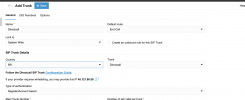
When I try to add a trunk I am not presented with an option to choose a provider, the system simply creates a Convergia trunk with Convergia defaults. I tried refreshing the page but that did not resolve the issue. I also tried in a completely separate browser (Chrome and Edge) with the same results. It appears that the same goes for adding a Gateway - it defaults to Generic Gateway Device.
1707324471622.png

You can change the country from the trunk from SIP Trunk details section.
 
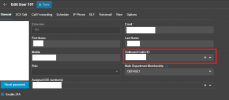
V20 seems to be working quite well. The only thing that is a real step back is that I can't figure out how to set an outgoing CID for a user that doesn't have an SDA affected. E.g. some of our users don't receive inbound calls directly but might want to show a specific CID on outgoing calls.
 
V20 seems to be working quite well. The only thing that is a real step back is that I can't figure out how to set an outgoing CID for a user that doesn't have an SDA affected. E.g. some of our users don't receive inbound calls directly but might want to show a specific CID on outgoing calls.
What's wrong with this?
1707330987757.png

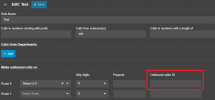
Or in outbound rules
1707331027101.png
 
With the addition of hot-desking in v20rc3, does this mean that v18 configured hot-desk devices will transition when upgrading from v18 to v20rc3 or is this only for new hot-desk extensions created in v20rc3? ...just wanted to confirm.

It does look like HD phones can now be provisioned as router phones (fantastic). Would love the ability to export/import hot-desk phones :-)
 
Is it going to be possible to have M365 SSO without having to sync new users from 365 like it works in V18? Seems the only way to do it in v20 is to check the "Sync Only" box and manually add the users as you go.
 
  • Like
Reactions: EdgeSG_Derek
I might be missing something but how does a user or company that has desk phones and does not have any headsets or microphones record a company greeting? I can' find any options to record with a desk phone for things like the digital receptionists prompts?
Also any Digital receptionists that were set to the DTMF option before the upgrade are now not accessible and there is no longer this option to be able to set?
 
Last edited:
When we have "Scheduled Reports" running in V18 and upgrade to V20, will we need to reconfigure them when Update 1 arrives or will they be converted with Update 1?
 
  • Like
Reactions: tronic
I might be missing something but how does a user or company that has desk phones and does not have any headsets or microphones record a company greeting? I can' find any options to record with a desk phone for things like the digital receptionists prompts?
It’s come up a few times on the forum. One option was to record a voicemail (can set to email the file) and upload.
 
when clicking on fax or fax server it takes me back to people. can someone reproduce or confirm this?
 
when clicking on fax or fax server it takes me back to people. can someone reproduce or confirm this?
Works fine for me on 2 test systems.
 
View attachment 39588

You can change the country from the trunk from SIP Trunk details section.
One problem with providers in V20 is that you can't change the domain name of the providers. As we use a 3CX preferred provider in Australia. They have servers in different states that we can force connection to by-way of a change to the domain name used to connect, which now is not available. I assume this means we will have to use generic and get the red alarm even though we are using a preferred provider. :(
 
  • Like
Reactions: nikolascx
One problem with providers in V20 is that you can't change the domain name of the providers. As we use a 3CX preferred provider in Australia. They have servers in different states that we can force connection to by-way of a change to the domain name used to connect, which now is not available. I assume this means we will have to use generic and get the red alarm even though we are using a preferred provider. :(
there is a trick to get set it to green. you will see it on provider templates xml we use our own trunks and still green

1707360882970.png
:)
 
Last edited:
Thanks @Nick Galea so much for adding this feature:
From: Display Name
1707362507886.png

Just saved me so much time from having to export and import trunk templates.

Just updated 4 systems. :)
 

Forum statistics

Threads
111,991
Messages
590,167
Members
164,929
Latest member
Cloudstar