





Adds Hot Desking, FXS, Bridges and Teams support.
We’ve added more of the remaining V18 features into another release candidate for V20. The only major feature not currently in V20 is “Scheduled Reports” - this will be redesigned and become available in Update 1. If we don't find any major issues, V20 will be released in the coming weeks.
Here are the top features explained.
Configure Bridges
New in RC3 is the ability to configure a bridge between 3CX systems. The Add Bridge button in “Voice & Chat” allows you to create either a master or a slave bridge to make it possible to make and receive calls on other systems. Presence will keep working for configured bridges but new bridges will be SIP only. Learn more about Configuring Bridges.
Add FXS Gateways & DECT Phones
In RC3 you can now configure DECT base stations as well as FXS gateways from the Add DECT/ FXS button in the “Voice & Chat” menu. Learn how to configure a DECT phone or see our full list of supported DECT Phones.
Hot Desking
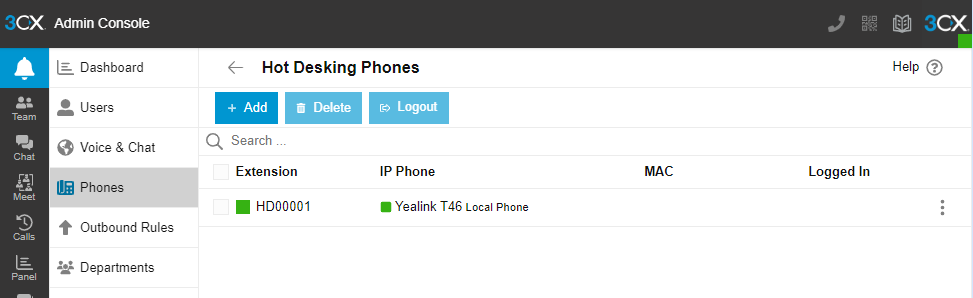
You can now configure Hot Desking phones from the new Admin console. Simply go into the phones tab, select HD phones and then configure a new phone as a Hot Desking phone. Learn more about Hot Desking.
Teams Direct Routing Integration
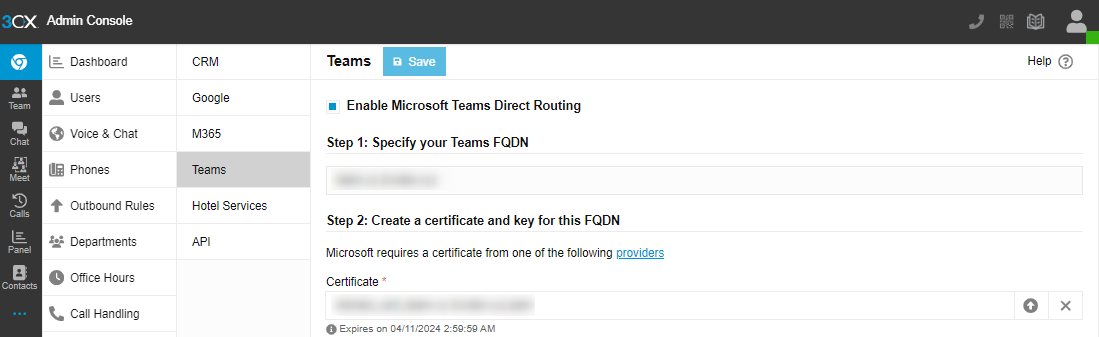
The Teams configuration is back and can be configured from the Integrations section in the Admin Console. The V18 Teams configuration will be restored and fully functional, and can be edited if need be. Further enhancement of Teams’ integration will be done in future updates. Learn more about Microsoft Teams integration.
SIP Trunking & Routing
In regards to SIP Trunking & Routing the following issues were addressed:
- Default Route - When creating a new SIP trunk you can configure the destination for calls to the main number. This destination will also be used as the default for any DIDs associated with the trunk and not yet configured. In RC2 a new SIP trunk was routed to the Default Group Department menu which was confusing.
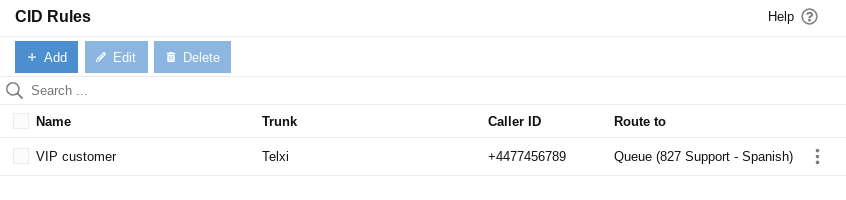
- CallerID Inbound Rules - In the Advanced section you can now configure a Caller ID routing rule for a particular trunk which will be applied before any DID rules are applied for that trunk. So you can, for example, forward any calls from a VIP customer to a particular extension or queue.
- It's now possible to configure Caller ID parameters without having to edit the associated SIP Trunk template. In Trunks “Options”, you can configure:
- From: Display Name
- Remote Party ID - Calling Party: Display Name
- P-Asserted Identity: Display Name
- Import providers templates
- <field name="IsSupportReinvite">1</field>
- <field name="IsSupportReplaces">1</field>
- <field name="DisableVideo">0</field>
- <field name="IsBindToMS">1</field>
- Caller ID Inbound Rules are now restored on V20 as CID rules.
- Outbound rules tab is shown for department owners/admins.
- You can now assign a friendly name to a DID and optionally display it on the incoming call.
Other Features
- Added ability to optimize Database added in Troubleshooting
- Import/export departments
- Redesign of Troubleshooting page
- Improvements to the updates mechanism
- Include type of build (alpha, beta, releases, major release)
- Option to notify System Owners separately
- Added Title and Department (renamed from Home 2 and Home Fax)
- Updated roles and rights
- Profanity filter for transcription added
- Call Flow Apps dialog fix and moved to Advanced.
Try it out
- If you’re running Version 20, Build 1609 you will see an update "New 20.0 Release Candidate 3” Click on it to install the update.
- Deploy a fresh V20 cloud installation here https://www.3cx.com/install/. Select "3CX Hosted (PRO/ENT)" then follow the steps.
- Deploy an on-premise installation here https://www.3cx.com/install/. Select "3CX Self Hosted / On Premise - PRO / ENT", Linux Platform and follow the installation steps.
Note: Do not upgrade yet if your setup requires Scheduled Reports, this feature will be included in Update 1.
This release also supports SSO for the new 3CX Windows Softphone Release Candidate.
Stay Connected
Let us know your thoughts in our dedicated Partner or Customer Forums.
Follow 3CX on X and LinkedIn to stay-up-to date on further developments.









 Copyright © 2026