

- Joined
- Jan 9, 2014
- Messages
- 5,077
- Reaction score
- 1,096
Yes as CFM advised , scratch the VM and reinstall, it's about 15 minutes to go to the end with a fresh restored config on a new VM




Recording is a pro feature. toggling it is enterpriseV20 seems to allow recording to be turned on and off in the Pro version despite it saying feature is not available in current version.
View attachment 39741
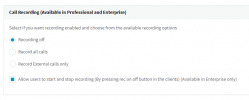
Recording is a pro feature. toggling it is enterprise
See the help text from v18:
View attachment 39742
I understand this and the options are the same in V20 as in V18, just compare the pics, I am pointing out that in V20 in a Pro edition (as it stands today) you can turn recording on and off when I thought this was an Enterprise only feature!

thats fine for just one email what if I have 10 different numbers that go to different emails ?

Thats not possible for the moment, maybe it will come later in v20 update 1 or 2. I dont know.thats fine for just one email what if I have 10 different numbers that go to different emails ?
in V18 i can send fax to email via the inbound
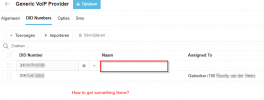

Where you assign DIDs. Check an IVR, user, department, etc. Pencil icon on the DID once assigned.Quick question, where can I find this:
- You can now assign a friendly name to a DID and optionally display it on the incoming call.
I do see the column name under Voice & Chat > Trunk > Tab DID, but I cannot edit / enter anything in that column..?
View attachment 39753
Thats works, thx. But why the hell did they put it there.Where you assign DIDs. Check an IVR, user, department, etc. Pencil icon on the DID once assigned.
Pro is actually allowed to turn recording on and off. Enterprise isn't needed for this feature.I understand this and the options are the same in V20 as in V18, just compare the pics, I am pointing out that in V20 in a Pro edition (as it stands today) you can turn recording on and off when I thought this was an Enterprise only feature!
Agreed. We have several customers that rely heavily on DIDs being assigned to Fax to email for multiple extensions.thats fine for just one email what if I have 10 different numbers that go to different emails ?
in V18 i can send fax to email via the inbound

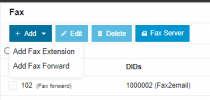
On my system this faxserver menu is missing. What could be the problem?
Its now there:On my system this faxserver menu is missing. What could be the problem?

@petermac Yes this functionality was removed. We will see how to make it via call scripts..Upgraded, but still no dial code for forcing the system in or out of office, is this feature going to return?
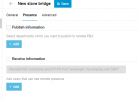
Wir sind in Brücken präsent, zweite Registerkarte im Dialogfeld „Brücke hinzufügen“neue Bridges funktionieren jedoch nur über SIP ohne Anwesenheitsfunktion? Warum?
I'm very curious, lol.
You always seem to « know everything » about the development progress of 3CX.
I understand that you're the CEO,but that doesn't explain how you manage to stay on top of every little detail! Hahaha. Where I live, there are only 24 hours in a day.
Do you have daily meetings with the developers?
Do you code along with other developers?
Regardless, it's impressive! It's truly appreciated to have access to all these answers so quickly, I say sincerely. Thanks

Hello @CallingFromMarsWe noticed this, too. Every v20-like record button should have a 'record by extension callback' button ('Make call') next to it.
Being able to record by deskphone is elementary as deskphones are still common.
@Dominion-Don Can we live with how it is now? I don't see the problem..Fax to email: I see in v20 that the fax server is available to email to a single email address but no longer see a way to direct different fax numbers to different email addresses. In version 18, you could direct them to different extensions with different emails. Does version 20 require all fax numbers have the emails sent to a single email address?
I just setup a v20 test system, and for the life of me i cant get it to make outbound calls! Inbound is working just great.
When placing an outbound call, it states there is no route for the call...
Founded in 2005, when VoIP was an emerging technology, 3CX has gone on to establish itself as a global leader in business communications.


