Firewall Checker Failed (Google Cloud) even with PBX Express Setup(?)

Status
Not open for further replies.

Stefan_TC

Forum User
Joined
Jul 2, 2020
Messages
18
Reaction score
2
Hello,

I´ve stumbled upon other threads here with people having problems during their firewall test.
In the end somebody from the 3CX Support team recommended to use PBX Express - which is exactly what we did but still receive many errors.

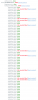
Please see attached screenshot.
Did we do something wrong or does PBX Express not solve the problem?

Thanks, Stefan
 

Attachments

  • 2020-07-02 13_44_03-3CX Phone System Management Console.png
    2020-07-02 13_44_03-3CX Phone System Management Console.png
    199.4 KB · Views: 9
I would check the firewall rules in the Google Cloud portal.
 
I would check the firewall rules in the Google Cloud portal.
thanks, I´ll do that - I was just curious to find out why the PBX Express Setup did not handle this automatically as suggested by 3CX support. (in another thread)
 
Probably someone did a sloppy job on the provisioning script or (more likely) Google changed some defaults that are impacting 3cx deployment.

Did you manage to solve your issue ?
 
Hi,

I just spun one up and seems to pass the test just fine.

You can post a screenshot of your firewall rules if you wish.
 
I just changed the firewall rules manually to this:
UDP: 5090,5060,9000-9398,10600-10998
Errors gone now within Firewall Checker. (although not sure what I did is completely right)

PBX Express installation had the following setting:
UDP: 5090,5060,9000-10999
..and gave the Errors you can see in the screenshot of my first post.
 
Please note that the Google Cloud Project you used (you can have many projects), may have some limitations or changed options that affect all machines under it.

If in doubt, you can make a new Project, and deploy via PBX Express in that project so you start based on the defaults, and the PBXE opens the necessary ports in a manner that would work "out of the box"
 
Please note that the Google Cloud Project you used (you can have many projects), may have some limitations or changed options that affect all machines under it.

If in doubt, you can make a new Project, and deploy via PBX Express in that project so you start based on the defaults, and the PBXE opens the necessary ports in a manner that would work "out of the box"

Thanks, but this is exactly what I did - made a New Google Cloud Project + Deployment via PBX Express. First thing I did then was run the firewall checker and ran into the problems above.

Anyway, it seems to work now but the PBX Express deployment did not setup the firewall correctly it seems.
 
ADD ON: "No Audio Sound via 3CX Webclient"
We´ve had the problem of having no Audio either way when using the Webclient.
After some digging through the forums it seemed having Firewall open for ports 9000-10999 was important even though the firewall checker did not give any errors after changing the settings as described above.

So I´ve added 9000-10999 to the firewall settings again and after that audio now works with the webclient.
 
If you check here you will see a ruleset called pbxports
https://console.cloud.google.com/networking/firewalls

In case you used PBX Express at any point in the past, this ruleset was created and will not be modified by future installations unless you remove it and redeploy using PBX Express (to get the correct ports by default). Same applies if the installer finds a ruleset that happens to be called pbxports

At some point we revised the ports:
https://www.3cx.com/community/threads/3cx-is-the-first-pbx-to-be-listed-on-google-marketplace.66370/
So, if you had deployed in the past before we have amended the ports, you might still have the old config which the last PBXE you deployed would not have modified.
 
@JohnS_3CX
Thanks, I´ve only deployed once (last friday) and the firewall checker reported errors instantly after deployment.

These were the UDP Google Firewall Settings after the (one and only) PBX Express deployment with no manual changes.
UDP: 5090,5060,9000-10999

I then changed these to:
UDP: 5090,5060,9000-9398,10600-10998
Firewall Checker reported no more errors!

Today I noticed that the chrome extension has no audio in both directions.
I added to the Firewall Settings which now are:
UDP: 5090,5060,9000-10999,9000-9398,10600-10998

This works fine now: still no errors in the firewall checker AND chrome extension softphone audio also works.

Why this does not work out of the box after using the recommended PBX Express Setup - I don´t know. I just report what I experienced as a first time user.

If the ports were not revised since last friday, then I feel something is not right with the current PBX Express setup routine but I got it working now so I am good.
 
Status
Not open for further replies.

Latest Posts

Forum statistics

Threads
111,953
Messages
589,916
Members
164,851
Latest member
DrunkeMeister