• We do not provide troubleshooting help for unsupported phones. Please try with a supported phone.
  • V20 Update 10 Alpha 2 Learn more

Firmware Upgrade Woes

Status
Not open for further replies.

simonm23

Customer
Joined
Aug 23, 2018
Messages
7
Reaction score
2
Hi,

3CX console (v16.0.5.622) informed me recently that my Fanvil X4G phones had unsupported firmware.
I was using v2.10.1.6836. Attempted to upgrade to v2.12.1.7297.
So far this has bricked three different phones. I have tried using push from console and manual upgrade from phones web admin page.
I have had no previous issues with firmware upgrades using either method.
Phones have disappeared from 3CX console and an attempt to logon to web page generates an HTTP 500 error.
Two still respond to ping, one doesnt. These phones are at a remote site.
Is there any known problem with this firmware or a compatibility issue with the server version?
Advice welcome.
 
Hi Simon,

I have successfully upgraded a X4 to this version without any issues.

Since the phones are at a remote location, it's best if you contact someone there to tell you what those phones are doing, or showing on screen.

By the way, the official method we support for upgrading is via the management console, Phones page. What do you mean "push from console" ?
 
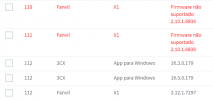
We also have X1 devices that do not update in any way via the management console.

Other X1 devices have updated normally.

1614257749142.png
 
  • Like
Reactions: Osney Santos
1. Unplug all the affected phones
2. Plug in just the first one, and factory reset it
3. Wait for the "Phone Reset" message after the procedure is complete
4. Unplug it to power off
5. Plug it back in, if all goes well, the phone should now start up, and show the Language selection screen
6. You may now provision it as per our guide

If this is successful repeat for the next phone until they are all done one by one
 
Hi John,

Thanks for getting back.
By "push" I mean using the method you outlined.
I'll try and contact someone on site to try the Factory Reset approach.
 
  • Like
Reactions: JohnS_3CX
John
Just Factory Reset two of the phones.
They appear in the Phones page of console but the Assign Extension button is greyed out. Only option is to "Reject". I have tried to Factory Reset twice.
What does Reject mean and what is going on?
 
Let's start from the basics so we can better understand your type of setup:

- Where are the phones located
- Where is the PBX located
- How do the phones reach the PBX
- What provisioning method is selected under the extension's Phone Provisioning tab?
- Are you using modified or default templates?
 
OK
I have three sites.
Two sites are behind SBCs.
Last site is where 3CX PBX is located.
Affected phones are on the same LAN as the server and are provisioned over the LAN.
Templates are Default.
I am currently 50 miles away, working from home due to Covid, but I have VPN access to our LAN.
 
Hi Simon,

Please go ahead and update your PBX first so that you will be on the latest version 16.0.8.9. You can find it in the updates section.

Then ensure you are logging in using the latest version of Chrome, and check the updates section again to see if there are any further pending updates, including Fanvil templates.

Try logging in using the latest version of Chrome, just so we are on the same "page" during testing.

The reject button makes the "new" phones go away from the list, but as soon as you restart them they will reappear and you should now be able to assign them.
 
Am using Vivaldi which is a Chrome fork but tried latest Chrome - no difference.
There are no current updates available except option to upgrade PBX to v16.0.6.641.
I do seem to recall a Fanvil template update recently which I downloaded.
I need to double check any potential implications to upgrading PBX and will want to do some backups and do any upgrade out of hours.
Currently the affected phones are not in use as their users are working from home.
I'm going to slow down here to avoid potentially making the situation worse.
Please keep the thread open and I'll come back to it when the PBX upgrade is complete.
Thanks for your help so far.
 
  • Like
Reactions: JohnS_3CX
Sure thing! I would suggest to stay on Chrome during the entire troubleshooting phase to eliminate any possible UI issues.

Go ahead with your backup, and then as you progress through the upgrades you will finally reach the version I mentioned.

Let us know how it goes!
 
  • Like
Reactions: simonm23
Update.
Had to visit site for another reason but did some more 3CX investigation while I had the chance.
One phone had been put into "Recovery Mode" by attempting to update firmware from the 3CX Console.
This mode allowed me to do a manual fw update to v2.12.1.7297, after that I could assign an extension from the console in the normal way.
Two other phones were showing in the console>phones page but were only able to be Rejected. Attempting to access the phones web interface resulted in an HTTP 500 error. I did a Factory Reset on these phones and was then able to update the FW manually via the phones web interface. I then Rejected the phones, rebooted and was able to assign an extension.
I tried again to update FW on another phone using the 3CX supported push from the console method. Phone became unresponsive and I had to Factory Reset it.
As all my phones are remote this is not really a viable way for me to update the FW.
I then tried another method by which I Factory Reset the phone from its own web interface. I could then access the phone using the default credentials and then manually update the FW. After which I could then assign an extension from the console. This was repeated on two other phones. Not ideal but OK for now.
I offer this as a potential workaround for anyone else in my position.
At some point I will update the PBX to the latest release and try again to use the console to update the FW.
Please leave the thread open so I can report back again
 
Hi Simon,

From the description you gave it would suggest that both the phones and the firmware are ok, but the issue only happens when they try to download and install the update from the remote 3CX server.

This might indicate that the data transfer breaks/suffers for some reason, and the phones may be getting a corrupted file, causing them to "panic".

Unfortunately I cannot assist on troubleshooting the transfer, but I'm glad to hear at least that you were able to do it manually and get them updated and provisioned.
 
Hi John,
Partially true.
The 3CX server and the affected phones are on the same subnet.
An attempt to use the supported method of FW update (ie push from the console) still results in an unresponsive phone which needs to be factory reset to continue.
Last thing for me to check is, as you suggest, upgrading the 3CX server to the latest version and trying again.
 
Status
Not open for further replies.

Forum statistics

Threads
112,147
Messages
590,959
Members
165,167
Latest member
Finatra.us