Solved Force Day / Night Mode

Status
Not open for further replies.

SyncWave

Silver Partner
Joined
Oct 25, 2013
Messages
186
Reaction score
63
I see posts that are 10+ years old posting a work around via use of *641 *642 and *64 "Emergency Codes" which is basically system wide forcing day, night, or run schedule mode. It would be awesome if I could toggle it with one button/feature code even if it didn't have a visual indicator but for the time being I can make two buttons with no visual indicators. However, I can't seem to find where to configure this "deactivated by default feature". Was this functionality removed in later builds? I'm running the latest 18 on all client systems now.

Really, I'd like call flow control I can insert anywhere in call flow with visual indicator tied to a BLF key...
But I know I have to use free software to get that functionality from my PBX (Currently).
 
Last edited:
  • Like
Reactions: red45
I found this: https://www.3cx.com/docs/pbx-dial-codes/#h.43je7s56x0ri
Under section "Force 3CX IN or OUT of Office – Emergency Code" that talks about it but not much else. On the box I'm testing, my ext is a system administrator. However, I don't see anything in dial codes or system parameters that has reference to this or further instruction for configuring it on the back-end.
 
Currently no way of settings a blf key to indicate if the system is in or our of office.

I believe this function is still in the pipeline.
 
Thanks, I'm aware of this, I'm more looking to make this documented code feature work.
 
What feature isn't working?
 
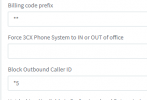
Do you have it defined in the settings? What happens when you dial it?

1637173192074.png

add *64 there

Code:
(:5001/#/app/settings/dial_codes/1)
 
  • Like
Reactions: ChrisC_3CX
Do you have it defined in the settings? What happens when you dial it?

View attachment 25928

add *64 there
Somehow I overlooked that, I was key word searching "Emergency Code" and "Night" which are words used in the documentation. Guess I should have read each line description. Thanks!

Looking forward to a single button toggle with visual indicator option thats being considered. I just hope they make it insertable call follow decisions and not just system wide mode changes.
 
Settings>Dial codes, can be define/modify
Can be set to BLF

in this example:
*450 - Using default in/out office hours
*451 - Bypass default and put 3cx in INOFFICE
*452 - Bypass default and put 3cx in OUT of office.

1637202512722.png
 
I setup Custom Speed Dial buttons for *642 Night and *64 to return to schedule. I upvoted it already a couple days ago. Thanks guys.
 
  • Like
Reactions: ChrisC_3CX
I'll be closing the thread since this seems to be sorted now.
 
Status
Not open for further replies.

Forum statistics

Threads
111,974
Messages
590,081
Members
164,899
Latest member
mazet