Forward to outside Number not saving/not working

Status
Not open for further replies.

TLCtech

Customer
Joined
Oct 12, 2020
Messages
263
Reaction score
29
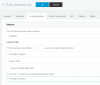
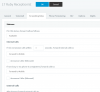
I have an extension made specifically to forward to an outside number. Basically, if anyone needs imediate help, they can hit 0 and it dials this extension, which is set up to forward to an outside number. I was told today it isnt working. Instead, it is saying "this extension doesn't have voicemail set up, and disconnects. Going into the settings, everything is set to "forward to mobile" which is also the number we want to use. Its both not forwarding to mobile, and not forwarding to an outside number. Ive tried to go in and set it to "outside number" and the settings never take. As soon as I go back to the forwarding rules, it is revered to "forward to mobile" which isnt working.

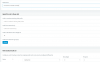
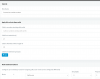
Doing some reading, it looks like another outgoing rule may be in order. I have attached both the forwarding rules and the new outgoing rule I made. But no matter what I do, it reverts to "forward to mobile" which isnt working anyway.

Thanks in advance.

Update: I made another extension, same forwarding rules, but if I dont provision it, it just says "does not exist"
 

Attachments
  • Forward3.PNG
    Forward3.PNG
    25.8 KB · Views: 11
  • Forward2.PNG
    Forward2.PNG
    29 KB · Views: 11
  • Forward1.PNG
    Forward1.PNG
    32.6 KB · Views: 11
Last edited:
Call forwarding (and many other internal PBX dialing) does not come from the extension but rather the system itself. So you'd want to make sure you have a rule that matches what you are trying to dial that is not limited to an extension or extension group
 
  • Like
Reactions: AWS2P
Also, you shouldn't have dashes in your number, it should be digits only
 
I did correct the dashes. But after editing the outbound rule to account for any extension, it still wont let me save those settings in the extension. It reverts back to "forward to mobile" and that still isnt working. And it still says "Voicemail disabled for this extention".
 

Attachments

  • Forward4.PNG
    Forward4.PNG
    26 KB · Views: 7
So I recommend going very carefully through each tab. If you have something out of sorts like having voicemail to email enabled with no email address set on the general it will won't let you save. Any attempts to save will take you over to the tab that has the error.
 
Well, it's acting like it's saving. I hit "OK" and it takes me back to the extention page. But no calls are forwarding. So I click back in, and it's back to "forward to mobile". Which, I guess, is also not working. And currently, I don't even have voicemail enabled.
 
Have you tried clearing your browser cache, using an incognito window or another supported browser? Sometimes certain elements of the management console can get cached and throw things off.
 
I've seen forward to mobile not work if the extension is unregistered. Try activating the extension on a spare phone, webclient, etc and see if it works.

You really need to look at the activity log though as this is guesswork.

EDIT: Also make sure the extension is in the available status... your other status's may be directing it to the disabled voicemail.
 
Last edited:
I'll run it as available. It was previously not regestered but I've regestered it, but left it unavailable. I'll run verbose logging, and run it tomorrow. Thanks!
 
Have you tried clearing your browser cache, using an incognito window or another supported browser? Sometimes certain elements of the management console can get cached and throw things off.
I didn't even think of that. I'll give that a shot too.

So I picked back up from a different computer and it is still giving me the same issues. The previous settings just stick. And even from a cleared cache or other browser, it remains the same. I cant shut it down yet to start the verbose log, but when we do, Ill update the thread. Thank you all again,
 
Last edited:
Ok, so Here is the log for when I try and call in to the ivr, transfer to that extension, and instead of getting forwarded to mobile or an external number, I get a broken VM message.

I figured out why it kept falling back to "forward to mobile" and thats because the number I listed to forward to was listed as a mobile number. But either way, it doesnt even try to forward. Ive been trying to track down an exact process to this too, as I feel like Ive missed a step. I thought it was as simple as adding the rule. The post here makes it seem that way.

https://www.3cx.com/community/threa...-from-digital-receptionist.71648/#post-318498

Thanks again.
 

Attachments

I FIGURED IT OUT!

The status of the extension is always DND. So I changed the rule to make it DnD. DONESKI!
 
  • Like
Reactions: AWS2P
Status
Not open for further replies.

Latest Posts

Forum statistics

Threads
111,990
Messages
590,161
Members
164,926
Latest member
tohoken1