FQDN not accessible after IPV4 change

Status
Not open for further replies.

FlyingMedic

Customer
Joined
Jan 13, 2021
Messages
10
Reaction score
1
Our google instance recently was reset and picked up a new public IP address. However, the 3CX FQDN is still pointed to the old IP address. How do I update the DNS for the FQDN? I have tried accessing the support page, but keep running into errors and am unable to even open a ticket. Who/what do I do? Our whole phone system is down for a dozen DID's.
 
If you’re using a 3CX FQDN, Pro licenses have a 6 hour TTL, Enterprise 5 minutes.
 
The instance have been live for 24+ hours since we restarted it and has not changed the IP over to the correct one. Is there a way to purge and refresh the DNS?

I am unable to login to the 3CX admin panel, even through direct IP access. When I attempt, it just says "IP address blocked"
 
You being blocked probably means your IP is blacklisted. Try from another IP.

Our 3CX name servers are Google. You can query directly, e.g.:

find your FQDN's name servers:
nslookup -type=ns il.3cx.us

then query one:
nslookup fqdn.il.3cx.us ns-cloud-b3.googledomains.com

Restarting the services (or server) should work, or I believe I've seen posts about changing the 3CX network setting to dynamic and back to static.

Edit: if you do get in from another IP, Allow your normal IP on the IP Blacklist page.
 
Is 3CX set to static or dynamic? If it's set to static with the old IP change it to dynamic.
 
  • Like
Reactions: jed
I have been unable to goin to the 3cx instance since it was restarted. I restarted the instance twice yesterday and the domain’s IP has not updated.
 
I have been unable to goin to the 3cx instance since it was restarted. I restarted the instance twice yesterday and the domain’s IP has not updated.

Try accessing the instance via IP rather than FQDN. If you still can't then, as above, you're either blacklisted (and should try from another location / network), the instance is set to only allow access from certain IP addresses (and your IP address has also changed) or the firewall is blocking access.

Once working invest in a fixed IP.

If all else fails: https://www.3cx.com/community/threads/edit-admin-white-list-via-ftp-ssh.84527/#post-395720
 
  • Like
Reactions: jed
I've tried to via IP. I can get into the webclient page. However, I am unable to connect to the management console.
 
I've tried to via IP. I can get into the webclient page. However, I am unable to connect to the management console.
Can't connect at all? Above you wrote you did connect but were blocked from logging in. The management portal and web client are the same web server...
Have you tried from a non-blacklisted IP yet?
 
  • Like
Reactions: jed
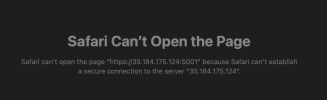
This has been an evolving situation. After rebooting a couple times I was able to get into the webclient area via IP directly. However, when I navigate directly to the IP itself, port 5001 or 5000 it just fails. I get a message saying that it couldnt establish a secure connection to the server.
 
message saying that it couldnt establish a secure connection to the server.
That's expected in a browser if the URL you're using (the IP) doesn't match the certificate (3CX FQDN), if that's the message you mean. You'll need to bypass/allow that to get to the web site.

The webclient is on the same web server/port so should have the same message.

If that (invalid cert) is not the message your seeing can you copy/paste the error?

Port 5000 is not a standard 3CX port.
 
How do I setup my browser to allow me to bypass that error? I have tried loading in Safari and Chrome without luck.

The error is in the attached image.
 

Attachments

  • error.png
    error.png
    42.8 KB · Views: 11
That's not the invalid cert warning. I can't connect at all to it though. Is there a firewall configured on the server end?
 
Not that I am aware of.
 
Makes me think:
  • wrong IP
  • firewall blocking connections
  • web server not running
  • VM not running
You wrote it worked once, after a server restart. Do you have access via SSH or the VM console?
 
I can get to your management console login page by going to https://35.184.175.124/#/login

If that doesn't work for you it's likely either your IP is blacklisted or you have only allowed access from specific IP addresses and your current locaiton does not include that address.

As recommended earlier, if that link is not working for you then try from a different location with a different internet connection where the IP is not blacklisted.

edit: Your FQDN is still resolving incorrectly, I suspect that when you do get access you need to switch 3CX to "dynamic public IP" until you get your static IP addressing sorted out.
 
Last edited:
  • Like
Reactions: jed
  • Like
Reactions: jed
I can today, too so something changed.
Possibly the blacklist expired. I would whitelist your organisation's WAN IP address(es) as a precaution against it happening again.
 
Possibly the blacklist expired
I'm not the OP. :) No reason to block me. And I thought the blacklist didn't block connections, it just prevented logins.
 
  • Haha
Reactions: Lee Cramman
I'm not the OP. :) No reason to block me. And I thought the blacklist didn't block connections, it just prevented logins.
Lol, my mistake.

It's all become a bit unclear quite what is going on. Probably needs OP to respond and update us...

It doesn't look complicated to fix (famous last words).
 
Status
Not open for further replies.

Forum statistics

Threads
111,972
Messages
590,065
Members
164,887
Latest member
KrishnaMR