


- Joined
- May 6, 2019
- Messages
- 74
- Reaction score
- 25
New/Fresh install of v16 "Debian" version. Not by my choice but I have $9k in new Polycom VVX300 and VVX410 phones to use, new in the box. While I prefer my beloved YeaLink the Polycom hasn't been too bad to work around. I tried the recommended 5.6 version of the firmware as well as the recent 5.9 and have not seen any differences as of yet. One problem and one annoyance, with the annoyance first:
I understand the two trunks/bridging issue with v16, but do we need to show two trunks when I really have one? I am trying very hard to not go down the custom template route and hack that second trunk off the screen. Anybody encounter this and if so, any solutions? Shown below is default template Polycom VVX410 showing two trunks even though I only have one, taking up an extra BLF slot.
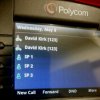
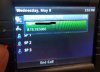
The problem is when a call is parked at one of the three SPs. The Android and Windows client works fine with the Shared Park, and the Polycom phone displays the red LED parked indicator when a call is parked, but the phone is never able to retrieve the SP call. Using the BLF or directly with *10/1/2 command. When the BLF is pressed a window appears showing the correct parked phone number but the second line shows "8.15.19:5060" which is the last part of the 3CX server at 192.168.15.19:5060. Smells like a possible bug somewhere.
Any help is greatly appreciated.
I understand the two trunks/bridging issue with v16, but do we need to show two trunks when I really have one? I am trying very hard to not go down the custom template route and hack that second trunk off the screen. Anybody encounter this and if so, any solutions? Shown below is default template Polycom VVX410 showing two trunks even though I only have one, taking up an extra BLF slot.
The problem is when a call is parked at one of the three SPs. The Android and Windows client works fine with the Shared Park, and the Polycom phone displays the red LED parked indicator when a call is parked, but the phone is never able to retrieve the SP call. Using the BLF or directly with *10/1/2 command. When the BLF is pressed a window appears showing the correct parked phone number but the second line shows "8.15.19:5060" which is the last part of the 3CX server at 192.168.15.19:5060. Smells like a possible bug somewhere.
Any help is greatly appreciated.
Last edited:


