- Joined
- May 18, 2023
- Messages
- 19
- Reaction score
- 6
I am creating this post as an informational piece to other users who might have an issue where the management user who was a System Owner, suddenly reverted to a standard User, with no rights to administer the system. Having this issue, in my search I found this post: https://www.3cx.com/community/threads/system-owner-right-changed-to-user.119461/. But it is locked, I cannot add to it so I am creating this post and referencing that one.
I am just really getting started with 3CX as an MSP. I set up my own instance about 3 months again and yesterday began set up of an instance for my first client.
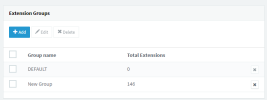
Got most all working as expected. I had created a new group, assigned users, assigned to a Queue, assigned DIDs, etc. All was well. I was / am the System Owner / Manager of the instance. but not I do not need to participate in calls as it is my clients organization. So after this initial setup, I decided to do a little cleanup. I removed myself from the new group I had created and since I wasn't using the DEFAULT group, I removed everyone including myself from that group as well. Then I deleted the DEFAULT group. Almost immediately I noticed I no longer had the Admin tab in the Web Client, then had to revert to using the Management Console, I discovered that my Extension / User now was assigned standard User rights, not System Owner. Long story short it seems you must be part of a group in order to be System Owner. Scrambling to find how to regain access, I found the community post listed above, and answers & suggestions posted by @JohnS_3CX and @SweetAction provided the answers I needed to resolve my issue and regain System Ownership. I tried the suggestions of attempting to access the system thru port 5001 or 443, but I did not have access to the Root Credentials tab. It was suggested to take a backup and download it to my local drive, unzip and view the .xml file that is in the root of that folder. In that file I found the credentials for the root user (not OS, but 3CX), and using that I was able to log in to the PBX, change my own user back to a System Owner, re-logged in to the Web client with my extension and I now regained the Admin tab and had rights again to administer the system. Seems that you cannot actually remove the DEFAULT group (seems that the system recreated it). After logging in with the root user, I put myself in that group. No calls should route thru that group.
So I wanted to say thanks to @JohnS_3CX and @SweetAction for providing the information I needed to regain access.
Hopefully my post here will assist others as well.
Thanks
LThibx
I am just really getting started with 3CX as an MSP. I set up my own instance about 3 months again and yesterday began set up of an instance for my first client.
Got most all working as expected. I had created a new group, assigned users, assigned to a Queue, assigned DIDs, etc. All was well. I was / am the System Owner / Manager of the instance. but not I do not need to participate in calls as it is my clients organization. So after this initial setup, I decided to do a little cleanup. I removed myself from the new group I had created and since I wasn't using the DEFAULT group, I removed everyone including myself from that group as well. Then I deleted the DEFAULT group. Almost immediately I noticed I no longer had the Admin tab in the Web Client, then had to revert to using the Management Console, I discovered that my Extension / User now was assigned standard User rights, not System Owner. Long story short it seems you must be part of a group in order to be System Owner. Scrambling to find how to regain access, I found the community post listed above, and answers & suggestions posted by @JohnS_3CX and @SweetAction provided the answers I needed to resolve my issue and regain System Ownership. I tried the suggestions of attempting to access the system thru port 5001 or 443, but I did not have access to the Root Credentials tab. It was suggested to take a backup and download it to my local drive, unzip and view the .xml file that is in the root of that folder. In that file I found the credentials for the root user (not OS, but 3CX), and using that I was able to log in to the PBX, change my own user back to a System Owner, re-logged in to the Web client with my extension and I now regained the Admin tab and had rights again to administer the system. Seems that you cannot actually remove the DEFAULT group (seems that the system recreated it). After logging in with the root user, I put myself in that group. No calls should route thru that group.
So I wanted to say thanks to @JohnS_3CX and @SweetAction for providing the information I needed to regain access.
Hopefully my post here will assist others as well.
Thanks
LThibx


 . Over time the program gets better though!