Solved General call log for the whole system

Status
Not open for further replies.

oliverschierer

Forum User
Joined
Apr 15, 2019
Messages
8
Reaction score
0
Hi Guys
I have a Problem with the call log in our organisation.
If a call arrives, it goes to the backoffice first. If no one is available there, the call will be forwarded to "Ring All".
The problem is all users except "Backoffice" don't see the external caller ID but the ID "Backoffice" in their call log on 3CX Softclient on Windows (Version 16.0.1.81).
I think the reason of this issue is the forwarding rule. Is there an option to solve this issue, for example a central call log for the system instead of one log per client?

Thanks for your Help
Oli
 
Can you provide more specific information in PBX terms so we can better understand your current setup?

i.e "Call arrives at trunk from X provider -> goes to Queue/IVR/RG -> then destination if no answer goes to extension/outside no/queue/RG"
 
The config for one phonenumber as follows
Call arrives at Trunk from Sipcall -> goes to Substation 11 "Backoffice" (configured at "inbound rules")
If no answer from 11"Backoffice" -> goes to "Ring All" (configured at "Extensions")

We have the same issue with the following configuration (other Phonenumber):
Call arrives at Trunk from Sipcall -> goes to Ringgroup "Support" (configured at "inbound rules")
If no answer from Ringgroup "Support" -> goes to "Ring All" (configured at "Extensions")

Also if the call is forwarded (internal or external) the receiver can only see the number of the person who took the call first.

thx for your help
 
What is: Substation 11 "Backoffice"

and

Is "Ring All" a group or queue?
 
Substation 11 "Backoffice" is one client/Substation in our System

"Ring All" is a Group
 
Thanks I think I have a good understanding now.

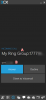
So the default behavior is when the call reaches the 3CX Soft client, it will ring and show the top line with the big fonts (A) with the name of the Ring Group,Rule, and Trunk no. and then on the lower line it will show the number of the person you called your company (B).

in this example here: A = 1777555555 (your trunk) and B = 1777456789 (the caller)

10274

Is this not what you are getting for your PBX?
 
yes this is correct, but if no one takes the call or also after the call, in the call log we can not see the number of the caller
 
So the call logs from the management console should show

Date/TimeFromToTalking
Time - YourTrunkNo (TheCallersNo) - YourRingGroupName(ExtNo) Answered/NotAnswered
 
yes but not the call logs of each client
 
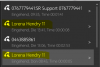
Not sure what you mean, if I look at the call logs of my windows client, I see the same detail (number/name of group or queue, and the number of the caller that called us - not the extension that send the call). Perhaps provide a screenshot of what you mean and what you would have expected to see?
 
10324

One of the two yello marked calls arrived at Trunk from Sipcall -> goes to Substation 11 "Backoffice" (configured at "inbound rules")
If no answer from 11"Backoffice" -> goes to "Ring All" (configured at "Extensions")

The other Call was forwarded from Substation 11 to myself
 
I think you are seeing the name if the inbound rule here.

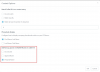
If you go to your Dashboard and Contacts section then click options, you have a method of changing how the ID appears. Does this help change the way it is displayed for you if you try different combinations here?

10326
 
Thank you this setting solved the Problem
 
You're welcome Oli, glad it was resolved
 
Status
Not open for further replies.

Forum statistics

Threads
111,921
Messages
589,746
Members
164,796
Latest member
Dame24