Generic SIP Outgoing Calls Issue

AlexanderJHanna

Bronze Partner
Joined
Jun 5, 2025
Messages
55
Reaction score
72
Good Day, I am trying to resolved my outbound calls issues where I am getting "temporary unavailable 480". Inbound calls are working.

I am using version 20 Update 6 (724).

I have been working with my local telco and we can see that the "From:" has the incorrect IP. Under version 18, I was able to provide the correct IP using "From: Host Part" Custom IP Range. However, this SIP field is not available under v20.

Any ideas?

Thanks!
 
Hello AlexanderJHanna,

You can still do the same thing as with V18, it just works differend as you will need to create and use your own Trunk template.
Just follow these easy steps:

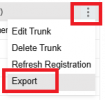
Admin - Voice & Chat - Click the 3 Dots, Export (of your existing SIP Trunk)
1751656288232.png
It will download a file, open it in Notepad (or tekst editor of choice).

Find this line:
<field name="ParameterOut" custom="" parameter="FromHostPart">$GWHostPort</field>

Change this line to Custom, and replace {yourIP}, with your IP/Value
<field name="ParameterOut" custom="{yourIP}" parameter="FromHostPart">$CustomField</field>

Save the file

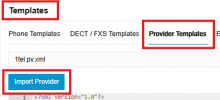
Admin - Advanced - Templates - Provider Templates - Import Provider

1751656333321.png

Now setup a new trunk with your SIP Trunk details.
And you should be good to go.

If you get an error on same name or main-number just temporary change it on the old trunk, to test the new trunk first.

Paulo
 
If you are using Flowroute, see this:
 
  • Like
Reactions: AlexanderJHanna
Hello AlexanderJHanna,

You can still do the same thing as with V18, it just works differend as you will need to create and use your own Trunk template.
Just follow these easy steps:

Admin - Voice & Chat - Click the 3 Dots, Export (of your existing SIP Trunk)
View attachment 48515
It will download a file, open it in Notepad (or tekst editor of choice).

Find this line:
<field name="ParameterOut" custom="" parameter="FromHostPart">$GWHostPort</field>

Change this line to Custom, and replace {yourIP}, with your IP/Value
<field name="ParameterOut" custom="{yourIP}" parameter="FromHostPart">$CustomField</field>

Save the file

Admin - Advanced - Templates - Provider Templates - Import Provider

View attachment 48516

Now setup a new trunk with your SIP Trunk details.
And you should be good to go.

If you get an error on same name or main-number just temporary change it on the old trunk, to test the new trunk first.

Paulo
You are a life saver paulodagraca!

Thank you so much! It worked!
 

Latest Posts

Forum statistics

Threads
111,990
Messages
590,161
Members
164,926
Latest member
tohoken1