• We do not provide troubleshooting help for unsupported phones. Please try with a supported phone.
  • V20 Update 10 Alpha Learn more

Gigaset N670 Pro loses settings for handsets

Status
Not open for further replies.

beyond2

New User
Joined
Feb 23, 2023
Messages
13
Reaction score
0
Hello,

I support a company and I have set up 3 new handsets on the N670 Pro.

Basically I did it like this: https://www.3cx.com/sip-phones/gigaset-n670-n870/#h.qjk51y62i09l

And entered the access data for this, so #extension, auth username and password of 3cx. Now this data has disappeared again! Everything worked, but overnight it seems that these data have deleted. The handsets are apparently still registered in the N670, but the data is missing.


beyond2
 
Last edited:
Hi @beyond2

If you entered the extension/auth/pass manually, then you probably missed some steps from the guide. Especially this step here

So if the data is gone, it means that you probably did not add the extensions here:
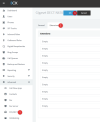
1677150235950.png

Try to add your extensions from here, pres OK to save, then restart the Gigaset.

You should then see all your extensions appear in the Gigaset like you wanted.
 
You are right! Can I trigger an update without a restart?

Bildschirm­foto 2023-02-23 um 12.15.46.png

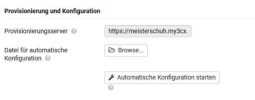
What happens if I click that auto-config button? Because I'm not sure if my customer is taking phone calls right now. So, I don't want to disconnect any connections.
 
Yes you can, use the Start auto configuration button here and give it a few moments to complete:
_MfPyyUHfJetubwXjKwE_DhqpjNdO8Az3FD378gSjunRVcikQF57ZnmZp3tunqS2I5RZENSuhSf-Zf418p6o_lEVk9V-MMZ4krm1pGYM1c1jeU-nNwLVASD_3IM1kIZQPufwANp-_v-kBsc
 
  • Like
Reactions: beyond2
You are welcome!
 
I added all extensions to FXS/Dect 3cx settings. After that I clicked auto-config in N670 configuration panel. I also restarted the N670 Pro. Now it lost 2 more configurations, 5 phone configurations are now missing.
 
Ok start from the very beginning. Note: This will interrupt calls and you will need to pair the handsets again.

- Upgrade the firmware from Gigaset to 2.52 which is the latest version

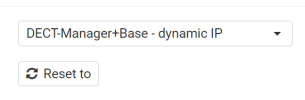
- Then factory reset the N670 to this mode - very important step! We must make sure no old settings remain so the the next setup will be perfectly clean
1677160121986.png

- When the reset is complete, login to the device, and enter the 3CX provisioning link again (just follow our guide again)

Let's see if this will help keep all the SIP accounts that you configured in 3CX. The 3CX settings will overwrite any manual changes you make in the N670, so avoid adding any manual settings.
 
I already had a fresh reset and paired all DECT phones on Tuesday.
Firmware is V2.52.0 (V2.52.0+build.5d71b83). I also upgraded the firmware on Tuesday.

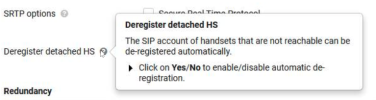
I saw that there's a setting in Provider or PBX Profiles on the N670 Pro.

Bildschirmfoto 2023-02-23 um 14.59.02.png

What does that mean? It was set to Yes, then I changed it to No.

Bildschirm­foto 2023-02-23 um 15.01.09.png
 
You do not have to set anything at all. For this test, you must keep everything default on the N670, and just give it the 3CX provisioning URL.

We must confirm that the base works when using this method first.

By the way, an important question: what type of 3CX installation is this?
- Local / Cloud / 3CX StartUP ?
 
Ok and the N670 base is on the same LAN as the 3CX machine?
 
Yes. Actually it's a raspberry pi.
 
Network: 192.168.178.0/24
 
ok perfect, is it ok to reset it again now please?

we must make sure all default settings are restored before provisioning again.
 
I can't reset now because people are working right now. They are taking phone calls, etc
 
I can see the problem now. The .xml provision file is faulty. SIP-Accounts are missing.

XML:
<!-- ###       SIP Settings for Identity 11 (idx="11")      ### -->
<oper name="add_hs" value="00011">
<param name="hs.RegStatus" value="NotReg"/>
</oper>
<param name="SipAccount.00011.AuthName" value=""/>
<param name="SipAccount.00011.AuthPassword" value=""/>
<param name="SipAccount.00011.UserName" value=""/>
<param name="SipAccount.00011.DisplayName" value=""/>
<param name="SipAccount.00011.ProviderId" value="0"/>
<param name="SipAccount.00011.VoiceMailMailbox" value="99"/>
<param name="SipAccount.00011.VoiceMailActive" value="1"/>
<!-- ###       SIP Settings for Identity 12 (idx="12")      ### -->
<oper name="add_hs" value="00012">
<param name="hs.RegStatus" value="NotReg"/>
</oper>
<param name="SipAccount.00012.AuthName" value=""/>
<param name="SipAccount.00012.AuthPassword" value=""/>
<param name="SipAccount.00012.UserName" value=""/>
<param name="SipAccount.00012.DisplayName" value=""/>
<param name="SipAccount.00012.ProviderId" value="0"/>
<param name="SipAccount.00012.VoiceMailMailbox" value="99"/>
<param name="SipAccount.00012.VoiceMailActive" value="1"/>
<!-- ###       SIP Settings for Identity 13 (idx="13")      ### -->
<oper name="add_hs" value="00013">
<param name="hs.RegStatus" value="NotReg"/>
</oper>
<param name="SipAccount.00013.AuthName" value=""/>
<param name="SipAccount.00013.AuthPassword" value=""/>
<param name="SipAccount.00013.UserName" value=""/>
<param name="SipAccount.00013.DisplayName" value=""/>
<param name="SipAccount.00013.ProviderId" value="0"/>
<param name="SipAccount.00013.VoiceMailMailbox" value="99"/>
<param name="SipAccount.00013.VoiceMailActive" value="1"/>
<!-- ###       SIP Settings for Identity 14 (idx="14")      ### -->
 
But were the accounts configured on this page like I mentioned earlier?

1677161846863.png
 
Yes, I did. Wait a second. I check again.
 
Actually, I was wrong. The xml file is fine. The SIP accounts are just from 1 to 8.
 
Status
Not open for further replies.

Members Online Now

Forum statistics

Threads
111,832
Messages
589,278
Members
164,662
Latest member
DejanMDS