Google Workspace contact sync

Status
Not open for further replies.

pmterp

Gold Partner
Joined
Jun 13, 2017
Messages
420
Reaction score
249
We're trying to determine if it is possible to have Google Workspace contacts sync to 3CX like the MS365 integration as opposed to a standard CRM integration.
We need the contacts to sync without having to make/receive a call with that contact first.
Basically a user could type the name of any GW contact into their softphone and it would recognize the GW contact and allow them to initiate a call.
Does anyone know if that is doable and if so, be willing to point me in the right direction?
 
  • Like
Reactions: LukeSavefrogs
The only way would be to manually import them. There is no sync possible.
 
The only way would be to manually import them. There is no sync possible.
Thanks for the response. Unfortunately they're constantly updating the contacts in Google Workspace and so a manual sync/import/transfer isn't a viable solution.
I would normally just say "no" but since I know that MS 365 does a contact sync, I'm trying to be hopeful that there is someway to leverage the same functions with GW.
 
  • Like
Reactions: N_G
Well, there isn't.

A better way is to move them to O365 lol
 
  • Sad
Reactions: pmterp
We are planning to make support for Google Workspace like we have for o365. If you can wait another few more months it will be done in the product itself. Actually we use Google Workspace ourselves....
 
Last edited:
If you cannot wait for 3CX, we have a "3CX Contacts Sync" tool that creates new contacts automatically on a scheduled basis -- once a day, or as frequently as you need.
 
  • Like
Reactions: LukeSavefrogs
If you cannot wait for 3CX, we have a "3CX Contacts Sync" tool that creates new contacts automatically on a scheduled basis -- once a day, or as frequently as you need.
I tried looking at your solutions but i cannot get a grasp of where I need to look for the contact sync and how to use it... Could you help?
 
The development team is putting the finishing touches on the installer and will officially release it later this week. It is pretty straightforward -- put in your Google credentials and how often you want to synchronize, and the tool will automatically create any new company contacts not already in 3CX.

You can email me directly using the contact information in my signature.
 
  • Like
Reactions: LukeSavefrogs
We are planning to make support for Google Workspace like we have for o365. If you can wait another few more months it will be done in the product itself. Actually we use Google Workspace ourselves....
Hi Nick,

Do you have any update on the progress of this?

Thanks

Rick
 
Hello. When will be added to 3cx official support for goole contacts?
 
Hello. When will be added to 3cx official support for goole contacts?
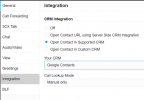
If what you need is just searching the phone number in Google Contacts when you receive a call, that's already available in the Web Client. Just go to Settings > Integration > Open Contact in Supported CRM > Google Contacts.
1716984726980.png
 
  • Like
Reactions: Evolute IT
I need integration of 3CX contacts with Google contacts. To see the name of a Google contact on our phones
 
I need integration of 3CX contacts with Google contacts. To see the name of a Google contact on our phones
With what I mentioned, the Web Client will open a new tab on an incoming call, and show the contact record from Google Contacts there. But the phone will just display the number. To show the contact name on the phone's display you will need to add the contact to the 3CX phonebook, and that requires a different integration.
 
  • Like
Reactions: Evolute IT
I encourage you to take a look at your 3CX Contacts Sync tool. It was designed specifically to sync Google Contacts. That means, before the person ever calls 3CX, your contacts will already exist in the 3CX phonebook and will display the contacts name and number. This is a fully automated process that updates new contacts automatically, however, it can also work with any source that can produce a csv with the necessary fields.
 
We are planning to make support for Google Workspace like we have for o365. If you can wait another few more months it will be done in the product itself. Actually we use Google Workspace ourselves....
Just checking the status of this, is this in a new release? I would like to use the built-in functionality as much as possible.
 
Status
Not open for further replies.

Forum statistics

Threads
111,955
Messages
589,926
Members
164,856
Latest member
Luca Christiansen