• We do not provide troubleshooting help for unsupported phones. Please try with a supported phone.
  • V20 Update 10 Alpha Learn more

Grandstream GSC3505 Firmware 1.0.1.12 Bug

Status
Not open for further replies.

tomnorton

Premier Customer
Joined
Feb 23, 2015
Messages
45
Reaction score
4
We are starting to roll out a number of the GSC3505 PA Speakers and have discovered a bug with the 3CX support firmware version 1.0.1.12.

If you set the 3505 to communicate with 3CX using a FQDN rather than IP address it failed with 'Bad Gateway' error.

Grandstream have release version 1.0.1.15 which in the release notes fixes the bug with 3CX, I have tested it and it does work.

When are 3CX adding that to the support list of firmware? We are running 3CX Ent 16.0.8.9
 
If you set the 3505 to communicate with 3CX using a FQDN rather than IP address it failed with 'Bad Gateway' error.
Hi Tom,

Kindly provide some more information on the type of provisioning, and how the device reaches the PBX.
 
The Provisioning Method is set to 'Local LAN (in the office)'

3CX and the PA Speaker are on separate VLANS.

We use 'Option 66' on the DHCP server to provide the PA Speaker with the provisioning URL
 
Thanks. And where does the "Bad Gateway" error come into play exactly?
 
If the 'Select Interface' under Phone Provisioning is set to the FQDN you get the 'Bad Gateway' error. If you change it to use the IP address and re-provision it it works fine.

If you look on the Grandstream Release Notes (Page 3) it mentions the same issue we have seen: https://firmware.grandstream.com/Release_Note_GSC3510_GSC3505_1.0.1.15.pdf

  • Fixed issue where device would fail to register if you use a 3CX server domain name instead of the IP
    address
 
  • Like
Reactions: Evolute IT
If the 'Select Interface' under Phone Provisioning is set to the FQDN you get the 'Bad Gateway' error. If you change it to use the IP address and re-provision it it works fine.

Sorry to be persistent, but it is still not clear to me where exactly this appears.

I have one of those devices here, can you perhaps type up some numbered steps I can follow to replicate this?

I will also read the release notes you posted.

Thanks!
 
Hi John

This is the scenario we experienced.

New out of the box 3505, shipped with Firmware 1.0.0.22.

Provision the 3505 Speaker in 3CX:
Provisioning Method: Local LAN (in the office)
Select Interface: FQDN

Speaker provisioned, rebooted and connected to 3CX. Showed up in 3CX with the green dot next to the extension.

3CX showed that the Firmware was unsupported, so upgraded to the 3CX Supported one (1.0.1.12). The speaker rebooted. In 3CX the extension showed as red.

Open up the web interface of the speaker. Go to 'Status', then 'Account Status'. There you will see the status of "Error 500 Bad Gateway".

Change the 'Select Interface' o 3CX to IP address and re-provision. The speaker will reboot and connects fine. Change it back to FQDN and it fails again with 'Bad Gateway'

Download firmware 1.0.1.15 from Grandstream and upload that to the speaker web interface. Reboot and it will then connect with the FQDN.

I hope you can replicate the issue.

Let me know if you need anything clarifying.

Thanks

Tom
 
When are 3CX adding that to the support list of firmware? We are running 3CX Ent 16.0.8.9

Thanks Tom! We will add this firmware as soon as Grandstream finishes their testing and sends it to us for release. Please note however, that we will release it on V18 as V16 is no longer getting updates.

We will also inform them about this conversation we had so that they become aware that there customers waiting for the 3CX release to hopefully speed things up a bit. At the moment it has not yet been fully tested to my knowledge, so there might be other pending issues holding the release back.


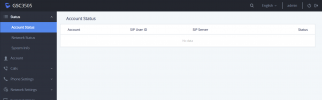
Please note however that I was not able to replicate the same behavior as you did. The most I got was the Accounts Status page showing blank. I would expect to at least see my extension account here.
1637334272975.png

"Fixed issue where device would fail to register if you use a 3CX server domain name instead of the IP address"
Also note that the issues the PDF mentions being fixed are not related (at least directly) to what you were noticing. They had to do with SIP registration rather than the Gateway Error you were getting (and besides, you said yours was registered, otherwise it would not appear green and would not respond to the reprovision command).

We do not recommend the way you originally did it (first provision and then upgrade). We usually prefer that you upgrade the firmware, then reset the device to give it a clean slate - leaving no lingering old settings from a big jump across at least 8 firmware revisions. And then finally provision it once it's prepped in this state.

There might be a bit of leftover weirdness otherwise, so best to play it safe..
 
Thanks for looking into this. Much appreciated! :)
 
Thanks Tom! We will add this firmware as soon as Grandstream finishes their testing and sends it to us for release. Please note however, that we will release it on V18 as V16 is no longer getting updates.

We will also inform them about this conversation we had so that they become aware that there customers waiting for the 3CX release to hopefully speed things up a bit. At the moment it has not yet been fully tested to my knowledge, so there might be other pending issues holding the release back.


Please note however that I was not able to replicate the same behavior as you did. The most I got was the Accounts Status page showing blank. I would expect to at least see my extension account here.
View attachment 25989

"Fixed issue where device would fail to register if you use a 3CX server domain name instead of the IP address"
Also note that the issues the PDF mentions being fixed are not related (at least directly) to what you were noticing. They had to do with SIP registration rather than the Gateway Error you were getting (and besides, you said yours was registered, otherwise it would not appear green and would not respond to the reprovision command).

We do not recommend the way you originally did it (first provision and then upgrade). We usually prefer that you upgrade the firmware, then reset the device to give it a clean slate - leaving no lingering old settings from a big jump across at least 8 firmware revisions. And then finally provision it once it's prepped in this state.

There might be a bit of leftover weirdness otherwise, so best to play it safe..
Just to clarify here. Tom is right.

This new firmware fixes a bug that made the GSC35xx not working properly over STUN or some other deployments (a problem with a combination of UDP and "accept invite from proxy only".) It did the "Bad Gateway" thing. We had this issue too.

This has been resolved in the .15 firmware and it has been officially released. However, as usual with Grandstream, they are slow to test with 3CX and correct any bugs there before sending everything to 3CX for final validation.
 
We have received an update that they will start the testing soon, hopefully it should not be too long before we can also release it on our platform too.
 
  • Like
Reactions: Evolute IT
Status
Not open for further replies.

Forum statistics

Threads
111,852
Messages
589,391
Members
164,691
Latest member
Daz1964