Grandstream GXP2160 date/time issue

Status
Not open for further replies.

avmt

Customer
Basic Certified
Joined
Apr 18, 2019
Messages
16
Reaction score
1
I have seen this is a recurrent situation on posts outside this community forum, but haven't been able to find a solution.

The phone 2160 doesn't show date and time correctly, every morning it shows 19:16:36 12/31/69 on the device and on the status information (webpage). I have tried:
- Phone Webpage: (once changed, every reboot will override what I had changed, and 3cx re-apples the settings every morning)
- NO - Allow DHCP Option 42 to override NTP server
- UNCHECK: Allow DHCP Option 2 to Override Time Zone Setting
- Manually Self-Defined Time Zone
- Auto Timezone

- On the Phone:
- Manually change date/time (will work until it reboots or next morning)

NTP server (pool.ntp.org) is accessible from the network where the phone is.

Any other ideas?
 
I have seen this is a recurrent situation on posts outside this community forum, but haven't been able to find a solution.

The phone 2160 doesn't show date and time correctly, every morning it shows 19:16:36 12/31/69 on the device and on the status information (webpage). I have tried:
- Phone Webpage: (once changed, every reboot will override what I had changed, and 3cx re-apples the settings every morning)
- NO - Allow DHCP Option 42 to override NTP server
- UNCHECK: Allow DHCP Option 2 to Override Time Zone Setting
- Manually Self-Defined Time Zone
- Auto Timezone

- On the Phone:
- Manually change date/time (will work until it reboots or next morning)

NTP server (pool.ntp.org) is accessible from the network where the phone is.

Any other ideas?
I just had this tonight. Check the firewall to make sure NTP protocol is allowed. We could ping the server but the clocks wouldn’t update.
 
I have to add that I have GXP1625 which doesnt have the problem. Just the 2160.
I can ping and get the time from computers in the same LAN, which makes me think is something different.
 
Some more information would be helpful such as

  • PBX Version
  • Phone firmware version
  • If you are using default or custom templates
  • PBX current timezone
  • If you tried factory reset and PnP provisioning yet
 
thanks JohnS_3CX,

PBX v16.0.1581
Phone firmware: 1.0.9.127
It is a default template
PBX timezone: -6:00 Mexico (Mexico City, Acapulco)
I have had tried the factory reset and re provision.

Thanks
 
Great, so you have the latest PBX and FW releases. Tried to replicate this as closely as possible but mine works fine here.

It seems for some reason this phone cannot reach the NTP. I would test that device in a different environment other than where it is currently installed (i.e directly connect to an internet modem and bypass local net and firewall), it should receive the time correctly and lose it again when you bring it back to where it was installed

  • Keep in mind that port 123 must be open as UDP on your firewall
  • The other phones can receive time? Plug the 2160 in their network port to see if it makes any difference (I don't know how the phones are set up and if they have access to same network resources in fact)
 
  • Like
Reactions: Evolute IT
PBX is in the cloud with a VPN to our office where the SBC is connecting the phones.
Local FW allows port 123 outbound without problem (tested from a local PC) to pool.ntp.org
All the GXP1625 phones have no issues with the date/time.

I used the same network port to connect a GXP1625 and GXP2160 and the 2160 still presents the problem.

Used same network port to factory reset both phones and PnP re-provision them and the issue is on the 2160. (Both phones have the exact same network access)
 
So if you simply reset the phone to factory, and don't reprovision it, what time will it show?

  • Remove power after reset to make it forget the time completely.
  • When the phone powers on and loads up it should at least show the correct date

This would indicate that the phone is capable to retrieve the time from the network before any configuration takes place, at least eliminating the chance that the phone is problematic for any reason.
 
Thanks for the help

I removed the provision of the phone and did a factory reset.
When it reboots, it shows the date and time: 6:00:00 01-01-1970
After a minute or so the date changes to 19:00:00 12-31-1969, waited for at least 5 mins
After provisioning via PnP, the phone reboots and shows 19:00:00 12-31-1969 again. Every reboot the date will start as 19:00:00 12-31-1969
 
Hi @avmt

Ok so since the phone shows the wrong date even without provisioning, we can at least rule out your PBX at this point.

To see if the issue is with the device itself or the local network, can you reset it and plug it directly into an internet connection and see if you get time? (i.e like direct internet connection or a home ADSL modem or something that is not behind a firewall and has a simple DHCP)
 
I was able to do some extra troubleshooting and now its working.

NTP protocol was open, but in order to get the information, the phone is accessing weather.grandstreamapis.com which has to be permitted in the network.

Hope this helps others.
 
  • Like
Reactions: AWS2P
It was to good to be true, its not working any more. It works without provisioning with 3CX. Any other ideas?
 
I remember i had to battle for fix this also on a GXP1625, perhaps it'is same solution.
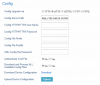
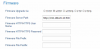
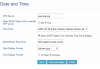
If you want to check with yours i put some capture done on mine, i don't remember what was the relevant point to modify for time and date to work properly.

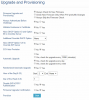
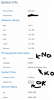
I'm french so my natural timezone is GMT+1, this is set in 3cx extension side but in phone, System info give GMT-5 eastern time but time and date are good.
Basic infos local phone
FW 1.0.4.132
IPV4 in DHCP (dhcp given by local router)

10691

10692

10693

10694

10695

Hope this may help to fix
 
Thanks for your reply. I already tried with different time zones and nothing happens.
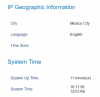
On status, I'm not getting the timezone as you can see in the image attached.
I had to add the city code "User-defined" to get the City.


10704
 
Hi @avmt

Ok so since the phone shows the wrong date even without provisioning, we can at least rule out your PBX at this point.

To see if the issue is with the device itself or the local network, can you reset it and plug it directly into an internet connection and see if you get time? (i.e like direct internet connection or a home ADSL modem or something that is not behind a firewall and has a simple DHCP)

Hi @avmt

Did you get the chance to reset it and test it in a non-office environment so that you can completely bypass any firewall? I'm curious to know if it will work in that situation and pick up correct time
 
Thanks @JohnS_3CX, let me clarify what I have done:

  • I updated the GXP2160 to firmware 1.0.9.132 with the new template from 3CX.
  • The phone with a factory reset will show the correct date and time and even the location in a direct internet connection (at home) which is the same provider as the one we have at the office.
  • The phone with a factory reset won't show the correct date and time or location at the office. I created a firewall rule to allow all traffic to the device.
  • The phone once provisioned won't show the correct date and time or location.
  • Considering that the phone re-provisions every day, if I manually type the date and time on the phone, the next day it will return to 1969.
  • We have a SBC which connects to the phone.
  • We have other phones GXP1625 which are not having the same behavior, they're fine.

Any other ideas?
 
Ok this test shows that the phone ist at least healthy when plugged in and at an unprovisioned state at home.

At the office the same case is not true for some of your phones which indicates that something in the network environment there is different.

At this point, I think the only way to troubleshoot further is to run a capture on your network, if you have the ability to mirror a switch port. You need to see all the traffic the phone will make from startup and see if it receives replies back (for example when it contacts grandstream, or NTP servers). If you don't see replies coming back then clearly the phone sent a request that was not acknowledged.

Then you need to see why that destination was blocked. I suspect something on your network but unless you dive deep in this case it might not be easy to find out why (since it clearly works at home, the phone should be healthy most likely)
 
Status
Not open for further replies.

Forum statistics

Threads
111,925
Messages
589,758
Members
164,798
Latest member
Call_Flow.co.uk