


- Joined
- Apr 23, 2021
- Messages
- 9
- Reaction score
- 1
Hi All,
We've recently discovered that contacts listed only with a 'Company' name show up in the phone book as "None" and then the mobile number - which if left empty, will also say "None"
Yes, you could enter it as a First name, but this seems like something that should be a feature.
If the First and Last name field is empty, use the 'Company' name.
Same goes for if the company doesn't have a mobile number, display the Business number instead.
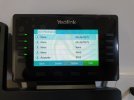
We've recently discovered that contacts listed only with a 'Company' name show up in the phone book as "None" and then the mobile number - which if left empty, will also say "None"
Yes, you could enter it as a First name, but this seems like something that should be a feature.
If the First and Last name field is empty, use the 'Company' name.
Same goes for if the company doesn't have a mobile number, display the Business number instead.
Last edited:


