Hide Contacts for users of other Groups. Permission settings.

Status
Not open for further replies.

Edwin Hoekman

New User
Joined
Oct 28, 2021
Messages
9
Reaction score
2
I have several groups and I want to control which groups can see which information about the users in other groups.
e.g.:
I have group a, b and c.
Users in group a are not allowed to see the users of group b & c in their contacts.
Users in group b may only see the users of a & b in their contacts.
Users in group c may see all users in their contacts

Untill now I was not able to get this security setting implemented. Is their a option which iIam missing or is it simply not possible at this moment?
 
  • Like
Reactions: Evolute IT
Hi @VasilisV_3CX,

I trried this but unfortunattely this did not bring the result i am looking for.
I did the following:

Group a (has all extentions within the 100 range)
Group b (200 range)
Group c (400 range)

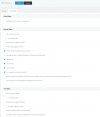
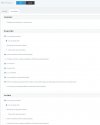
Group rights:
all group: "Show presence to group members" Disabled for manager and users.
Group a: "Can see group members" Disabled for managers and users.
Group b & c: "Can see group members" Enabled for managers and users.

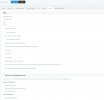
User Rights:
User 1 in Group a: Role User, "Show presence to group members" & "Can see group members" Disabled.
User 2 in Group a: Role Manager, "Show presence to group members" & "Can see group members" Disabled.

All other users in Group b & c do have the same settings as User 1

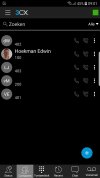
But when looking in the contacts, on the Android Phone app of User 1, I still see all contacts. also the contacts for Group b & c.

I have included the group a settings, User 1 settings and the screenshot of the app as attachments

Where do I go wrong?

Cheers,

Edwin
 

Attachments

  • Group a Group Rights.jpg
    Group a Group Rights.jpg
    164.3 KB · Views: 64
  • Group c Group Rights.jpg
    Group c Group Rights.jpg
    160.1 KB · Views: 56
  • Group a-User 1 User Rights.jpg
    Group a-User 1 User Rights.jpg
    208.4 KB · Views: 43
  • App screenshot.jpg
    App screenshot.jpg
    124.2 KB · Views: 53
First of, make sure the users are not in multiple groups.

Now, use the "Publish presence to all groups" (in the Group rights directly, not available in the extension itself) instead of "Show groups members".
 
User 1 is only present in Group a. User 2 is present in multiple groups as a manager.

Where to find the "Publish presence to all groups". I can only find the Param "Publish group information to all extensions" And this param is disabled for all groups (as is shown in the screen captures).
 
User 1 is only present in Group a. User 2 is present in multiple groups as a manager.

Where to find the "Publish presence to all groups". I can only find the Param "Publish group information to all extensions" And this param is disabled for all groups (as is shown in the screen captures).
Okk I see. Are you sure those exts are not contacts? They shouldn't appear in there's no sharing, but the manager would see them all in his group tho.
 
I use an old phone without any contacts in the Phone's contact list. I removed the App once and restarted the phone. After the restart I checked my contact. No contact found on the phone.
Installed the app on the phone. Send a activation email to my laptop. Scanned the QR. And Yes the Contact appear again :-(.

And no these otherusers are not in the contacts lists on the 3CX server

I am really puzzeled.
For as far as I know I did all you guys advised me. The only thing left is a hard reset of the PI system it is running on. It might be stuck bit or something other unexplainable ;-).

Or do you have another idea?
 
I use an old phone without any contacts in the Phone's contact list. I removed the App once and restarted the phone. After the restart I checked my contact. No contact found on the phone.
Installed the app on the phone. Send a activation email to my laptop. Scanned the QR. And Yes the Contact appear again :-(.

And no these otherusers are not in the contacts lists on the 3CX server

I am really puzzeled.
For as far as I know I did all you guys advised me. The only thing left is a hard reset of the PI system it is running on. It might be stuck bit or something other unexplainable ;-).

Or do you have another idea?
You will need to either open a support ticket or get a Partner to help you further. This is clearly not normal.
 
  • Like
Reactions: VasilisV_3CX
Hi @ConceptsWeb
Thanks for the assistance :). This will be something for next week.
I will put the solutions (or my mistake), once we found it, it in this thread.

Hope you have a wonderfull weekend.
 
@VasilisV_3CX,
Are you able to raise a ticket to look at this issue? I am not able to do so and the persons in the chat are not really helpfull.
 
Hi @Edwin Hoekman,

I'm afraid we don't escalate issues to support. Our customers / partners do. As we're committed to our channel, I'd suggest contacting one of our partners to investigate this issue with you. You can find a local partner here. Or if you'd like you can use one of the partners that are active on our forum.
 
Hi @VasilisV_3CX,

So this probably means I need to pay for a potential Bug. Sorry to say so but this is very bad support.
I am looking into 3CX as a potential sollution and am not at the point of investing in it.
 
Hi again @Edwin Hoekman,

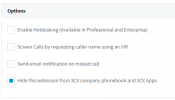
I just thought, if you want to hide the internal extensions from the contacts list, bulk select them and navigate to Options >> under the Options subsection >> Hide this extension from 3CX company phonebook and 3CX Apps.

1635860013722.png

You can then divide them up as you wished above by controlling the presence as mentioned in my first reply.

Hope this helps!
 
Hi @VasilisV_3CX,

Thanks for this last update. This resolves partly the issue. Users are no longer visible in the contact list after changing this settings for all users.

Cheers,
Edwin
 
I see what you mean @Edwin Hoekman, there isn't an option just yet to hide all Group extensions, it'll have to be handled on the extension level for now. Good going on getting this working the way you wanted though!
 
Hi @VasilisV_3CX,

I did some extra tests with the Hide settings and some group settings.
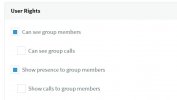
I set the Hide Extension settings under all users and Enable the "Can see group members" and the "Show presence to group members" under the Group Rights settings.

Screenshot 2021-11-04 102313.jpg


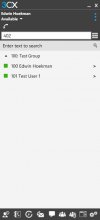
After these settings were set the users did not populate the contacts list but the group members were visible in the windows app and under the status tab on the Mobile app.

Screenshot 2021-11-04 102759.jpg


I think we are almost there. I think this will be a good workaround but the final solution would be a setting in the group rights where you can state to hide all users out of the group to other groups.

Lets say a setting like: "Hide all group members extensions from the 3CX Phone Book and 3CX App"

Please your thoughts.

Cheers,
Edwin
 
I think we are almost there. I think this will be a good workaround but the final solution would be a setting in the group rights where you can state to hide all users out of the group to other groups.

Lets say a setting like: "Hide all group members extensions from the 3CX Phone Book and 3CX App"

Please your thoughts.

Cheers,
Edwin
Hi Edwin,

I am glad to see that you seem to have found a way to satisfy the behavior you want

The option you proposed sounds like it would just do what the per-extension options does, just on a scale of the whole group. Sure, it would be convenient, but seeing that you can mass-select multiple extensions and toggle that option for all, it shouldn't be too strenuous.

Currently we don't have any plans to include an option of the sorts, but we have received this as feedback for future review.
 
  • Like
Reactions: Evolute IT
Status
Not open for further replies.

Forum statistics

Threads
111,975
Messages
590,084
Members
164,902
Latest member
OnionITServices