Holiday exceptions apparently not being honored

Status
Not open for further replies.

David Liddle

Customer
Basic Certified
Joined
Aug 23, 2018
Messages
56
Reaction score
59
Greetings, all! We discovered an issue in our system today in which extensions have been placed on holiday DND status that should not have been.

There is indeed a holiday period scheduled for yesterday (Corpus Christi) and today (an optional "bridge" day in which the administration is officially closed). Only a few extensions are configured to make use of the holiday settings, while exceptions have been created for most other phones (e.g. guest rooms) by way of the setting "Apply these office hours even if it's a global holiday". However, this setting doesn't seem to be applied by the system today.

Have I missed something? I find it a little dizzying that business hours and holiday applicability can be set at multiple levels—system, trunk, inbound rule, and extension—so I wouldn't be surprised to learn that a subtle setting or behavior escaped my attention in the matter.
 
Just to first make sure I understood the situation better, could you please provide a screenshot of the holiday settings you have and a screenshot of the times used by an affected extension?
Also, where is the "Apply these office hours even if it's a global holiday" set, on the extension level or on a DID Rule perhaps?

To also allow us to better understand your current setup, please provide the relevant information mentioned here: https://www.3cx.com/community/threads/information-to-provide-when-requesting-help.67558/
 
Thank you for the quick reply! First, with apologies, the general information:
  • 3CX Version: Professional Perpetual, 16.0.9
  • Server OS: Debian GNU/Linux 9.13 (stretch)
  • Is the 3CX Server Hosted and where? NO, onsite installation on former Askozia appliance
  • IP Phone Make/Model/Firmware: Snom (various models, including DECT)
  • Provisioning Method: Local, SBC
  • Trunk Provider: Telekom x 2
  • Gateway Make/Model: LANCOM 1906VA
  • Has the Firewall Checker passed: YES
  • Are custom Phone Templates being used: NO
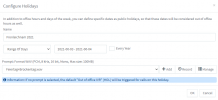
Next, a screen shot of the holiday entry in the system:
3CX-holiday-settings-2021-06.png
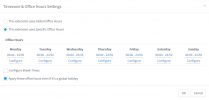
And one of the relevant forwarding settings of an affected extension:
3CX-holiday-settings-extension.png
The exception is set only on the extension and not on the incoming rule. Is that the influencing factor? If so, I would love to have an better understanding of the effects and priorities of such settings at the various levels.
 
The way you have this configured seems fine so does your understanding of it. Since the extension is following its own office hours which are essentially stating that they are in office 24/7, and is also set to ignore holidays, it should've stayed in the "Available" profile status. There does exist a known issue which seems to be the same that has contributed to your case, though it has already been addressed in 3CX v18 which should not be very far from release.

That said, the question is, why have the extension set to consider all hours as office hours and also ignore holidays? This setup essentially means that the extension in question will always be available so, it would have the same effect as leaving "Auto Switching" disabled completely, which is what I would recommend doing at this point.
 
If I recall correctly—though I can't put a date or a 3CX version to it—there was a past holiday for which we set up a schedule in the system, only to discover that it affected all of the extensions and not just the reception stations. Our system serves administrative offices for the organization (Trunk #1) as well as our conference center (Trunk #2), which has its own administrative offices in addition to the guest lodgings. I think that a report came to me that calls to guest rooms were being intercepted by the holiday greeting.

Wanting to make sure that non-reception office phones remained free to be set as desired, and wanting to ensure that calls to guest rooms would always go through, I created 24-hour schedules for the affected extensions. If I'm not mistaken, that caused calls to flow as we wished.

Due to the mix of usage, we do not have office hours configured globally or for either trunk. The holiday settings are super convenient, but they seem to apply only at the global level. And one can't create an excepton without activating Specific Office Hours. So there we are.

Is there a help document that gives a comprehensive description of office hours and holiday settings, including the effects that higher-level settings will or will not have on lower levels? I would love to use these features as effectively as possible.
 
Regarding documentation, you may find some useful information in the following links:

3CX Academy - Time Based Scheduling
https://www.3cx.com/3cxacademy/videos/intermediate/time-day-routing/

Inbound Rules - Routing Incoming Calls
https://www.3cx.com/docs/manual/inbound-did-call-routing/

To hopefully help clear up the situation, when it comes to Out of Office routing, essentially only Inbound Rules/SIP Trunks utilize it as is. From their on, the call will be routed as per the routing/forwarding rules of the component that received the call. For instance, extensions on will only route a call based on their forwarding rules which are defined by their profile status and not by time based conditions. The only way to have extensions route calls on time based conditions is to have the actual profile status change accordingly by utilizing the profile status autoswitching on the extension level. That said, if you wanted to make sure that the said extensions remain available and are not affected by by the PBX's Office hours or Holidays, all you need to do is make sure that the "Profile Autoswitching" feature for those extensions is disabled. That way, they will never switch profiles based on time conditions(They can however still be switched by the user manually).

Hope this helps!
 
Status
Not open for further replies.