Holiday Prompt Not Working

Status
Not open for further replies.

TagleRock

Silver Partner
Basic Certified
Joined
Apr 24, 2018
Messages
160
Reaction score
16
Hello. We are trying to setup some holiday prompts. The way we plan to do it is we'll have a holiday specific message on the holiday created under office hours, and then on the queue we'll have it direct the call to a voicemail box with a generic recording. The problem is that it will not play the holiday prompt that is specified on the holiday under Office Hours -> Office Holidays, it just goes directly to the voicemail box. If I toggle "Play Announcement" under "When on holiday route to" then it will play what is specified there, this isn't the desired behavior though as we would like to have separate recordings for each holiday and than have them go to the generic voicemail box. Is there a setting somewhere that has to be enabled before the prompts on the holiday schedules will play?

PBX Info -
OS: Debian
Version: 20 Update 2
 
  • Like
Reactions: Evolute IT
I followed the instructions but its still not working. If I tell the ring group to route it to the call processing script it just hangs up. If i tell it to route to the general voicemail box, it still ignores the recording and sends it straight to the voicemail box.

Side note: I had to remove #nullable disable at the top of the script or it would give a compilation error. I added that back in after it compiled the first time and it saved it after the second attempt. Made no difference though, when I try to call and its routing to the script it just hangs up right away.
 
I noticed in the script that it says the prompt should be in Data/Ivr/Prompts/holidays. The holidays folder did not exist, so I created it and copied the prompt in there. It still didn't work though. The name of the holiday is laborday, the name of the audio file is laborday.wav
 
I confess we haven't set it up yet. The client I'm thinking of that does this is still on v18. The doc page (step 4.4) says to attach it to the SIP trunk though, not a ring group.
 
Last edited:
I tried that just now and the calls don't hang up immediately, but it doesn't play the prompt either. It behaves in the same way, it doesn't play the prompt and will send the call to wherever is specified on the ring group or queue's "When on holiday...." setting. The screenshots appear to come from a version 20 install, but not sure if they tested it or not...or maybe I'm still missing something somewhere.
 
Also after reviewing this script some more it appears that there is info it spits out at each step, but i'm not sure how to view that on Debian, would you know how to do that? I know barely anything about C#.
 
So I was messing with CFD and figured out that if I can have it play the holiday message and then send it to the appropriate destination. It actually seems to do everything I need, except it can't do yearly recurrence (easily fixable in c# code on admin interface) and it can't pick the nth weekday of the month and use it as a condition. I did some googling about c# and checking if its the nth weekday of a given month. I figure if I can create c# code that sets a boolean to true if its the nth weekday of a month I can have CFD route calls to a particular place if the boolean is true, and ignore it if its false. The problem is I don't really know how to do that in CFD. I'll continue looking, but if you or anyone else has any ideas I'd appreciate it. Or I can create a new thread if this is to off topic from the original question.
 
you can do a "manual" yearly recurrence in the CFD using a date/time object and adding all the occurences for the holidays you need. Takes some manual labor to insert the various years, but I guess when you add like 10 years you're pretty much set. then inside the condition branch matching those dates put the audio and the transfer objs

About the v20 script, from my testing I believe it works only on the trunk.
you add the holiday.cs script from the store button under call scripts
then set up holidays on the departments. from what I've read the name of the holiday must match the name of the wav file you upload on that page.
One weird thing I noticed is that the holiday audio plays, but then the call is diverted to the default route set up in the trunk (U3)
 
The script is not set as a Call Script extension. It should be set to "Upon receiving a call on a trunk", give it a name, then copy the code in the interface. That's how it will work.
 
@guidoq Thats a good idea actually, might give that a try. As far as the v20 script from the link that was posted earlier, I tried everything I could think of and it wouldn't work, which is why I switched to CFD, luckily it does what I need. It also has the bonus of being able to do some specific redirection to several different messages based on the day of the week that another customer wanted.

@ConceptsWeb Yes I tried that, it acted the same as when i was routing calls from the trunk to the ring group, it would ignore the prompt. I might have been missing something but since the call flow i created in CFD solved that particular issue I'm good with it. Just wish I could find a way to automate things like Thanksgiving that occur on a specific weekday rather than a specific date. But pretty sure that requires some C# knowledge.
 
Just wish I could find a way to automate things like Thanksgiving that occur on a specific weekday rather than a specific date. But pretty sure that requires some C# knowledge.

something like that should be pretty easy to do in a CFD app without programming knowledge.
prepare a csv with the dates, parse the csv, loop through the entries and create a condition that when the current date matches the entry plays a prompt or whatever
the only code you need is to format the datetime.now function to match how you entered the dates in the csv

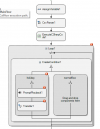
return DateTime.Now.ToString("yyyy-MM-dd");


something like this
1724945829858.png
 
So then instead of it checking each time to see if its, for example, the fourth Thursday of November, I just create a csv file with a list of dates several years into the future and have it check that each time?
 
I'm trying to figure out how to use this CSV parser. I specify the name of the CSV in the parser, but where does it get stored? Or do I put the entire contents of the csv in the text value for the CSV Parser? Also what is the purpose of the variable befor the loop in this case?
 
Ok, I'm getting closer to figure this out. The part I'm having trouble with is reading the CSV line by line. If this was powershell I would loop through it compare each line. If one matches a condition the the condition evaluates to true and does whatever is there, if none match it evaluates to false and moves on. There has to be a way to do this in CFD but I haven't been able to figure it out. I'll post back here if I do. In the mean time any help is appreciated.
 
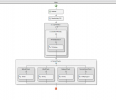
Nvm, I figured it out. I was use EQUAL on the loop instead of CONTAINS. It works now. This is the call flow

1725046763566.png
 
Status
Not open for further replies.

Latest Posts

Forum statistics

Threads
111,884
Messages
589,542
Members
164,741
Latest member
Carsonix