Hot Desk Phones appearing in Web Client after 3CX Update

Schuster GmbH

Premier Customer
Joined
Oct 28, 2024
Messages
4
Reaction score
1
Yesterday our self hosted 3CX server had been automatically updated to version 20.0 Update 3 (Build 806).
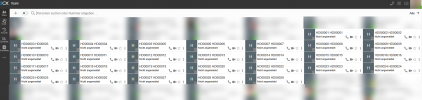
Since then all our hot desking phones appear as users under teams in our web client.
1730105255708.png

Any suggestions to remove those hot desking phones from the list?
 
3 Dots > Settings > View > uncheck show unregistered extensions
 
  • Like
Reactions: Evolute IT
Thanks, this is a good way to get rid of the phones.
But i still wonder why those phone showed up after the update.
 
If you go to Admin Console > Departments do you see the hot desking extensions being a part of any department?
 
I see the Hotdesking phones belong to our default department and are listet with role user (why?).
Would it be wise to remove them from the department?
 
Yes please remove them, and the system will behave as normal.

I think they were probably added during a previous update but normally they should not be part of any department.
 
They are removed now - thanks.
 
  • Like
Reactions: JohnS_3CX

Forum statistics

Threads
111,956
Messages
589,927
Members
164,858
Latest member
MichaelRussell3