How to allow internal calls outside regular office hours

Scott EIT

Bronze Partner
Basic Certified
Joined
Jan 29, 2019
Messages
209
Reaction score
18
Hi there,

Can someone explain how I can allow internal calls during out-of-office hours?
I have checked everywhere but I could find this options.

Thank you for your help in this matter!
 
Internal calls are never blocked...
 
Hello Scott EIT,

Do you mean that the account/extension does follow the system schedule in forwarding?
Where in that case the user would be in 'DND' status, when the system is in 'out of office hours'.

Or is it differend?

Paulo
 
Last edited:
Hello Scott EIT,

Do you mean that the account/extension does follow the system schedule in forwarding?
Where in that case the user would be in 'DND' status, when the system is in 'out of office hours'.

Or is it differend?

Paulo
Hi Paulo,
Yes, it is the same.
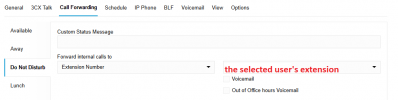
Are you saying that internal calls will still go through if I configure it this way ( please, see the attachment)?
 

Attachments

  • 3CX Q.png
    3CX Q.png
    13.7 KB · Views: 21
Hello Scott EIT,

no that will not work, in the DND status the extension will never ring.
You whould disable the out of office option (going to DND).

Paulo
 
  • Like
Reactions: Evolute IT
Hello Scott EIT,

no that will not work, in the DND status the extension will never ring.
You whould disable the out of office option (going to DND).

Paulo
Hi Paulo,

Thank you for your answer!
Our client's problem is the following.
"If you call up a department before they are open and input an extension number, it just goes to engaged. But this is a problem because the management might need to talk to someone in that department."
I am just wondering if it would be possible to bypass this.
 
Hello Scott EIT,

There is a work-around (not fully supported, but works great).
The function that will activate the DND is:
admin -> System -> Options -> Scheduler -> "When office is closed switch to "

This is normally set to 'DND'
What you would like to have here is 'Custom 1', but you can not select it here.

Work around to get it working:
admin -> System -> Advanced -> Parameters -> (find parameter): PROFILE_DND
Set this Parameter to: Custom 1

In this case the 'Out of office' will move the extention to the status 'Custom 1'
This status 'Custom 1' the extension will ring for a set number of seconds, just like 'Available'.
You can set diffrend option for internal and external calls.

Hope this helps you.
( And NO, it wasn't me who told you about this, I will deny any research :) )

Paulo
 
Hello Scott EIT,

There is a work-around (not fully supported, but works great).
The function that will activate the DND is:
admin -> System -> Options -> Scheduler -> "When office is closed switch to "

This is normally set to 'DND'
What you would like to have here is 'Custom 1', but you can not select it here.

Work around to get it working:
admin -> System -> Advanced -> Parameters -> (find parameter): PROFILE_DND
Set this Parameter to: Custom 1

In this case the 'Out of office' will move the extention to the status 'Custom 1'
This status 'Custom 1' the extension will ring for a set number of seconds, just like 'Available'.
You can set diffrend option for internal and external calls.

Hope this helps you.
( And NO, it wasn't me who told you about this, I will deny any research :) )

Paulo
Hi Paulo,

Thank you for your answer! Unfortunately, there isn't any parameter which is called PROFILE_DND.
Do you know why I don't have it?

Thank you for your help!
 
@Scott EIT ,

Now @paulodagraca might _not_ have gone and _not_ added a parameter that's not there by default.

If it works for you all good, but do note that updates etc might brake such fixes, so you need to be on top of it, and support team might not look kindly at issues that might be involved with this.
 
Hello Scott EIT,

Are you still working on V18 or what version 3CX server?

Paulo
 
Hello Scott EIT,

In this case, I am sorry, to have mentioned this, as I can not help you further.
I don't have insights, just found that this is working for me.
As it is not supported by 3CX, it stops here, again sorry!

Paulo
 
  • Like
Reactions: Evolute IT
Can we go back to basics because i seem to be missing something here.. or its too early in the day and im only 1 coffee in..

"If you call up a department before they are open and input an extension number, it just goes to engaged. But this is a problem because the management might need to talk to someone in that department."

Who is calling what?

Internal to internal? External to DID? What?

what is your call handling set up.
 
In this case the 'Out of office' will move the extention to the status 'Custom 1'
This status 'Custom 1' the extension will ring for a set number of seconds, just like 'Available'.
You can set diffrend option for internal and external calls.
As far as I know, the global 3CX parameter PROFILE_DND exists on every current 3CX system - whether it's an upgrade from v18 or a newly installed 3CX v20 from version U5 onwards.
But in the end, that's not really important. Repurposing this parameter - though it might work permanently - is only one part of the solution.

There is no perfectly functioning solution using built-in tools atm.

You can handle directly routed calls via CID or DID using exceptions, for example, redirecting calls outside of business hours from numbers higher than the highest possible extension number in 3CX to another destination. However, incoming calls from ring groups or queues are still put through. To handle those, you'd have to intervene at the level of the ring groups (e.g., via a call script), the queues, or manually change the user’s status - such as switching to custom1 - and adjust the corresponding call handling options there.

Our own solution is a call script that triggers on the trunk and handles external calls inside or outside of business hours depending on various conditions.
 
Sorry, I don't think my colleague has explained properly what we're looking for here. Maybe a bit lost in translation.

We have a client who would like to be able to call an extension directly from an external number while the department is closed. Is this possible or not? It's possible when the digital receptionist message is playing by inputing the extension number during office hours but doesn't appear to be the case out of office hours. Is there a workaround?
 
Sorry, I don't think my colleague has explained properly what we're looking for here. Maybe a bit lost in translation.

We have a client who would like to be able to call an extension directly from an external number while the department is closed. Is this possible or not? It's possible when the digital receptionist message is playing by inputing the extension number during office hours but doesn't appear to be the case out of office hours. Is there a workaround?
If I understand you correctly, this should not be an issue. Is the User using "This extension uses default office hours"? If so, the calls will be routed based on your department office hours. You will need to select "This extension uses specific office hours" under the user.
 
Appears to be working okay. Apologies for taking this down a rabbit hole.
 

Forum statistics

Threads
111,955
Messages
589,926
Members
164,855
Latest member
parik24pro